March 2026

Performance web testing is the process of measuring how fast, stable, and scalable your website is under real-world conditions — before your customers find out the hard way.
Here’s a quick breakdown of what it covers:
| What It Tests | Why It Matters |
|---|---|
| Page load speed | Slow pages drive visitors away |
| Server stability under traffic | Prevents crashes during busy periods |
| Behavior under sudden spikes | Protects you during promotions or viral moments |
| Long-term reliability | Catches memory leaks and gradual slowdowns |
| Scalability limits | Shows how much traffic your site can actually handle |
Think of it this way: a delay of even a single second between your visitor clicking and your page loading can be the difference between making a sale and losing a customer forever. System failures under high demand don’t just frustrate users — they damage your brand reputation and hit your bottom line hard.
Most business owners only discover their site has a performance problem after it’s already cost them.
That’s why testing proactively — not reactively — is the move.
I’m Blake George, founder of BMG MEDIA, and over more than a decade of building and optimizing 1,000+ custom websites for businesses across real estate, healthcare, and manufacturing, performance web testing has been central to every high-converting site we’ve delivered. In the sections below, I’ll walk you through exactly how to test your site’s performance, what tools to use, and how to act on what you find.
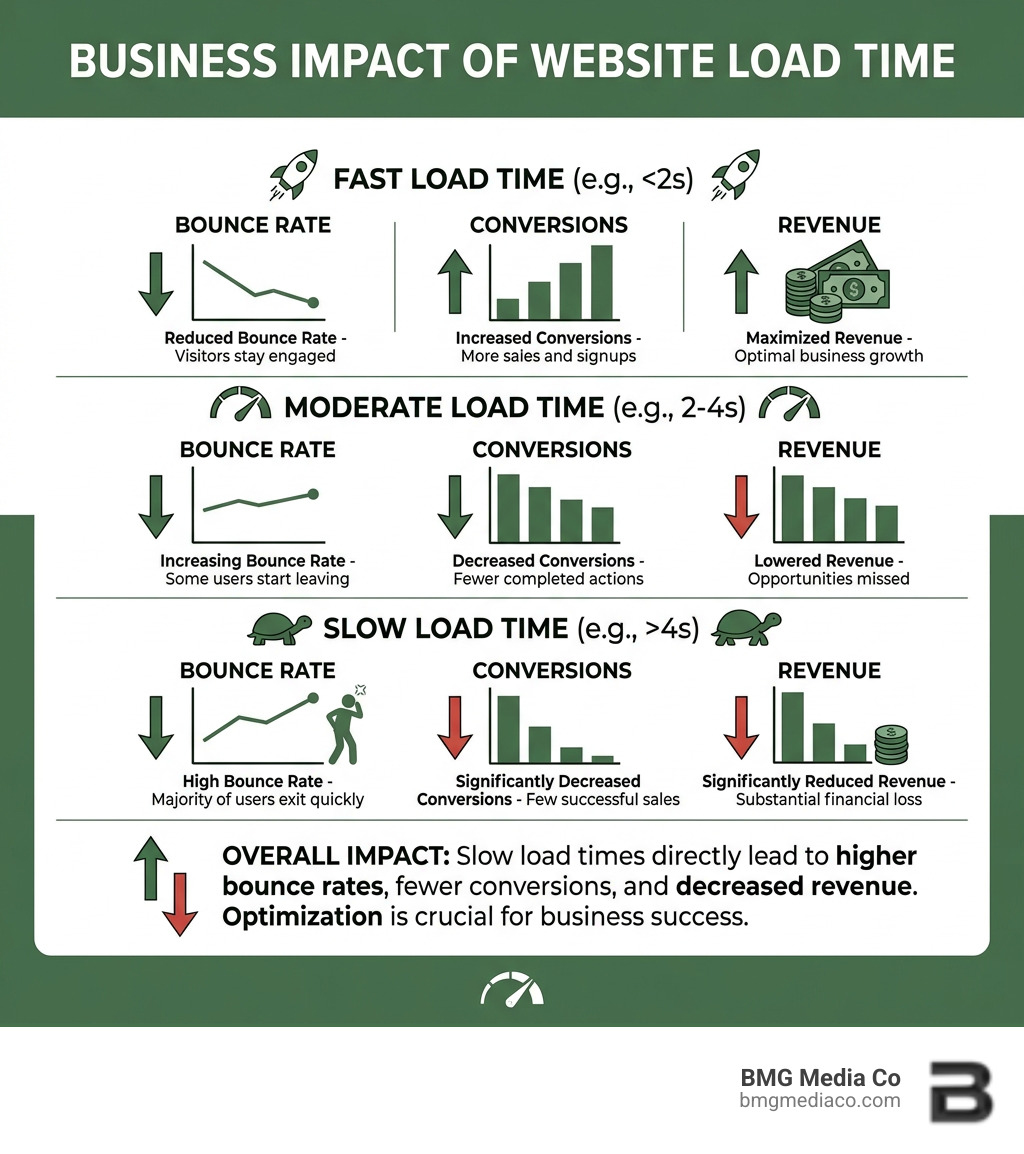
In today’s digital landscape, a website is much more than a digital brochure. It is a mission-critical engine for engaging customers, driving sales, and building brand loyalty. When this engine sputters, the consequences are immediate. Research shows that every moment of delay is a line between attracting or losing a potential customer. If your system collapses under high demand, it doesn’t just lose a transaction; it damages the user’s digital quality of life and generates massive losses for your company.
To stay competitive, we must Learn about Web Performance and how it affects the bottom line. Modern web applications face challenges that didn’t exist a decade ago. We aren’t just serving users in one city; we are often serving a global audience. This brings external factors like geolocation and latency into play.
The physical distance between your server and your user matters. If your server is in Michigan but your user is in London, the data has to travel thousands of miles. Without proper performance web testing, you might not realize that your site feels “snappy” to you but “sluggish” to an international lead. This is where Content Delivery Networks (CDNs) come in, caching your content at edge locations to reduce that distance. Testing helps us verify if our CDNs are actually doing their job.
We live in a mobile-first world. Google now uses mobile-first indexing, meaning the mobile version of your site is the benchmark for your search engine rankings. A site that loads perfectly on a high-powered desktop might crawl on a mid-range smartphone over a 4G connection. We prioritize Web Design for Mobile-First Indexing: Optimizing for Mobile Search because performance isn’t just about speed—it’s about accessibility across all devices.

Not all tests are created equal. To get a full picture of your site’s health, we use a variety of testing methodologies:
It’s important to note that functional testing should usually precede performance testing. There’s no point in measuring how fast a page loads if the “Buy Now” button doesn’t work. Once the site is functionally sound, we layer on performance checks to ensure those functions remain stable under pressure.
Traditional load testing often happens at the protocol level (sending HTTP requests directly to the server). While efficient for generating massive load, it ignores the user experience—it doesn’t account for how long it takes a browser to render JavaScript or images. On the other hand, browser-level testing is more realistic but resource-intensive. We often recommend a hybrid approach, such as Hybrid Performance Testing for Websites, which allows us to run bulk load at the protocol level while spinning up a few real browser instances to see exactly what the user sees.
While we focus on speed, we never ignore security. Ensuring your site is encrypted is a baseline for performance, as modern protocols like HTTP/2 actually require HTTPS to function at peak efficiency. You can read more about What is a Secure Site? Importance of HTTPS for Your Website to see how security and speed go hand-in-hand.
Mastering performance web testing requires a structured approach. You can’t just “run a test” and hope for the best. Here is the workflow we follow to ensure accurate results:
What are you trying to achieve? Are you testing to see if you can handle a Black Friday sale, or are you trying to reduce the load time of your homepage? Define clear metrics like:
Your test environment must mirror your production environment as closely as possible. If your live site runs on a high-end cloud server but your test environment is a cheap virtual machine, your results will be meaningless. This includes mirroring the database size, network configurations, and server hardware.
Don’t just hammer your homepage. Real users browse. They search for products, add items to carts, and read blog posts. We design test scripts that simulate these journeys. This is where The Importance of A/B Testing in Web Design can provide insights; by understanding which layouts users interact with most, we can prioritize testing those specific paths.
Run your tests starting with a small load and gradually increasing it. Monitor how the server’s CPU, memory, and network usage respond. Once the test is complete, look for the “inflection point”—the moment where response times start to climb sharply as more users are added.
Choosing the right tool is half the battle. Depending on your needs, you might use open-source software or specialized cloud platforms.
| Tool | Best For | Key Feature |
|---|---|---|
| Apache JMeter | Protocol-level load testing | Open-source, supports many protocols (HTTP, FTP, JDBC) |
| k6 | Developer-centric testing | Scripting in JavaScript, great for CI/CD integration |
| Lighthouse | Frontend & SEO audits | Built into Chrome; measures Core Web Vitals |
| PageSpeed Insights | Quick performance checks | Google’s official tool for mobile and desktop speed scores |
| WebPageTest | Deep dive analysis | Simulates real devices and connection speeds (3G, 4G) |
When reviewing your Documentation for Web Performance, focus on these “Big Three” metrics:
In modern development, we don’t wait until the end of a project to test. We “shift left,” meaning we integrate performance checks directly into our Agile sprints and CI/CD pipelines. This allows us to catch a “performance regression” (a change that slows down the site) as soon as the code is written. This proactive approach is a key part of any Website Redesign Checklist: Key Considerations for a Successful Revamp.
Once you have your test results, the real work begins: optimization. You shouldn’t try to fix everything at once. Instead, prioritize the bottlenecks that offer the biggest “bang for your buck.”
One common mistake is testing on a “clean” environment that doesn’t account for third-party scripts. Many sites are slowed down by external trackers, chat widgets, and ad networks. When conducting performance web testing, make sure these external factors are included.
Another pitfall is forgetting that the web is always changing. Performance isn’t a “one and done” task. You need to ask yourself, The Significance of Regular Website Updates: How Often Should You Update Your Website? Regular updates ensure that your site remains compatible with new browser versions and continues to perform optimally as your content grows.
We measure results by looking at a combination of server-side and client-side metrics. Server-side, we look at throughput (how many requests handled) and resource utilization (CPU/RAM). Client-side, we focus on response times and “perceived performance”—how long it takes before a user can actually interact with the page. We also track the error rate to ensure the site isn’t just fast because it’s returning “404 Not Found” errors!
Manual testing—like opening your browser’s Developer Tools and checking the Network tab—is great for initial insights and quick “sanity checks.” It helps you see if a single image is too large or if a specific script is hanging. However, it cannot replace automated testing. Manual testing can’t simulate 1,000 concurrent users or tell you how your server will behave after 24 hours of sustained traffic. For scalability, automation is mandatory.
The best approach is to prioritize the most critical bottlenecks first. Don’t spend three days optimizing a tiny icon if your database takes two seconds to return a search result.
At BMG Media Co, we believe that speed is a feature. Based in Birmingham, Michigan, our team specializes in building fully custom, high-performance websites and web apps that don’t just look great—they perform flawlessly under pressure. We’ve completed over 1,000 sites, and we never use templates because we know that “one size fits all” rarely fits the performance needs of a growing business.
Whether you are in healthcare, real estate, or looking for specialized Manufacturing Web Design Services, your digital presence depends on reliability. Don’t wait for your load time to explode and drive your customers away. Start your performance web testing journey today and ensure your site is ready for whatever traffic comes its way. Ready to build something fast? Let’s get to work.
