July 2026

WordPress hosting providers are one of the most important decisions you’ll make for your website — yet most people treat it as an afterthought.
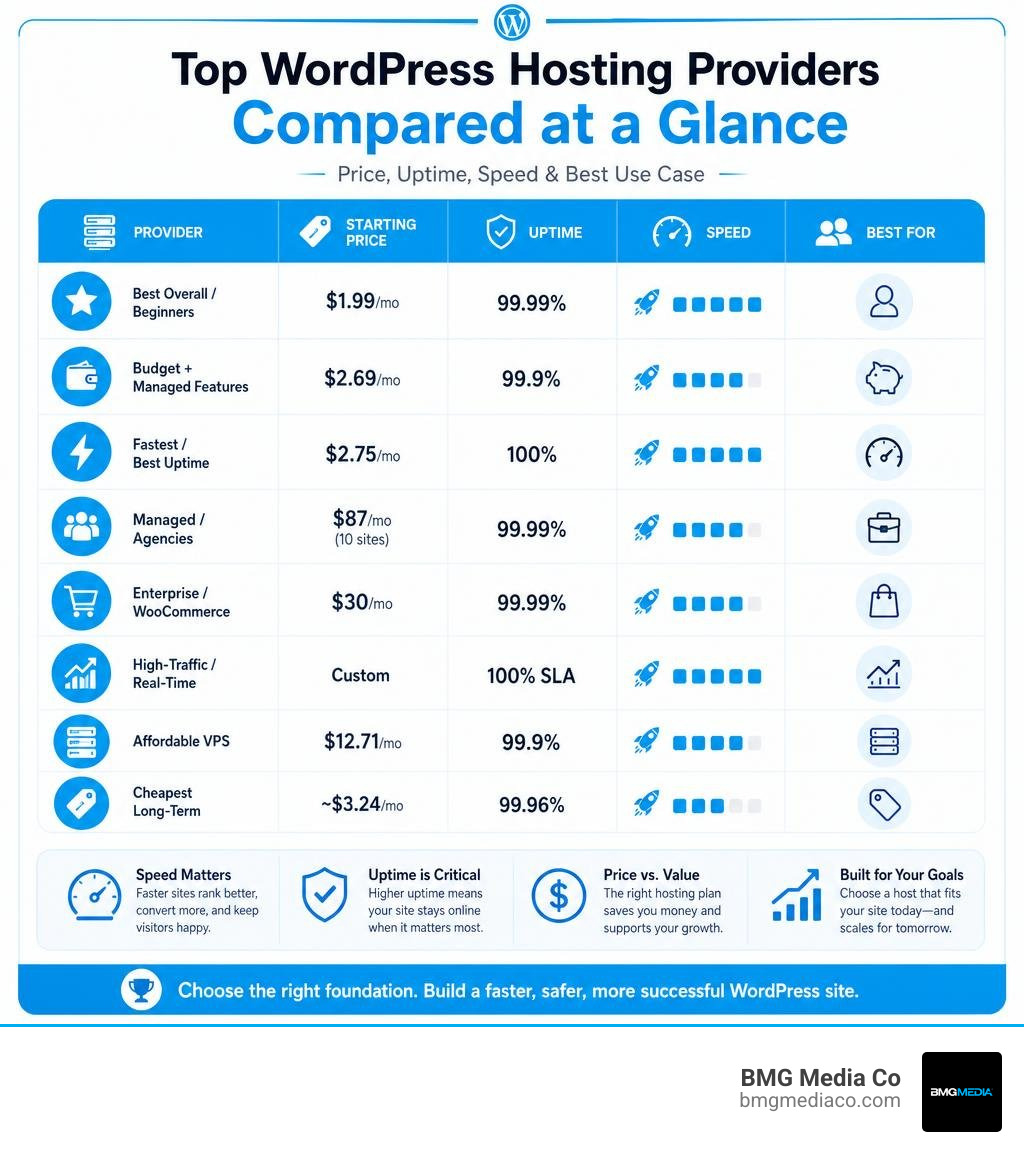
Here’s a quick-reference breakdown of the top providers for 2026:
| Provider | Best For | Starting Price | Uptime |
|---|---|---|---|
| Bluehost | Best overall / beginners | $1.99/mo | 99.99% |
| Hostinger | Budget + managed features | $2.69/mo | 99.9% |
| WordPress.com | Fastest / best uptime | $2.75/mo | 100% |
| WP Engine | Managed / agencies | $87/mo (10 sites) | 99.99% |
| Kinsta | Enterprise / WooCommerce | $30/mo | 99.99% |
| Pressable | High-traffic / real-time | Custom | 100% SLA |
| ScalaHosting | Affordable VPS | $12.71/mo | 99.9% |
| Namecheap | Cheapest long-term | ~$3.24/mo | 99.96% |
There are hundreds of thousands of web hosts available globally. The vast majority technically support WordPress. But support and optimize are very different things.
Your hosting environment directly affects:
A cheap shared hosting plan might work fine for a personal blog. But if your website drives revenue, leads, or client conversions, the wrong host is quietly costing you money every single day.
I’m Blake George, founder of BMG Media Co., and over the past 15+ years building and hosting 1,000+ custom WordPress sites for clients across industries, choosing the right WordPress hosting provider has been one of the most consistent factors separating high-performing sites from ones that quietly underdeliver. In this guide, I’ll walk you through exactly what to look for — and which providers actually deliver.
To understand how to evaluate wordpress hosting providers, you must first understand the fundamental architectural differences between shared hosting and managed WordPress hosting.
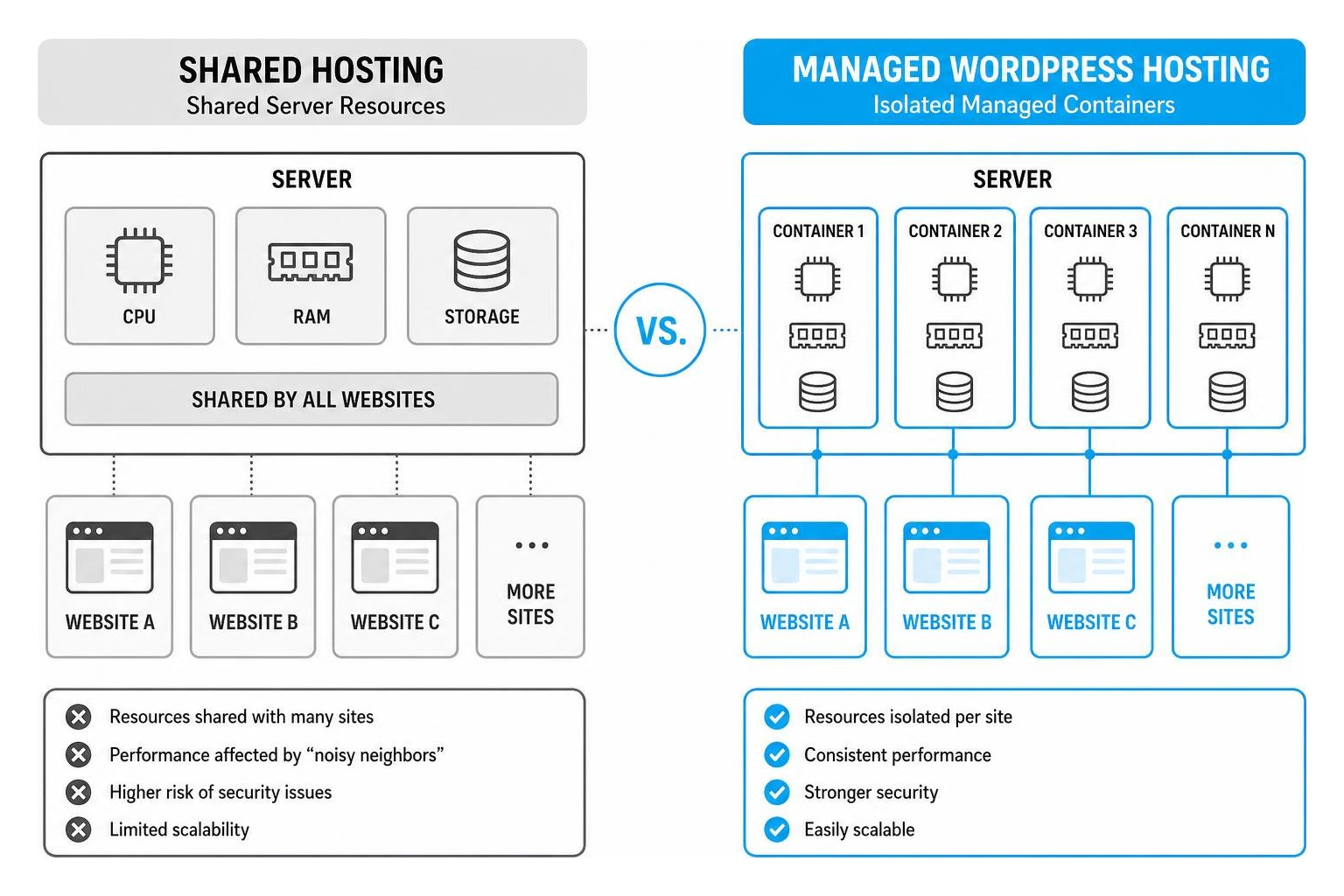
Shared hosting is the entry-level standard of the web hosting world. In this setup, hundreds—sometimes thousands—of websites are stored on a single physical server. They share the exact same processor, RAM, and storage drive.
Think of it like living in a massive apartment complex with one shared plumbing system. If your neighbor leaves their faucet running (or in web terms, experiences a sudden traffic spike or runs a poorly coded script), your water pressure drops. On a shared host, a “noisy neighbor” can hog the server’s CPU, causing your website to load slowly or crash altogether. Shared hosting is incredibly cheap, but it lacks resource isolation and leaves you vulnerable to performance dips and cross-site security breaches.
Managed WordPress hosting is a service where the hosting environment is specifically fine-tuned for WordPress architecture. Rather than dumping your site onto a generic server, managed hosts utilize advanced cloud infrastructure, often deploying isolated containers (like LXD/LXC technology used by premium providers) so your site has dedicated, unshared resources.
With managed hosting, you are paying for both high-performance hardware and a team of experts who handle the technical overhead:
If you are looking to scale your business, relying on a generic shared host is a bottleneck. To build a highly optimized digital footprint, you must pair a clean server environment with a solid development foundation. To see how clean code and server optimization work hand-in-hand, read our guide on How to Scale With Advanced SEO Web Optimization and Custom WordPress Development.
Evaluating wordpress hosting providers in 2026 requires looking past flashy marketing copy and focusing entirely on raw, empirical data. We look at server resources, Time to First Byte (TTFB), uptime SLAs, and real-world load handling.
Here is how the top tiers of WordPress hosting stack up across different categories:
| Hosting Category | Ideal Use Case | Pricing Range | Key Performance Expectation |
|---|---|---|---|
| Shared / Entry-Level | Portfolio sites, low-traffic blogs, testing | $1.00 – $5.00 / mo | Uptime: 99.9% | TTFB: 400ms – 800ms |
| Managed WordPress | Growing businesses, professional blogs, local service sites | $10.00 – $50.00 / mo | Uptime: 99.99% | TTFB: 200ms – 350ms |
| VPS / Cloud VPS | Agencies, developers, multi-site portfolios | $12.00 – $80.00 / mo | Uptime: 99.99% | Dedicated CPU & RAM |
| Enterprise / WooCommerce | High-traffic e-commerce, LMS, enterprise applications | $100.00+ / mo | Uptime: 99.99% – 100% SLA | Sub-15ms load handling |
If you are launching a new website, a personal project, or a local business site, budget-friendly options can offer surprising value if you choose wisely. However, you must keep an eye out for the “renewal trap”—the industry practice of offering incredibly low introductory rates that jump by 200% to 400% when your initial term expires.
As WordPress.org’s longest-running recommended partner (since 2005), Bluehost has undergone a major infrastructure revamp. By migrating to an enterprise-grade stack powered by Oracle Cloud and Percona databases, they now deliver performance that punches far above their price point.
Trusted by more than 5 million clients worldwide, Hostinger has established itself as a leader in affordable managed WordPress hosting.
llms.txt files for AI search engine optimization.DreamHost is one of the few remaining major independent hosting providers. They do not outsource support, and their team includes actual WordPress core contributors.
Note: For local businesses in Southeast Michigan looking for localized hosting options with direct hands-on support, exploring a trusted regional host like Michigan Web Hosting can provide excellent proximity and reliability.
When your website handles high-volume traffic, processes complex databases (like WooCommerce checkouts or LMS courses), or runs custom applications, cheap entry-level plans will quickly fail. Enterprise hosting requires dedicated resources, isolated containers, and high counts of PHP workers.
Kinsta is built on Google Cloud Platform’s premium tier network and uses isolated LXD/LXC container architecture.
WP Engine is the industry giant of managed WordPress hosting. After a major infrastructure overhaul in 2024, their speed and reliability have reclaimed top-tier status.
Owned by Automattic (the creators of WordPress.com and WooCommerce), Pressable is built directly on the WP Cloud platform.
While many associate WordPress.com with basic blogging, their higher-tier plans run on the same enterprise-grade WP Cloud architecture as Pressable.
For those who want the power of a Virtual Private Server (VPS) without the premium price tag, ScalaHosting is a standout.
If you are managing a complex multi-site setup or enterprise application, check out The Ultimate WordPress Multisite Custom Setup Guide to see how to structure your backend for maximum performance. For businesses in Southeast Michigan seeking local, hands-on enterprise maintenance, you can also explore specialized local support such as Managed WordPress Hosting Services in Ann Arbor, MI.
To accurately judge a web host, you must look at specific, measurable technical standards.

Your host should act as your first line of defense. Essential security features include:
When your site goes down on a Friday night, you don’t want to chat with a bot or wait 48 hours for a ticket response. Look for providers that offer:
When hosting high-performance custom websites, we often pair these server optimizations with custom-built features. If you want to understand how custom plugins can optimize your site’s speed and security, check out our guide on WordPress Plugin Development From Zero to Hero in Five Steps.
To ensure your custom site is built and maintained to the highest standards, it is also highly beneficial to work with top-tier local experts. If you are located in the Detroit metro area, Oakland County, or Macomb County, you can leverage localized design and maintenance services:
To manage multiple sites efficiently, many agencies also consolidate their performance and security tools using all-in-one platforms like WPMU DEV.
If you are on a strict budget but still want solid performance, Bluehost (starting at $1.99/mo) and Hostinger (starting at $2.69/mo) are your best options. Bluehost offers incredible server resources for its price point, while Hostinger’s Business plan matches premium hosts on load handling.
Just keep in mind the renewal trap: Bluehost renews at $9.99/mo and Hostinger renews at $10.99/mo. If you want the absolute cheapest long-term hosting over a 5 to 10-year period, Namecheap is the clear winner, costing just $280.80 over 5 years.
The difference comes down to who is hosting your site and how much control you have:
Yes. Standard shared hosting is built to serve static pages (like blog posts or portfolio pages) that can be easily cached. However, an e-commerce store or high-traffic membership site relies heavily on dynamic, uncached requests (such as a user adding an item to their cart, logging into a dashboard, or processing a payment).
These requests bypass the cache and force the server to query the database directly. If your host lacks raw server hardware and high numbers of PHP workers (the engine that processes PHP code), your site will slow to a crawl or crash during checkout. For WooCommerce or high-traffic sites, you should always invest in managed hosting (like Kinsta or WP Engine) that provides isolated container resources and autoscaling PHP workers.
Choosing the right wordpress hosting provider is half the battle when it comes to building a fast, secure, and successful website. But even the most expensive, high-performance server in the world cannot save a website that is bogged down by bloated pre-made templates, heavy page builders, and poorly coded plugins.
At BMG Media Co., we take a fundamentally different approach. Headquartered in Birmingham, Michigan, and founded in 2009 by Blake George, we have spent over 15 years building a reputation for excellence. We have completed over 1,000 projects for clients across the United States and globally, and our philosophy is simple: we build every single website 100% custom from scratch.
We never use pre-made templates, page builders, or bloated frameworks like Elementor. Every line of code, every design choice, and every database query is hand-crafted to match your brand and scale seamlessly. When you pair our ultra-clean, custom WordPress development with a highly optimized, high-performance hosting environment, you get a website that loads instantly, ranks higher on search engines, and converts visitors into clients.
If you are ready to stop settling for slow load times, generic templates, and uninspired web design, let’s build something extraordinary together. Discover how we can help you scale by visiting our Technology: WordPress page and let’s start a conversation about your next project.
