
August 2026
How to Echo and Format the Advanced Custom Fields WYSIWYG Editor
Configuring Core Settings in the Advanced Custom Fields WYSIWYG Editor
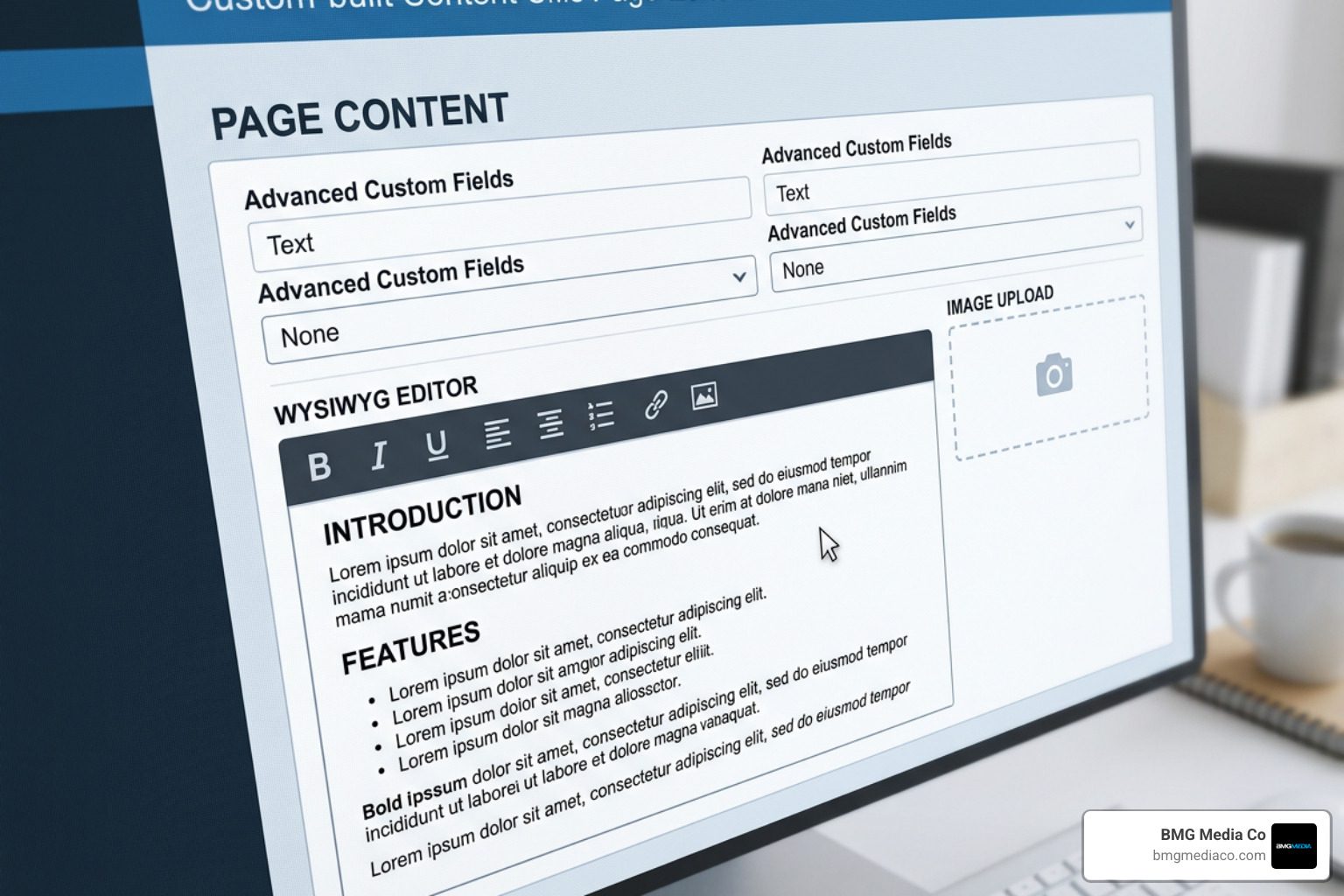
Setting up an advanced custom fields wysiwyg editor in WordPress is straightforward, but taking a few extra minutes to tune its configuration can significantly improve the client editing experience and optimize site speed. Built directly on top of WordPress’s native TinyMCE visual editor (and transitioning toward modern visual editing components), the field allows content managers to style text, introduce headings, craft bulleted lists, and place inline images seamlessly.
When adding a WYSIWYG field inside the ACF administrative interface, you are presented with a series of distinct configuration options that dictate how the field behaves inside the editor dashboard. For exact parameters and native filter references, consulting the ACF Wysiwyg Field Documentation is always a great baseline, but understanding how these choices impact end-users is crucial for long-term site health.
Essential Settings: Tabs, Toolbars, and Media Uploads
The three primary controls you will adjust on almost every field instance are Tabs, Toolbars, and Media Upload toggles:
- Tabs: Choose whether users have access to both Visual & Text tabs, or restrict them exclusively to Visual Only or Text Only. Restricting fields to Visual Only prevents non-technical clients from inadvertently adding broken HTML or unclosed tags.
- Toolbar: Controls which formatting options appear on the editor bar. Selecting Full renders a multi-row toolbar equipped with heading pickers, text alignment, blockquotes, colors, and table triggers. Selecting Basic streamlines the interface down to essential inline controls like bold, italic, lists, and links.
- Show Media Upload Buttons: A simple true/false toggle. Setting this to No removes the “Add Media” button above the editor canvas, which is helpful when you want a rich text area dedicated strictly to formatted body copy without full-bleed inline images.
By carefully selecting these choices, you can prevent layout breakage and ensure non-technical content creators stay within brand guidelines.
Optimizing Admin Load Times with Delay Initialization
One of the most practical yet overlooked settings in the ACF field configuration panel is Delay Initialization.
When a WordPress post or custom post type edit screen contains dozens of rich text fields—such as in deep flexible content layouts, wide accordion groups, or extensive repeater fields—loading individual TinyMCE editor instances simultaneously forces the browser to execute massive JavaScript payloads. This can freeze the admin dashboard during page initialization.
Enabling Delay Initialization defers the JavaScript instantiation of the visual editor until the user actively clicks inside the field box. This subtle performance tweak keeps admin screens blazing fast while also helping eliminate JavaScript event race conditions on heavy administrative pages.
Displaying and Formatting WYSIWYG Output on the Frontend
Rendering content on the front end might seem as simple as calling the_field('my_wysiwyg'), but understanding what happens behind the scenes ensures your styling remains clean and intact across custom template files.
To prevent infinite recursion loops that can occur when calling WordPress’s standard the_content filter within custom template loops, standard field rendering passes data through a dedicated ACF pipeline called acf_the_content. You can inspect how ACF builds this logic under the hood by looking at the official repository source code in includes/fields/class-acf-field-wysiwyg.php at master · AdvancedCustomFields/acf.
Outputting the Advanced Custom Fields WYSIWYG Editor via PHP
When template files call standard ACF functions, the output process handles formatting automatically:
If you prefer to assign the field value to a variable for structural checks or conditional logic using get_field(), always apply the custom filter explicitly to preserve shortcodes, responsive image attributes, and embeds:
The acf_the_content filter chain mirrors core WordPress content processing. It systematically applies vital hooks, including wptexturize, convert_smilies, wpautop (auto-paragraph generation), shortcode_unautop, autoembed, and do_shortcode. It even runs capital_P_dangit to guarantee WordPress is always properly capitalized. For a broader overview of rendering custom fields across your theme templates, check out our guide on ACF frontend display techniques.
Fixing Missing Paragraphs and Formatting Loss
A common complaint from WordPress developers is that their advanced custom fields wysiwyg editor output loses paragraph formatting, mashing multi-paragraph copy into a single, wall-of-text block.
This issue almost always stems from one of three causes:
- Using unformatted raw calls: Calling
get_field('my_wysiwyg', $post_id, false)explicitly passesfalsefor the formatting parameter, bypassing native formatting engines. - Escaping raw HTML improperly: Passing field output through overly restrictive sanitization functions like
esc_html()stripsandtags before they reach the browser canvas. - Template or element builder parsing: Certain custom elements or shortcodes strip raw line breaks before rendering.
To fix missing paragraphs without breaking output buffering in custom theme elements or shortcodes, wrap your output cleanly using native PHP buffer hooks:
Using ob_start() and ob_get_clean() inside shortcodes prevents content from leaking to the top of the browser page before template markup finishes loading.
Echoing WYSIWYG Fields in Repeaters and Groups
Nested data structures—such as Repeater or Group fields—are common in custom theme builds. However, accessing a rich text sub-field inside a repeater loop requires careful attention to function signatures and syntax.
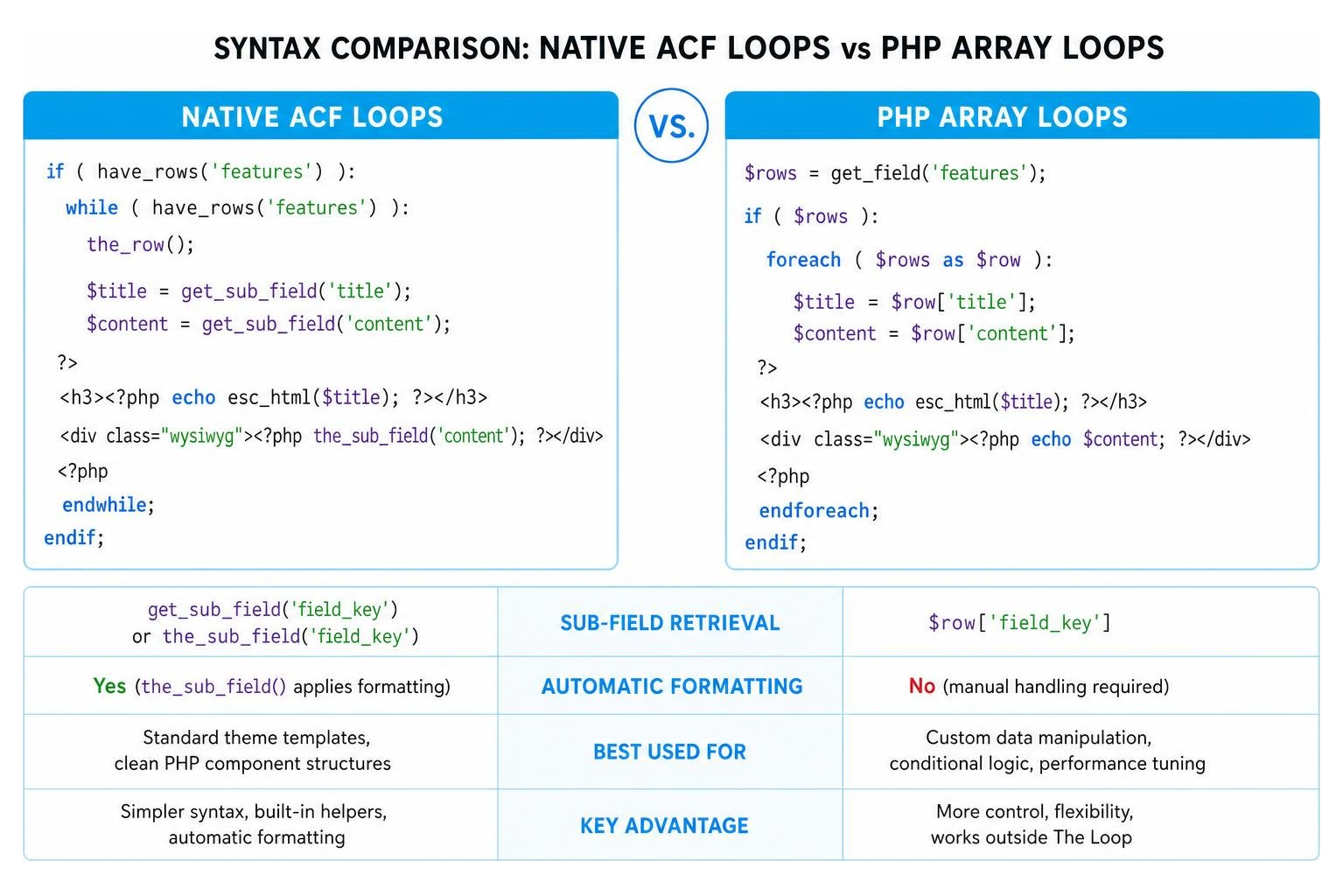
Whether you choose ACF’s native loop functions or standard PHP array iteration depends on your theme architecture. Here is a clear breakdown comparing both syntax patterns:
| Execution Syntax | Sub-Field Retrieval Method | Automatic Formatting? | Best Used For |
|---|---|---|---|
Native have_rows() Loop |
get_sub_field('field_key') or the_sub_field('field_key') |
Yes (automatic via the_sub_field) |
Standard theme template files, clean PHP component structures |
PHP foreach Array Loop |
$item['field_key'] |
No (requires apply_filters) |
Custom REST API endpoints, headless setups, processing external data arrays |
Rendering Sub-Fields inside Native ACF Repeater Loops
When using ACF’s built-in loop helpers (have_rows() and the_row()), rendering sub-fields is clean and consistent:
For custom plugins or structural builds, reading our beginner’s walkthrough on WordPress plugin development fundamentals offers deeper context on structuring modular theme code.
Accessing Sub-Fields via Custom Array Syntax
If you extract repeater fields into a PHP array using get_field(), calling the_sub_field() will fail or return empty output. Instead, access the array key directly and apply formatting filters manually:
Resolving Gutenberg and ACF Block Compatibility Issues
While using an advanced custom fields wysiwyg editor inside standard meta boxes works seamlessly, placing TinyMCE editors inside custom Gutenberg ACF Blocks can introduce unexpected visual bugs.
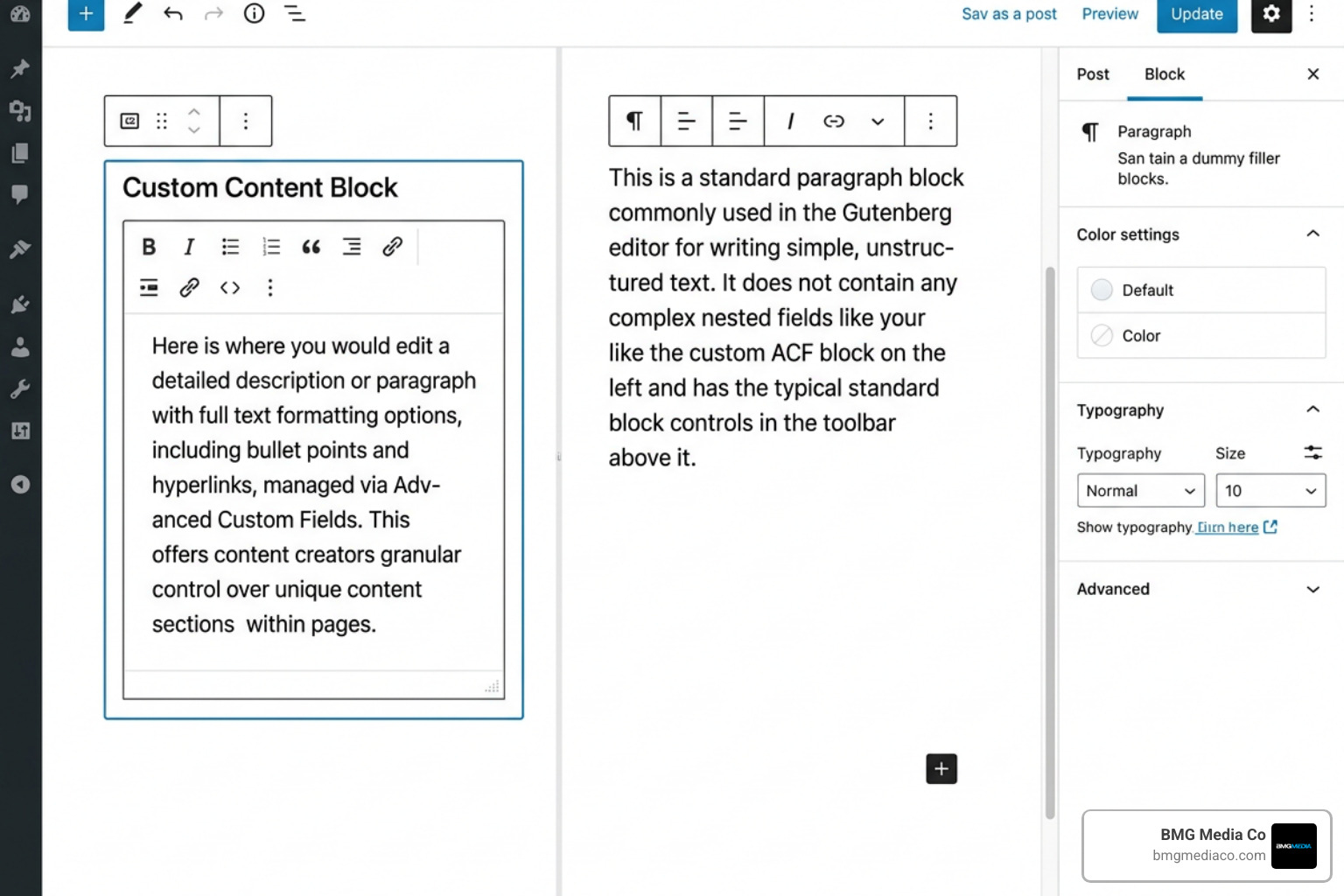
Using the Advanced Custom Fields WYSIWYG Editor in ACF Blocks and Gutenberg
Two prominent issues frequently surface when using traditional WYSIWYG fields inside ACF Blocks:
- The Enter-Key Focus Jump: Pressing the
Enterkey inside a standard Gutenberg text block unexpectedly forces cursor focus down into an active ACF WYSIWYG field on the page. This bug, active across WordPress versions, is documented in detail on GitHub Issue #946. - WordPress Core Frame Isolation: Recent updates to WordPress isolate block edit components within separate
shells, creating event listener conflicts with legacy jQuery and TinyMCE frameworks.
Quick Fix: Toggling Delay Initialization to On in your field group settings acts as an effective workaround for the cursor jump issue, preventing TinyMCE from binding global event listeners until the user clicks directly on the editor box.
Fixing Silent Content Loss on Post Save and Transitioning to InnerBlocks
An even more critical defect occurs when rich text editors are nested inside ACF Block repeaters or groups. Content creators type copy, click Update, and find that their newly entered text vanishes on page reload.
This happens because TinyMCE operates inside its own isolated iframe document. Keypress and change events fail to bubble up to the .acf-block-fields wrapper element, preventing ACF’s acf.serialize() script from running prior to the block saving its post attributes. This known issue is tracked on GitHub Issue #999.
While custom JavaScript event listener bridges can manually bind change events across the iframe boundary, the official recommendation from ACF maintainers is straightforward: Avoid using traditional WYSIWYG fields inside ACF Blocks whenever possible.
Instead, build rich text editing capabilities directly into your custom block architectures using native Gutenberg elements. You can learn how to implement these layouts smoothly in our guide to mastering ACF Gutenberg blocks.
Enhancing and Troubleshooting the Editor Experience
When standard field options fall short, third-party add-ons and systematic administrative troubleshooting can elevate your custom CMS builds.
Supercharging the Editor with ACF Extended
For projects requiring strict control over the visual editor interface, the popular ACF Extended plugin introduces over a dozen advanced controls directly into the field settings panel:
- Source Code Mode: Replaces classic Visual/Text tabs with a CodeMirror modal editor compatible with WordPress shortcode execution and HTML sanitization rules.
- Custom Valid Elements: Define exact allowed HTML tags (e.g.,
p, div, b, i, a[href|target]) to strip unapproved formatting on input. - Custom CSS Enqueuing: Link external stylesheets directly into the administrative TinyMCE canvas so typography matches the frontend theme design.
- Autoresize & Min/Max Heights: Automatically grow or limit editor height to eliminate excessive inner scrollbars.
Troubleshooting Blank Visual Tabs and Script Conflicts
If the Visual tab of your WYSIWYG field turns entirely blank or unclickable while the Text tab functions normally, work through this step-by-step diagnostic sequence:
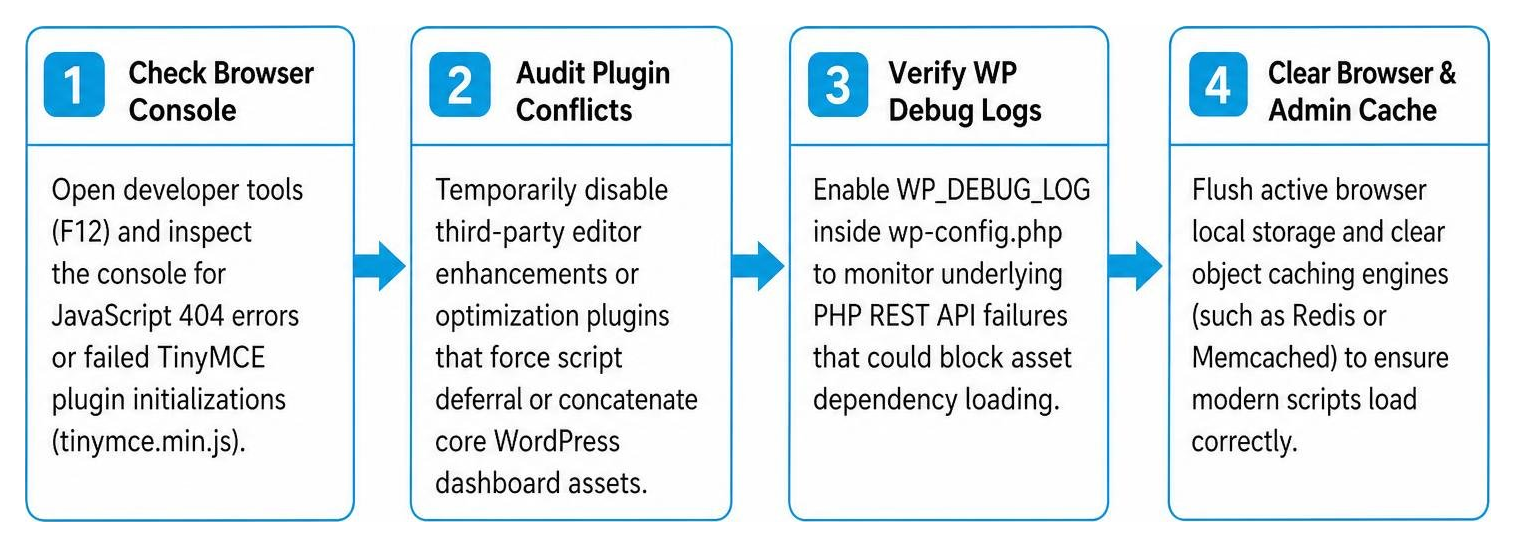
- Check Browser Console: Open developer tools (
F12) and inspect the console tab for JavaScript 404 errors or failed TinyMCE plugin initializations (tinymce.min.js). - Audit Plugin Conflicts: Temporarily disable third-party editor enhancements or optimization plugins that force script deferral or concatenate core WordPress dashboard assets.
- Verify WP Debug Logs: Enable
WP_DEBUG_LOGinsidewp-config.phpto monitor underlying PHP REST API failures that could block asset dependency loading. - Clear Browser & Admin Cache: Flush active browser local storage and clear object caching engines (such as Redis or Memcached) to ensure modern scripts load correctly.
Frequently Asked Questions About the ACF WYSIWYG Field
Why is my ACF WYSIWYG content missing paragraph tags on the frontend?
This occurs when the stored string bypasses standard formatting filters. Calling get_field() returns raw stored text without running auto-paragraph rules. Fix this by rendering output with the_field('field_name') or wrapping your variable in echo apply_filters('acf_the_content', $value).
How do I fix the cursor jumping bug when hitting Enter in Gutenberg?
Enable Delay Initialization inside the field settings panel. This defers TinyMCE script execution until the user actively clicks the editor area, preventing legacy focus listeners from triggering when pressing Enter elsewhere in the Gutenberg editor.
Why should I use InnerBlocks instead of a WYSIWYG field inside ACF Blocks?
Standard WYSIWYG fields run on legacy TinyMCE iframe instances, which can cause frame isolation issues, loss of event bubbling, and missing content during block saves. Native InnerBlocks use modern React components designed specifically for the block editor.
Conclusion
The advanced custom fields wysiwyg editor remains a cornerstone feature for delivering flexible content authoring inside WordPress. By configuring smart field defaults, enabling Delay Initialization on heavy pages, and piping PHP template output cleanly through acf_the_content, you ensure your client edit experience is as robust and performant as your frontend UI.
At BMG Media Co., we have spent over 15 years building custom digital solutions for clients across the nation—from Detroit, Chicago, and Austin to New York and Los Angeles. We believe every CMS implementation should be 100% custom-crafted, completely free from page builder bloat, and engineered for maximum speed, security, and long-term scalability.
Whether you are looking to refine an existing WordPress architecture, eliminate administrative bloat, or engineer complex web platforms, our boutique agency team delivers hands-on expertise from kickoff through launch. Explore our custom software and bespoke web development solutions to see how we can bring your next custom web project to life.