August 2026
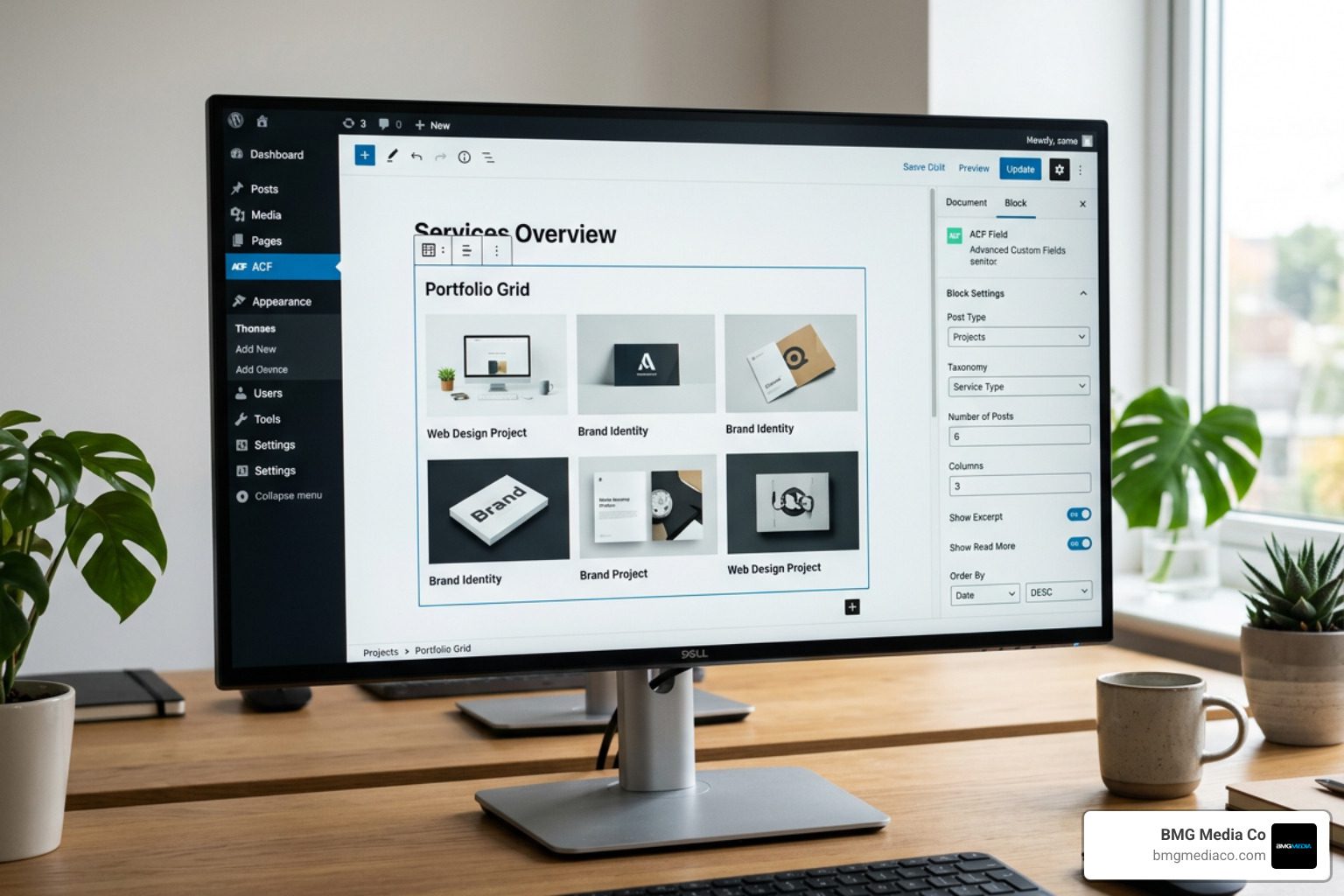
An ACF Gutenberg field is a custom data field — built with Advanced Custom Fields PRO — that powers a custom block inside the WordPress Gutenberg editor. Instead of writing React and JavaScript, you register a block with a simple configuration file and render it with a PHP template. Your custom fields show up directly in the block editor sidebar, exactly where editors expect them.
Here’s the short version of how it works:
block.json file alongside ACF PROget_field() to output your field dataThat’s the core workflow. No React. No build tools. No JavaScript framework required.
WordPress’s Gutenberg editor ships with native block creation tools, but those tools are built on React — a JavaScript framework with a steep learning curve for most PHP developers. ACF PRO bridges that gap. Since version 5.8, it has let developers build fully custom Gutenberg blocks using the PHP workflow they already know. With over one million active installs, ACF is one of the most widely trusted tools in the WordPress ecosystem — and its block-building capabilities are a major reason why.
Whether you’re adding a single custom field to a block or building complex nested layouts with repeaters and InnerBlocks, ACF gives you precise control over both the editor experience and the front-end output.
I’m Blake George, founder of BMG Media Co., and over the past 15+ years building more than 1,000 custom WordPress websites — many leveraging the ACF Gutenberg field framework — I’ve seen how this approach separates a maintainable, scalable build from a patchwork of plugins and workarounds. In the sections below, I’ll walk you through everything you need to know, from basic block registration to advanced features like Block Bindings and the ACF Datastore.
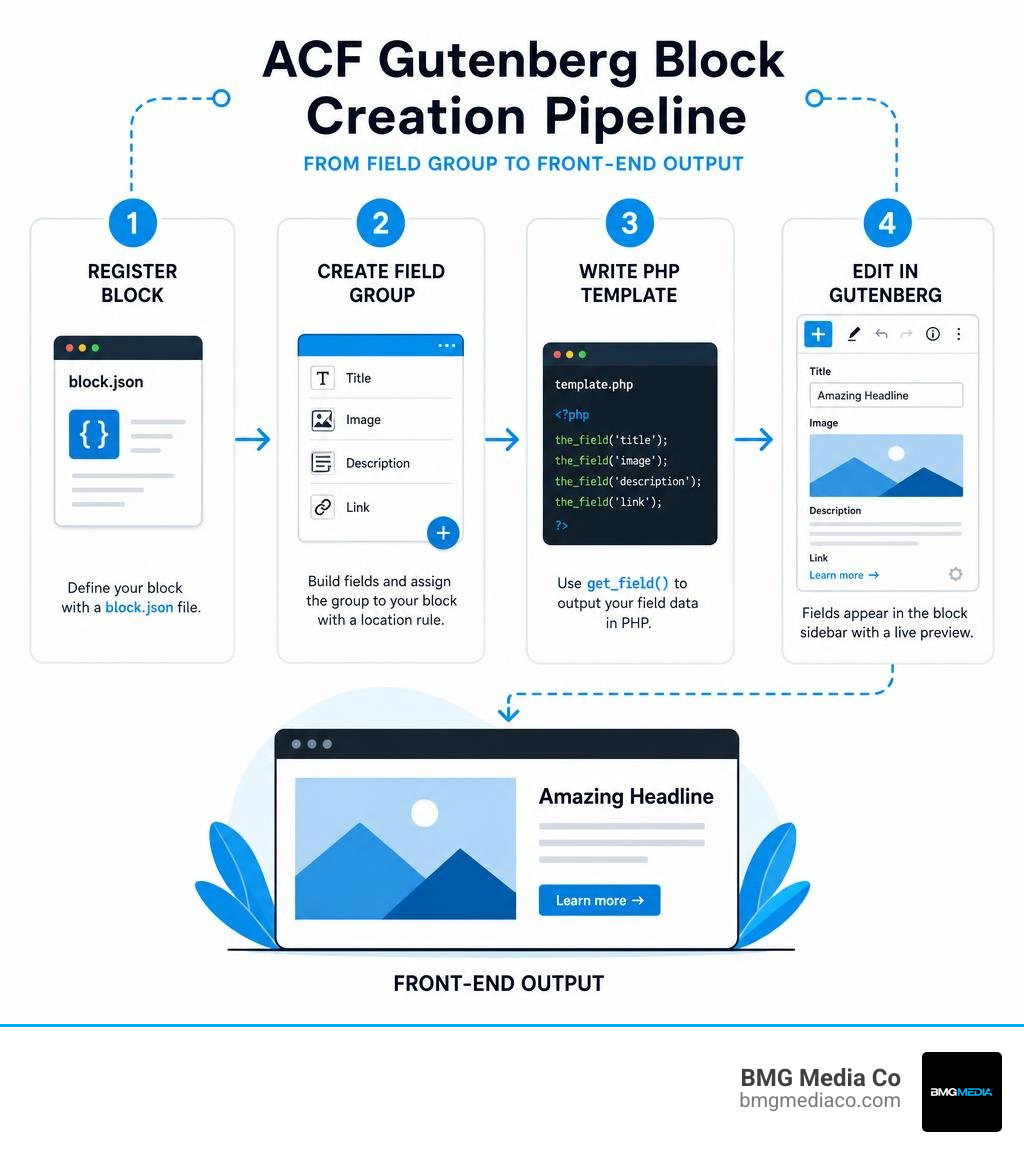
Acf gutenberg field terms at a glance:
When WordPress introduced the Gutenberg editor in version 5.0, it shifted the entire paradigm of theme and layout development toward modern component-based architecture. However, native Gutenberg block development relies heavily on JavaScript, React, JSX, Webpack, and NPM build toolchains. For traditional WordPress developers and agencies focused on speed, stability, and clean server-side execution, learning full-stack React simply to construct bespoke editorial components creates unnecessary friction.
This is where custom PHP blocks via Advanced Custom Fields PRO become invaluable. ACF Blocks allow developers to harness the exact native capabilities of Gutenberg — including block alignment, anchors, reusable blocks, and full site editing compatibility — without touching a single line of React.
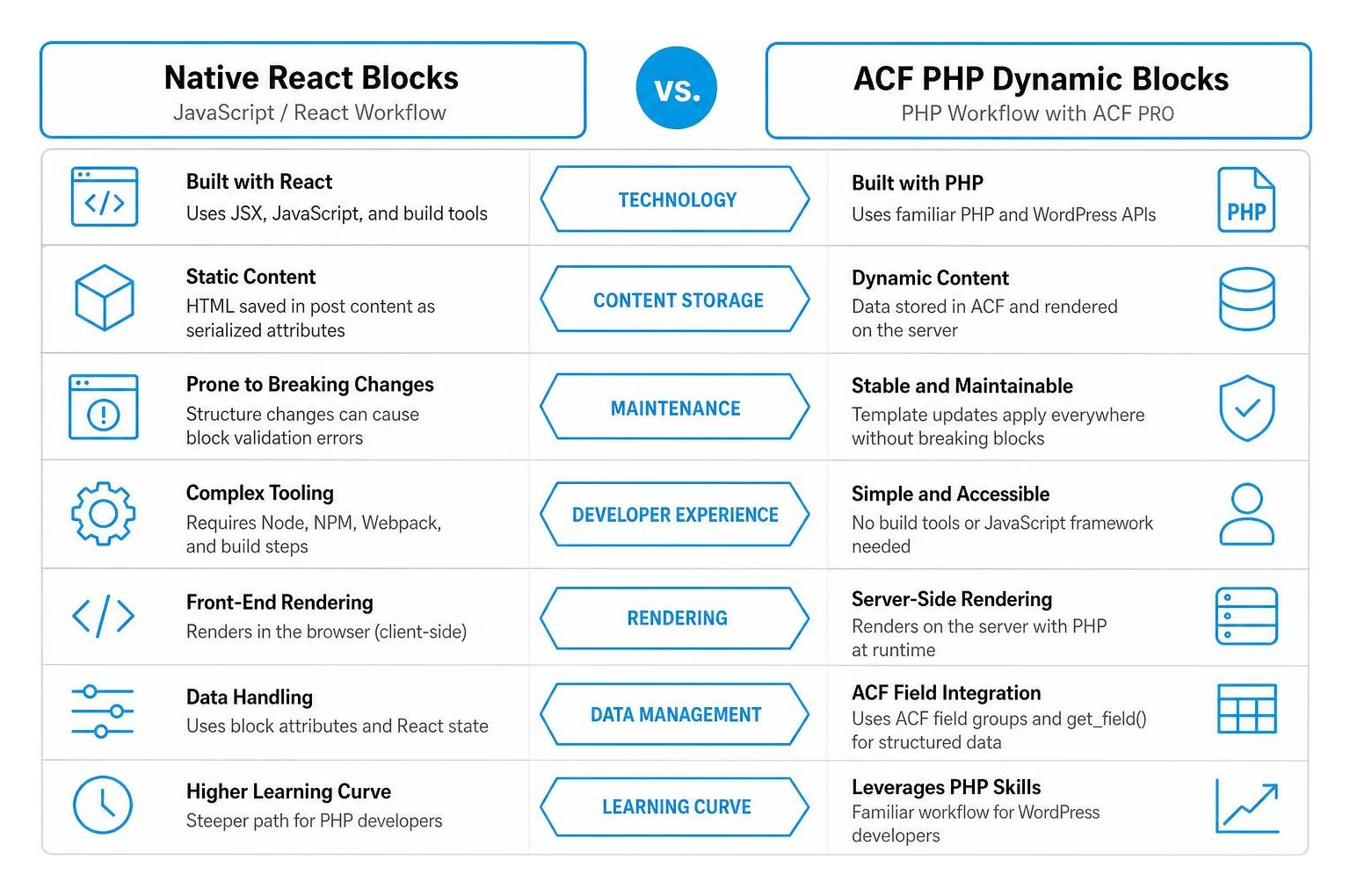
Native React blocks compile custom JSX code into static HTML comments saved directly inside post content. While this can offer interactive client-side rendering speed, it often creates massive maintenance bottlenecks. If a content structure needs to change later, updating static attributes serialized inside raw database content can lead to block validation errors. ACF PHP blocks, on the other hand, render dynamic HTML on the server during runtime. When you update your block template file in your code repository, every instance of that block across your entire website updates instantly without throwing editor broken block warnings.
For bespoke web engineering, leveraging custom PHP templates alongside structured field groups keeps backend database bloat to a minimum while maintaining maximum layout control. To understand how custom plugin architectures support these modular workflows, explore our Beginners Guide to Custom Plugins.
Building an acf gutenberg field structure requires pairing ACF PRO’s metadata engine with WordPress’s native block registration APIs. Historically, developers registered custom blocks by calling a dedicated PHP function named acfregisterblock_type inside an acf/init action hook. While this legacy method functioned well for years, WordPress core evolved toward standardized metadata definitions via block.json configuration files.
Since ACF version 6.0, registering blocks using block.json has become the official standard. Block versioning, introduced in ACF 6.0, lets developers opt into modern block engine features while maintaining strict backwards compatibility for older web applications.
To register an ACF block using the block.json approach, you create a dedicated folder inside your theme or custom plugin (for example, blocks/testimonial). Inside that folder, you add a block.json file that defines the block’s metadata, editor settings, asset dependencies, and rendering instructions.
A standard block.json manifest includes basic keys such as name, title, description, category, icon, and keywords. The critical element that connects standard WordPress block metadata to Advanced Custom Fields is the acf object key inside the JSON payload.
Within the acf object, you specify the rendering mechanism. You can define renderTemplate pointing to a relative PHP template file (such as testimonial.php) or specify a renderCallback PHP function name. Additional parameters include setting mode to auto, preview, or edit, which dictates whether editors initially see live rendered HTML or open input fields when inserting the block.
You can also configure block support options inside block.json, enabling features like full/wide alignment, custom anchors, custom background colors, and JSX support for nesting secondary blocks. Furthermore, block.json seamlessly handles asset enqueueing by allowing you to define style, script, or editorStyle paths directly in the manifest, ensuring styles load strictly when the block appears on screen.
For legacy setups transitioning to modern standards, detailed parameter breakdowns remain accessible via the official documentation at ACF | acfregisterblock_type().
Once your custom block manifest is registered, you need to create the corresponding acf gutenberg field group within the WordPress administrative interface or via code/JSON.
To associate custom fields directly with your block:
When an editor inserts your custom block into the Gutenberg content area, WordPress detects this location rule. Instead of cluttering the post screen with old-style metaboxes underneath the content editor, ACF injects those custom fields natively into the Gutenberg block sidebar Inspector panel or directly into the block view when switched to edit mode.
Once the block manifest is recognized and fields are assigned, rendering field values takes place inside your defined PHP render template. This file executes standard ACF functions like getfield() and thefield(), combining server-side flexibility with familiar template tags.
When an ACF block renders, WordPress automatically passes a comprehensive block context array ($block) to your PHP template file. This array contains critical metadata about the block instance, including its unique HTML ID ($block[‘id’]), alignment choices ($block[‘align’]), custom CSS class names ($block[‘className’]), and defined settings.
To output custom field data safely, retrieve fields by key and wrap outputs in appropriate WordPress sanitization functions:
For deeper insights into presenting structured data across templates, review our complete walk-through on ACF Frontend Display: A Step-by-Step Guide to Showing Your Fields.
One of the most powerful capabilities of modern WordPress block architecture is layout nesting. With an acf gutenberg field component, you aren’t restricted to static text inputs or fixed field structures; you can incorporate native WordPress blocks inside your custom PHP layout using the InnerBlocks feature.
To enable InnerBlocks inside an ACF block:
This hybrid approach allows you to build sophisticated container components — like custom hero sections, styled callout panels, or multi-column grids — where structured ACF meta fields handle background settings or dynamic controls, while InnerBlocks handles freeform body content.
A common dynamic scenario involves placing custom ACF blocks inside core Query Loop blocks or archive grid templates. Because Query Loop blocks iterate through multiple posts on a single page, relying on standard global post loop functions can lead to context confusion, displaying the main archive page’s metadata instead of the individual query item’s metadata.
When an ACF block renders inside a Query Loop, WordPress provides contextual post ID data within the $block object. To guarantee your fields display accurate data across dynamic post grids:
By explicitly passing the post context ID, every acf gutenberg field evaluates accurately within post sliders, dynamic post lists, and modern block template loops. Additional technical context on block theme rendering can be found at ACF | How ACF Makes Displaying Custom Fields in WordPress Block Themes Easier.
WordPress 6.7 and ACF PRO 6.8.1 introduced major architecture upgrades designed to deeply align custom field management with native block editor data systems. The most significant shift is the ACF Datastore feature.
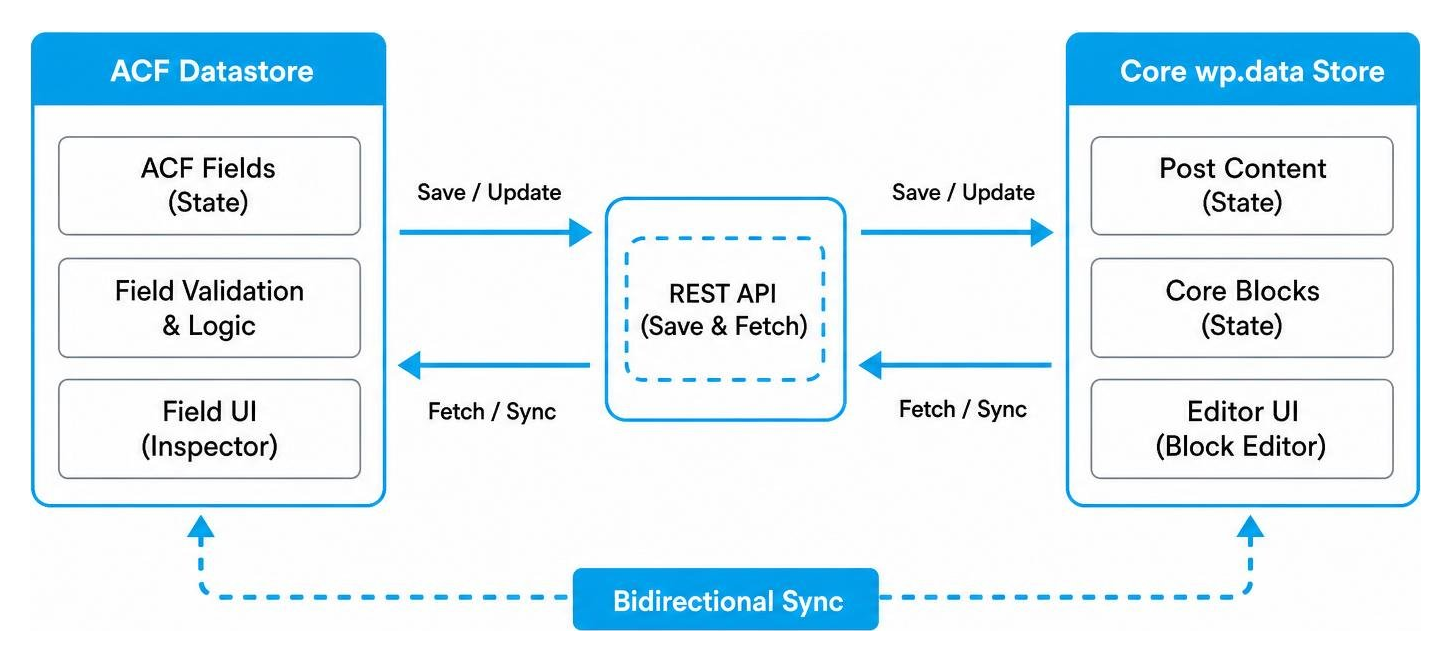
Traditionally, ACF saved field data via classic admin AJAX POST requests sent outside Gutenberg’s native save pipeline. The ACF Datastore changes this by routing field saves directly through Gutenberg’s native REST API and the core wp.data JavaScript store.
Enabling the Datastore unlocks three enterprise-grade platform enhancements:
To learn how to activate and configure the datastore in your builds, review ACF | Using the ACF Datastore.
Modern WordPress block themes rely on HTML template files (like single.html) rather than classic PHP files. Because static HTML template markup cannot execute PHP functions like get_field(), displaying custom field values in block theme templates historically required workarounds.
With WordPress 6.5+ and ACF PRO 6.8.1+, developers can utilize native Block Bindings. Block Bindings allow core blocks (Heading, Paragraph, Image, and Button) to consume custom acf gutenberg field values directly via block attributes.
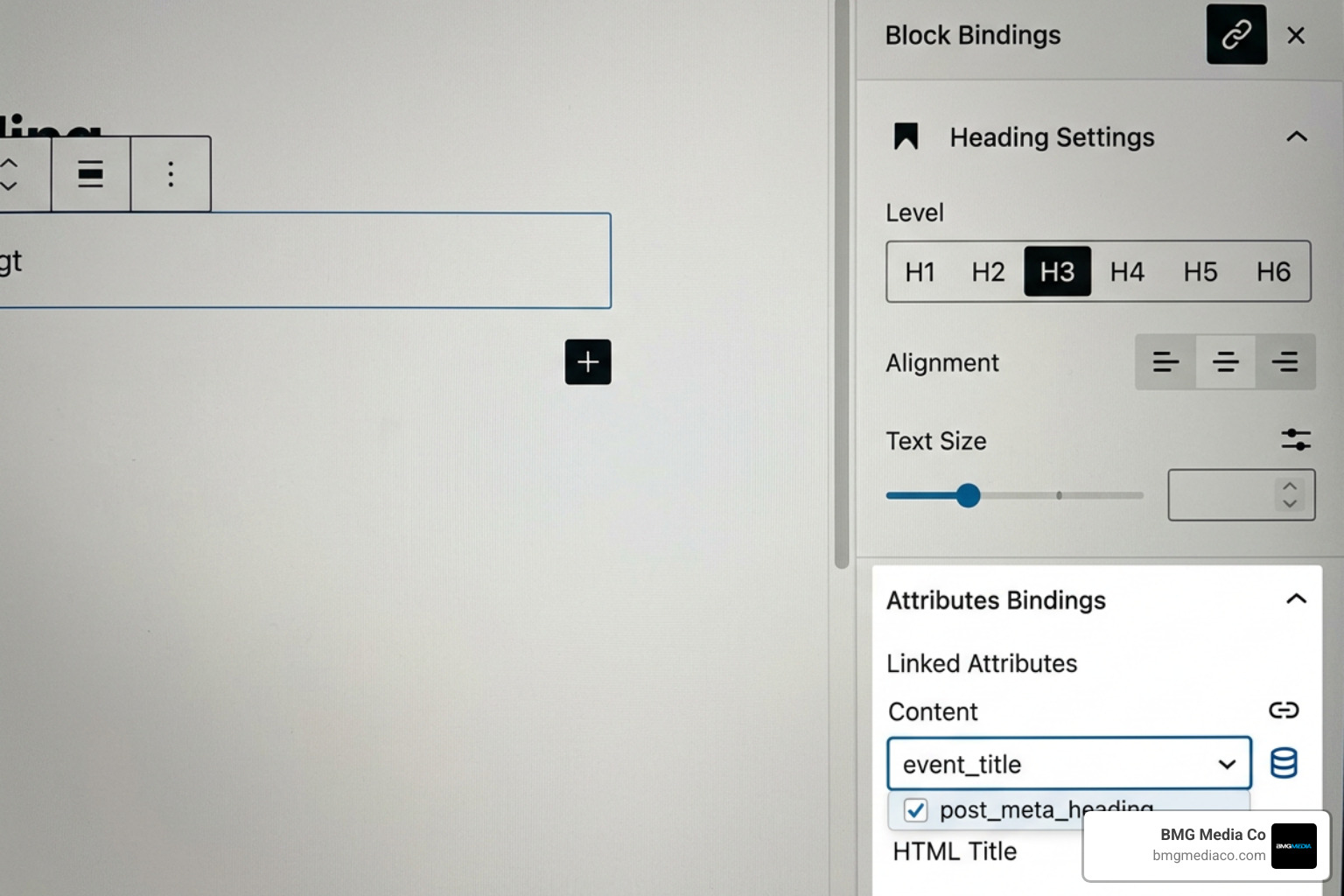
To use Block Bindings:
Alternatively, developers can define bindings programmatically inside block markup:
Block Bindings work seamlessly for simple scalar values like strings, numbers, images, and button URLs. For details on implementation, visit ACF | Block Bindings.
Avoid attempting to use ACF shortcodes in block theme HTML templates outside post body content. Shortcodes outside post content are disabled by default due to potential capability escalation security risks.
In dynamic web applications, you may want to display or hide entire Gutenberg blocks conditionally based on whether an acf gutenberg field contains specific values.
Using plugins like Block Visibility, you can define rule sets based on ACF field outputs directly within the Gutenberg editor sidebar:
When configuring rules, keep in mind that boolean ACF fields (true/false) evaluate as empty/no-value when false. Additionally, because the WordPress editor preview engine cannot always resolve complex dynamic post metadata during draft preview renders, conditional visibility rules should always be verified on the live front end.
Yes, absolutely. That is the foundational purpose of ACF Blocks in ACF PRO. By registering a block using a simple block.json manifest and rendering the content with standard PHP functions like get_field(), developers can build native Gutenberg blocks without writing JavaScript, React, or configuring NPM build systems.
When an ACF block is placed inside a Query Loop, standard functions like getfield(‘fieldname’) look for field data on the main post or archive page, rather than the iterated item. To fix this, extract the contextual post ID from $block[‘context’][‘postId’] inside your block PHP template and pass that ID explicitly as the second argument: getfield(‘fieldname’, $post_id).
Block Bindings connect scalar field values (simple strings, numbers, image URLs) directly to existing core WordPress blocks (Heading, Paragraph, Button, Image) without writing template files. Full ACF Blocks, by contrast, are completely bespoke PHP-rendered components capable of displaying complex structured data, repeater fields, flexible content layouts, and nested InnerBlocks with custom markup.
The acf gutenberg field framework bridges the gap between classic WordPress development and modern block-based editor workflows. By pairing block.json registration manifests with structured PHP render templates, developers can deliver lightweight, secure, and editor-friendly Gutenberg layouts without adding client-side JavaScript complexity or page builder overhead.
At BMG Media Co., we have spent over 15 years engineering custom WordPress websites, enterprise web applications, and tailor-made publishing tools for clients across the United States. Founded in 2009 by Blake George, our agency operates on a non-negotiable principle: every line of code, custom plugin structure, and block layout is hand-crafted from scratch to deliver speed, security, and long-term scalability.
If you are ready to modernize your digital infrastructure with tailor-made WordPress architecture, explore our Custom Software & Web Development Services to learn how we can bring your vision to life.
