July 2026
Custom plugins are self-contained pieces of code that extend a platform’s built-in functionality without modifying its core codebase. Think of them as add-ons you build yourself — designed to do exactly what you need, when the out-of-the-box features fall short.
Here’s a quick breakdown of what they are and what they do:
| Concept | What It Means |
|---|---|
| What they are | Modular code packages that plug into a host platform |
| What they do | Add features like custom UI, API integrations, workflow automation, and data transformation |
| Who builds them | Developers, agencies, and engineering teams with specific requirements |
| Where they run | Inside platforms like WordPress, Tyk, Claude Code, Amazon Q Business, and more |
| Why not use native features? | Native features are general-purpose; custom plugins solve your specific problem |
Whether you’re adding a request hook to an API gateway, building a skill for an AI tool, or wiring up a third-party integration inside WordPress — a custom plugin gives you control that pre-built solutions simply can’t match.
This matters more than most people realize. Platforms are built for the average use case. Your business usually isn’t average. When you hit the ceiling of what a platform does natively, a custom plugin is often the cleanest path forward — without forking the core software or building everything from scratch.
This guide covers the full picture: how plugins work, the different types, how to build and test them, platform-specific approaches, and the limitations you’ll run into along the way.
I’m Blake George, founder of BMG Media Co., where our team has built and deployed custom plugins across hundreds of WordPress projects over 15+ years of custom web development. That hands-on experience across industries — from healthcare to real estate to enterprise tech — shapes everything in this guide.
At its core, extensibility is about keeping the foundation of your software stable while allowing specialized features to grow around it. When we build custom applications or websites, we want a core that is fast, secure, and easy to update. If we modify the core code directly to add a unique feature, we create a maintenance nightmare. The next time the platform updates, our custom modifications get wiped out.
Custom plugins solve this by using hooks, events, and APIs to talk to the host platform. The platform remains untouched, while the plugin runs its custom logic in a protected sandbox or as an isolated middleware layer. This architecture allows us to build deep third-party integrations, design custom user interfaces, trigger automated workflows, and run complex data transformations seamlessly.
In our years of engineering enterprise web solutions from our headquarters in Birmingham, Michigan, we have found that custom plugin development generally falls into four primary buckets:
If you are looking to understand the fundamental steps of creating these tools for the web, our guide on WordPress Plugin Development From Zero to Hero in Five Steps provides a great practical starting point. For a broader look at how we leverage the world’s most popular CMS for enterprise-grade applications, explore our dedicated page on Technology: WordPress.
One of the most common dilemmas developers face is deciding whether to write a custom plugin, use a standalone configuration file, or stick entirely to native features.
Native features are always the easiest and cheapest option, but they are designed to be general-purpose. If you only need to change a single setting or alter a basic styling element, a standalone configuration file (like a JSON or YAML config) is usually the correct path. It keeps your system lightweight and minimizes maintenance overhead.
However, if your requirements involve global functionality, complex event triggers, or sharing the tool across multiple projects or teams, a custom plugin is the superior choice.
Consider a scenario where you need to implement keyboard shortcuts across an entire application. You could write a standalone JavaScript configuration, but managing that across multiple environments becomes messy. A custom plugin packages that logic, prevents conflicts with other scripts, and makes deployment as simple as toggling a switch. When scalability, clean code isolation, and long-term maintenance are your priorities, building a plugin is always the winning play.
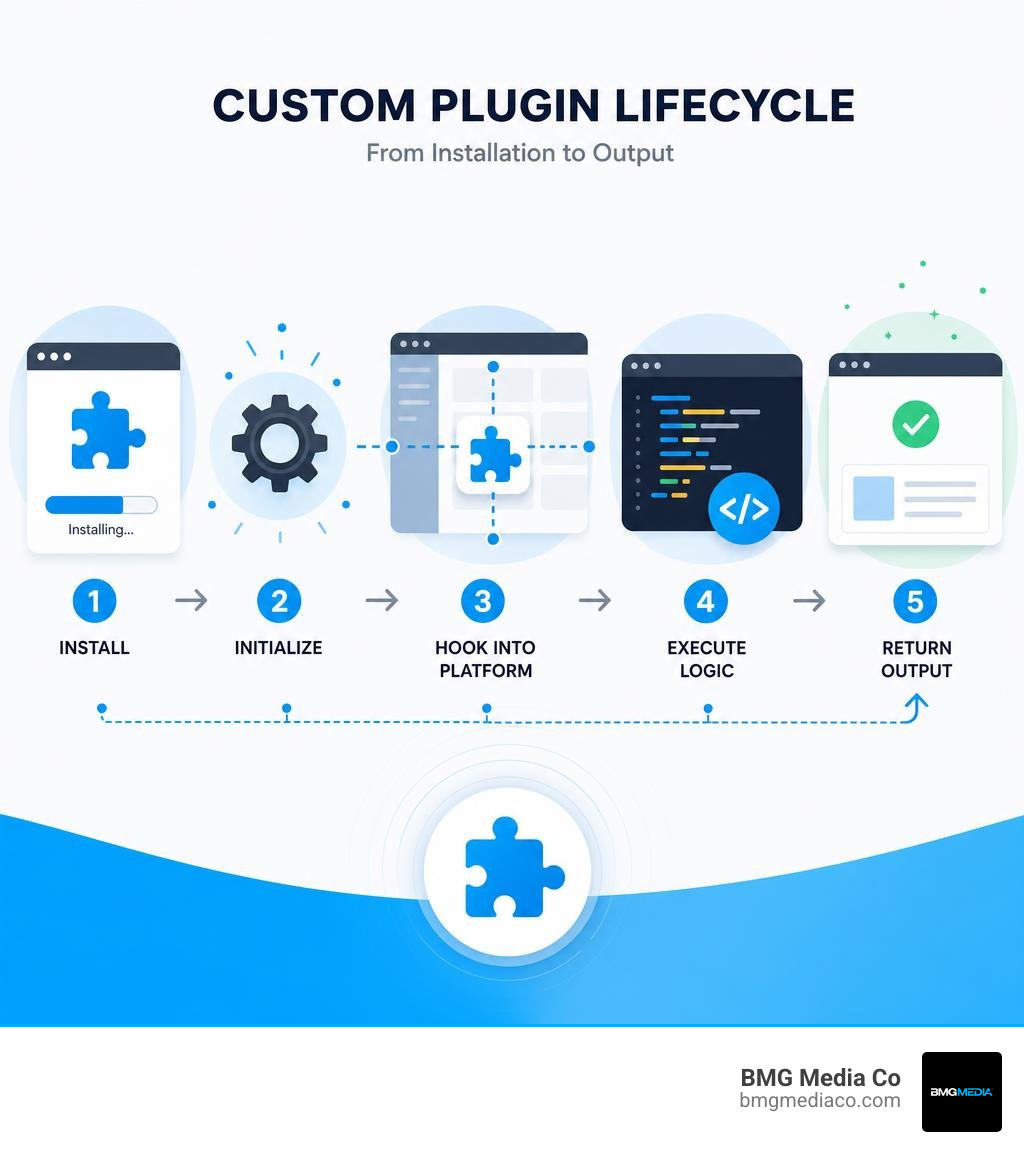
To build high-performing plugins, you must understand how they sit within the host platform’s architecture. Most modern platforms process requests or execute actions through a sequential chain of events. A plugin intercepts this chain, runs its custom code, and then hands control back to the platform.
| Deployment Type | Execution Environment | Best For | Key Advantage |
|---|---|---|---|
| Local Plugins | Runs directly on the host server/process | High-performance, low-latency tasks | Maximum execution speed |
| Plugin Bundles | Packaged ZIP files downloaded and cached by the host | Multi-site networks, distributed environments | Simplified version control and deployment |
| Remote / gRPC Plugins | Runs on a separate, external server | Polyglot development, heavy computational tasks | Language flexibility and isolated resource usage |
In API gateways and enterprise platforms, plugins act as middleware. Take Tyk, a leading API gateway, as an example. Tyk supports four types of plugins: Request Plugin, Authentication Plugin, Response Plugin, and Analytics Plugin.
These plugins hook directly into the request lifecycle at six distinct stages:
By utilizing these hooks, developers can build incredibly secure, fast, and customized API flows without ever modifying the gateway’s core engine.
How you deploy and manage your custom plugins depends heavily on your system architecture. Local plugins run on the exact same server and process as the host platform. They are incredibly fast because there is zero network latency, but they are tied to the host’s programming language.
Remote gRPC plugins, on the other hand, run on an external server. The host platform communicates with the plugin over a gRPC network connection. This offers the ultimate language flexibility — you can write your plugin in Python, Go, or Rust, even if the host platform is written in Node.js. It also ensures that if your plugin crashes or consumes too much memory, it won’t bring down your main application.
For complex, multi-site environments, plugin bundles offer a hybrid solution. A bundle compiles multiple plugins and a manifest file into a single ZIP archive. Platforms like Tyk can use a built-in bundle downloader to fetch these ZIPs from a remote storage bucket (like Amazon S3), extract them, and cache them locally. The gateway only re-downloads the bundle when the filename or version changes, ensuring both rapid execution and centralized management.
This centralized approach is highly similar to how enterprise networks manage distributed web environments, a concept we explore deeply in The Ultimate WordPress Multisite Custom Setup Guide.
Every platform has its own SDKs, manifest requirements, and development environments. Let’s look at how custom plugin development differs across developer tools, AI engines, and enterprise gateways in 2026.

Modern developer tools like Claude Code and AI engines like Creor have embraced robust plugin architectures to allow developers to build specialized AI workflows.
Claude Code supports two approaches for adding custom skills: standalone configuration and plugins. While standalone configurations in the local directory are great for personal, quick-turnaround experiments, formal plugins are designed for team collaboration and marketplace distribution.
A Claude Code plugin is structured with a central manifest file named plugin.json located inside a .claude-plugin folder. The actual capabilities of the plugin are organized into directories at the root, such as a skills directory containing markdown files with YAML frontmatter. These skills can accept dynamic user inputs using placeholder arguments (like $ARGUMENTS) to perform complex tasks, such as automated security reviews or code formatting.
Similarly, the Creor engine features a highly flexible plugin system that loads tools from npm packages, scoped packages, or local TypeScript files. Creor plugins hook into events like message creation, tool execution, and session management, allowing developers to create background monitors that watch error logs or send instant Slack notifications when an AI agent completes a task. If you want to dive deeper into building these developer tool integrations, check out the Create plugins – Claude Code Docs.
When building custom plugins for enterprise AI applications like Amazon Q Business, the technical requirements shift toward structured data schemas. Amazon Q Business allows you to build custom plugins that connect the AI to third-party applications using natural language.
To do this, you must configure authentication, set up service access roles, and define an OpenAPI schema in JSON or YAML format. This schema outlines the specific API operations the plugin can perform. For example, you can configure up to 20 API operations per custom plugin for Amazon Q Business, enabling the AI to dynamically check calendar slots, book meetings, or update CRM records based on a user’s natural conversation.
In headless databases and backend SDKs, Tailor uses a highly sophisticated plugin system (currently in Beta) that operates across two distinct lifecycle phases: definition-time hooks and generation-time hooks.
onTypeLoaded and onNamespaceLoaded run when the database schema is being defined. They allow the plugin to automatically add fields (like a deletedAt timestamp for soft-delete features) or generate derived database tables.onTailorDBReady and onResolverReady run when the SDK code is being generated, letting you output custom TypeScript types, database clients, or API executors.To explore this backend generation workflow in detail, you can refer to the Custom Plugins (Beta) | Tailor documentation.
Building a custom plugin that works on your local machine is only half the battle. To ensure it scales, remains secure, and doesn’t break during platform updates, you must follow a disciplined development lifecycle.
Every great plugin starts with a clear, explicit contract. This contract is usually a manifest file (like plugin.json or manifest.json) or an OpenAPI schema.
When writing OpenAPI schemas for plugins:
Security is the single most critical aspect of custom plugin development. Because plugins often have direct access to your database, host file system, or external APIs, a single vulnerability can compromise your entire infrastructure.
Always use secure credential management. Never hardcode API keys, passwords, or database credentials inside your plugin code. Instead, leverage environment variables or secure vault services.
When connecting to third-party APIs, configure strict service access roles (like AWS IAM roles) to grant the plugin only the exact permissions it needs to execute its tasks. If your plugin runs in a containerized environment, ensure your network configurations restrict outbound traffic to trusted domains only.
This rigorous approach to technical security is a core pillar of how we build high-performing, secure web systems. To learn more about how we blend enterprise-grade security with search engine performance, read our insights on How to Scale with Advanced SEO Web Optimization and Custom WordPress Development.
Before shipping your plugin to production or submitting it to a public marketplace, you must put it through its paces.
--plugin-dir flag to run a local copy of your plugin, which takes precedence over any installed versions./reload-plugins) to instantly apply code changes during testing without restarting your entire development server.claude plugin validate or schema validators) to ensure your manifest and code structure meet all platform specifications.1.0.0, 1.0.1) in your manifest files. This prevents client applications from breaking when you push updates.While custom plugins offer unmatched flexibility, they are not a silver bullet. Developers must be prepared to face several common challenges during the lifecycle of a plugin:
Your choice should be guided by performance requirements and your development stack. If your plugin needs to execute incredibly fast with sub-millisecond latency (like a header injection hook in an API gateway), build a local plugin.
If your team prefers to write in a language not natively supported by the host platform, or if the plugin performs heavy calculations that could slow down your main application, build a remote gRPC plugin.
Third-party plugins can introduce malicious code, expose sensitive database credentials, leak user data, or contain outdated dependencies with known vulnerabilities.
To mitigate these risks, always audit the source code of third-party plugins, pin them to specific commit SHAs or verified versions, run them in isolated sandboxes, and restrict their network permissions.
Yes. Most platforms provide a straightforward migration path. To convert a standalone configuration (like a local .claude config) into a plugin, you need to create a dedicated plugin directory, set up a .claude-plugin/plugin.json manifest file, copy your existing skills or commands into the new structure, migrate any event hooks into a structured format (like hooks.json), and test the package locally using your platform’s plugin testing flags.
Building custom plugins is the ultimate way to break free from platform limitations and build software that aligns perfectly with your business goals. From simple workflow triggers to complex enterprise API integrations, custom plugins keep your core systems clean, secure, and ready for future growth.
But building these tools requires deep technical expertise, a commitment to clean code, and an understanding of enterprise architecture. That is where we come in.
At BMG Media Co., founded in 2009 by Michigan State University graduate and Shark Tank alumni Blake George, we don’t believe in templates, page builders, or shortcuts. Headquartered in Birmingham, Michigan, our globally distributed team has built over 1,000 custom digital solutions from scratch. We specialize in custom WordPress development, API integrations, enterprise web applications, and custom software.
If you are ready to scale your business with custom software built specifically for your unique workflows, explore our custom software development services and let’s build something extraordinary together.

