July 2026

SEO web design is the practice of building websites that rank well in search engines and convert the visitors they attract — treating search optimization and design as one unified system, not two separate projects.
Quick answer: What is SEO web design?
| Element | What It Means |
|---|---|
| SEO | Helps search engines find, crawl, and rank your site |
| Web Design | Creates a clear, fast, and trustworthy experience for visitors |
| SEO Web Design | Combines both from day one so your site gets found and converts |
Here’s the problem most business owners run into: they invest thousands in a beautiful website, hit publish, and then… nothing. No traffic. No leads. Just a gorgeous site that nobody sees.
The opposite happens too. Some sites rank well but look outdated or cluttered — and visitors leave immediately.
Neither outcome is acceptable when you consider what’s at stake. 63% of all shopping experiences begin on a search engine. And an effective SEO strategy can deliver an ROI of over 12x your marketing spend.
The solution isn’t more SEO or better design. It’s building them together from the very first decision.
I’m Blake George, founder of BMG MEDIA Co., and over the past 15+ years I’ve led the development of more than 1,000 custom websites where SEO web design was built into the foundation — not bolted on afterward. In this guide, I’ll walk you through exactly how to do the same.
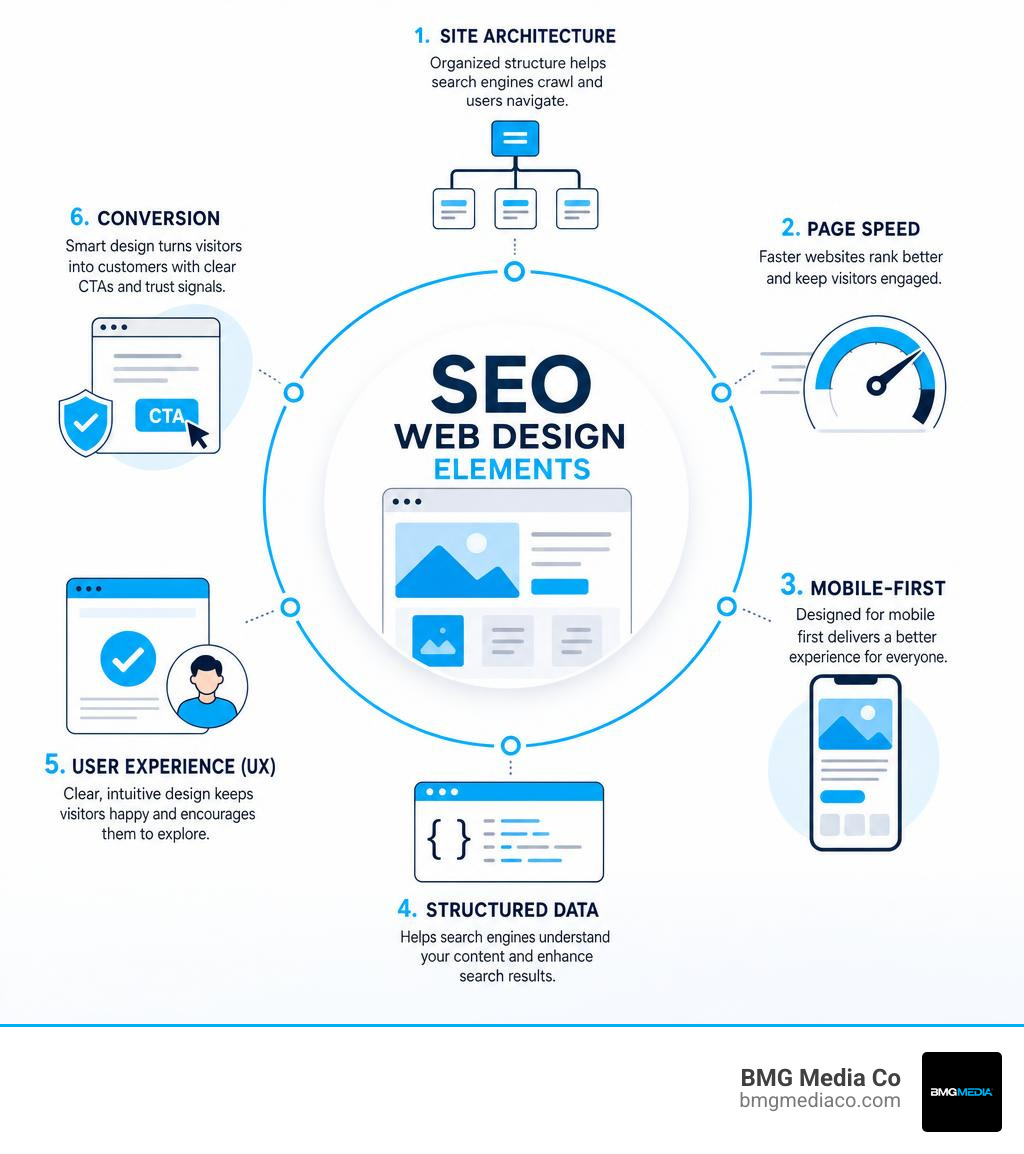
When most people think of web design, they think of colors, typography, layouts, and logos. When they think of Search Engine Optimization (SEO), they think of keywords, metadata, and link building.
For years, these two disciplines existed in silos. A business would hire a designer to build a beautiful site, and once it launched, they would hire an SEO agency to “optimize” it.
This sequential approach is a recipe for disaster. It often forces SEO professionals to dismantle the designer’s work to fix crawlability issues, rewrite unoptimized content, or completely restructure the site’s architecture. On the flip side, some SEO-first approaches yield technically perfect sites that look like they were built in 2008, driving visitors away instantly.
Integrating search optimization and design from the start ensures your site is built to satisfy both search engine crawlers and human visitors. This unified strategy is why top agencies featured among the Top Web Design Agencies in USA (2026) prioritize a holistic workflow. By designing with SEO in mind, you secure organic visibility, enhance your brand’s digital reputation, and dramatically improve your conversion rates.

To understand the difference, we have to look at how search engines work. Google uses automated programs called crawlers (or spiders) to constantly explore the web, index pages, and rank them.
Traditional web design focuses almost exclusively on visual aesthetics and user interface (UI) layouts. While this is crucial for brand perception, search engine crawlers do not “see” a website the way humans do. If a designer builds a stunning, image-heavy site with minimal text to maintain a clean look, Google’s crawlers will struggle to understand what the business actually does.
SEO web design builds the site from the code up to be easily crawled, indexed, and understood. This means planning the visual layout around the search intent of your target audience. It ensures that critical design choices—such as header tags, text-to-HTML ratios, image formats, and scripts—are engineered to help search engines parse your content without friction.
User Experience (UX) and SEO are two sides of the same coin. While SEO focuses on getting users to your website, UX is responsible for keeping them there and guiding them toward a conversion.
Google’s modern ranking algorithms, including the Helpful Content system, closely evaluate user behavior signals. If a user clicks on your search listing and immediately clicks back because your site is confusing, slow, or cluttered, Google receives a signal that your page did not satisfy their search intent. This leads to high bounce rates and, eventually, a drop in rankings.
Conversely, when a site is intuitive and easy to navigate, dwell time increases, and users interact with more pages. This positive user behavior signals to search engines that your site is a high-quality resource. To find the sweet spot between aesthetic layouts and search performance, we rely heavily on testing. You can read more about how we validate our design decisions in our guide on The Importance of A/B Testing in Web Design.
An optimized website is built on a solid technical foundation. If search engine crawlers cannot access your pages, or if they get lost in a chaotic site structure, no amount of beautiful design or keyword optimization will save your rankings.
Before we write a single line of code or sketch a wireframe, we must map out the technical blueprint of the site. This involves defining the site hierarchy, planning XML sitemaps, configuring the robots.txt file, and ensuring that search engines can easily access the same resources (like CSS and JavaScript) as a normal user. To make sure your current site isn’t holding you back, check out Why Your Site Needs SEO Technical Audit Services Right Now.

Site architecture refers to how the pages on your website are organized and linked together. A logical, shallow site architecture helps search engines crawl your site efficiently and makes it easy for users to find the information they need.
One of the most effective ways to structure a modern website is through content silos (also known as topical clustering). Instead of scattering blog posts and service pages randomly across your site, you group related content into distinct categories or “silos.”
For example, if you are a custom software development firm, you might have a parent page for “Web App Development” and child pages for “React Development,” “Database Design,” and “API Integration.” All of these child pages link back to the main parent page and to each other, creating a tight topical cluster that establishes your authority on that subject. For a deeper dive into building optimized web structures, explore The Developer’s Guide to SEO-Driven Web Apps.
Your URL structure is the map of your website. Clean, descriptive URLs help both users and search engine crawlers understand where they are on your site and what the page is about.
A poor URL structure looks like this:
https://yourdomain.com/index.php?id_sezione=360&sid=3a5
An optimized URL structure looks like this:
https://yourdomain.com/services/web-design
During the seo web design phase, we map out every URL to prevent future redirect chains. If you launch a site with unoptimized URLs and try to change them later, you risk losing your accumulated search equity and breaking existing backlinks.
Alongside URLs, your internal linking strategy determines how link equity (or “link juice”) flows through your site. By strategically linking from high-authority pages (like your homepage) to deeper service or blog pages using descriptive, keyword-rich anchor text, you help search engines discover new content and understand the relationship between different pages.
With over 60% of all search traffic originating from mobile devices, mobile responsiveness and page speed are no longer optional “add-ons”—they are primary ranking factors. Google has used mobile-first indexing for years, meaning it evaluates the mobile version of your website as the primary version for indexing and ranking.
At the same time, user attention spans are shorter than ever. Research shows that users start to lose interest after just two seconds of waiting for a page to load. If your site takes three, four, or five seconds to load, a massive portion of your hard-earned traffic will bounce before they even see your brand logo.
| Performance Metric | Mobile-First Optimized | Traditional/Desktop-Only | Impact on Rankings & UX |
|---|---|---|---|
| Average Load Time | < 2 seconds | 4+ seconds | High bounce rates, lower crawl budget |
| Lighthouse Score | 90+ | 30-60 (typical WordPress) | Direct impact on Core Web Vitals rankings |
| Mobile Layout | Fluid, touch-friendly | Cluttered, tiny text | Essential for Mobile-First Indexing |
| CSS/JS Payload | Minimized, lightweight | Bloated, unused code | Affects page rendering and user retention |
For businesses in our home state, working with a local specialist like a Top Web Design Companies In Michigan | 2026 – DesignRush can ensure your site is engineered to meet these strict speed and responsiveness standards from day one.
Designing mobile-first means starting your design process with the smallest screen size and scaling up to desktop, rather than the other way around. This forces you to prioritize the most important content and layout elements.
When designing for mobile-first indexing, we must pay close attention to touch-friendly navigation. Buttons and links need to be large enough and spaced far enough apart to prevent accidental clicks. Additionally, the viewport must be configured correctly, and font sizes must be readable on mobile screens without requiring users to pinch and zoom. You can read our comprehensive breakdown of this process in Web Design for Mobile-First Indexing: Optimizing for Mobile Search.
Core Web Vitals are a set of specific user-focused metrics that Google uses to measure a webpage’s overall user experience. They focus on three main areas: loading performance, interactivity, and visual stability.
To achieve high PageSpeed scores, we focus heavily on performance engineering. This includes compressing and optimizing images, leveraging modern image formats like WebP, minifying CSS and JavaScript, and eliminating render-blocking resources. For a complete guide on how to optimize these metrics, refer to Core Web Vitals Optimization for High-Performance Sites.
One of the greatest challenges in web design is balancing beautiful visual aesthetics with technical SEO requirements. Designers often want clean, minimal layouts with large images, video backgrounds, and minimal text. SEO strategists, on the other hand, want detailed written content, clear keyword-rich headings, and structured data.
These two goals do not have to conflict. In fact, the best websites use design to make comprehensive, SEO-friendly content look incredibly engaging and easy to read.
To explore how mobile-ready design and search optimization work hand-in-hand, check out our guide on Responsive Design 101: From Mobile-First to SEO-Ready.
Visual hierarchy is the arrangement of elements in a way that implies importance. By using clear heading structures (H1, H2, H3), contrasting colors, and varied font sizes, you can guide a user’s eye through your content naturally.
This visual hierarchy is also how search engines understand the structure of your page. Your main title should always be an H1 tag (and there should only be one H1 per page). Major sections should use H2 tags, and sub-sections should use H3 tags. This creates a logical outline that helps search engines parse your topic while making your content scannable for users who prefer to skim.
When design and SEO are kept separate, several common mistakes tend to crawl into the final build:
To learn how to avoid these pitfalls and build a highly scalable web presence, read our guide on How to Scale with Advanced SEO, Web Optimization, and Custom WordPress Development.
The landscape of search is changing rapidly. As we navigate 2026, websites must be optimized not only for traditional search engine crawlers but also for AI-driven search engines, chatbots, and large language models (LLMs).
To ensure your site is readable by both humans and AI tools, we implement advanced technical standards:
Your website’s design directly impacts how search engines perceive and rank your site. Visual layout, page loading speeds, mobile responsiveness, and structural navigation are all evaluated by search algorithms. If your design is slow, hard to navigate on mobile, or lacks clear text content, search engines will rank your competitors higher to ensure a better experience for their searchers.
Integrating SEO and web design from day one prevents costly rebuilds and design reworks down the road. When site architecture, URL structures, keyword mapping, and content layouts are planned collaboratively, you launch a site that is visually stunning, fast, and immediately ready to rank. It is far more cost-effective to build an optimized site correctly the first time than to try and fix structural SEO issues after the site is launched.
The success of an integrated seo web design project should be measured using both traffic and interaction metrics:
Your website is the digital front door of your business. It is not just an online brochure; it is a revenue-generating engine that should work tirelessly to attract new leads and convert them into loyal clients.
Achieving this requires a delicate balance of beautiful aesthetics, exceptional user experience, and robust technical optimization. When you treat search optimization and web design as a single, unified system, you create a powerful web presence that stands out to both search engines and your target audience.
If you are looking to build a high-performing digital platform for your brand, we can help. For businesses aiming to dominate their local search landscape, partnering with a specialized Top SEO Michigan Firm: Hunt, Don’t Get Buried in the Search Results is the key to rising above the competition.
At BMG Media Co., we design and develop fully custom, award-winning websites tailored to your unique business goals—with speed, accessibility, and search optimization built directly into the foundation. No templates, no bloated code—just high-performance results.
Ready to build a website that looks incredible and ranks on page one? Get started with Custom Web Design and Development Services today, and let’s build something remarkable together.
