August 2026
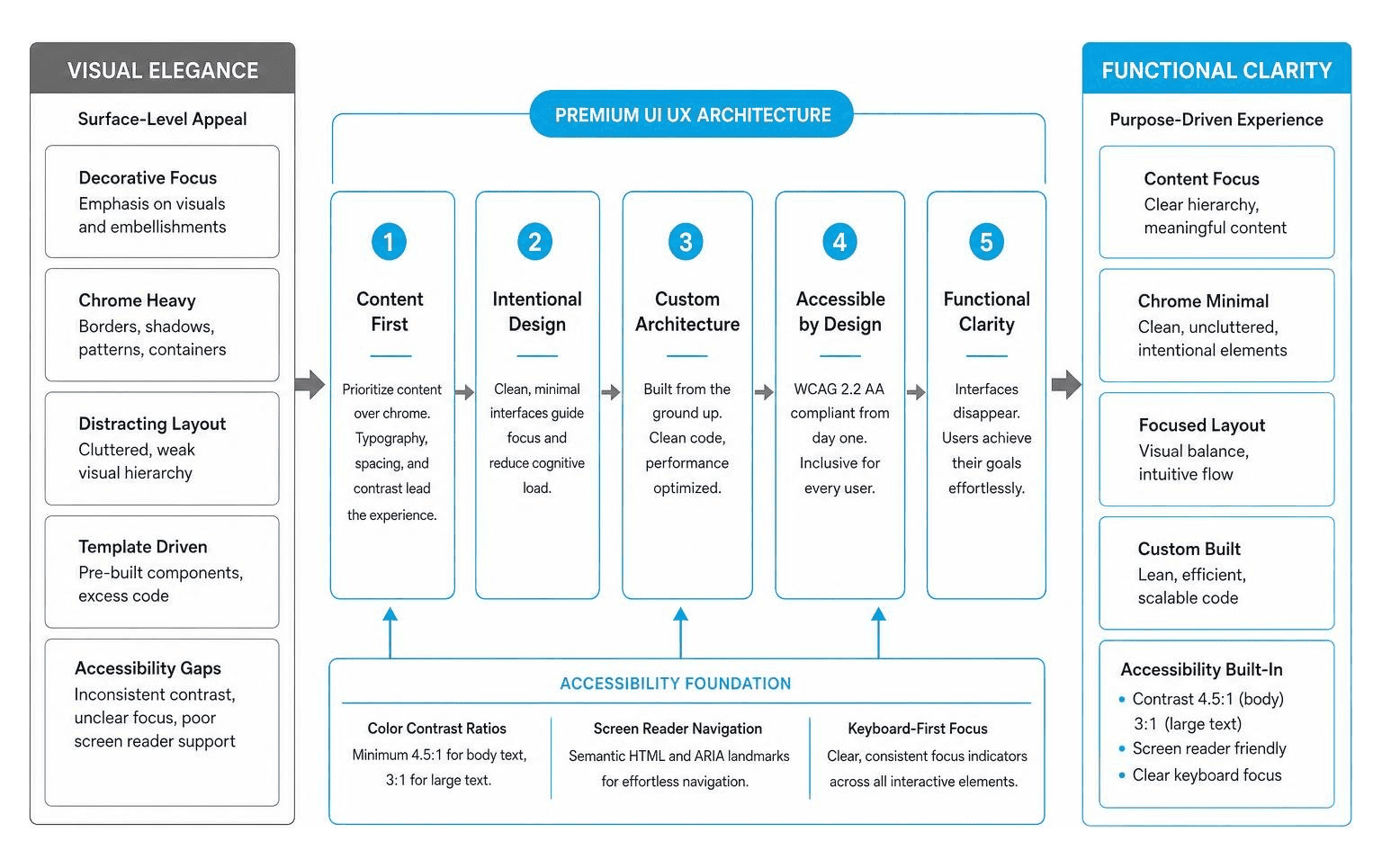
Standard web design often focuses on surface-level visual appeal—adding decorative graphics, bright accent colors, and trendy animations. Premium UI UX design, by contrast, operates under a philosophy of digital craftsmanship and intentional restraint. It prioritizes the user’s focus, using visual balance and subtle micro-interactions to guide visitors naturally through an interface without overwhelming them.
At its core, premium digital execution replaces template shortcuts with custom software architecture. While standard sites frequently rely on pre-packaged page builders filled with unnecessary code, high-end interfaces are engineered from the ground up. This structural discipline ensures fast loading times, clean code handoffs, and an intuitive layout. To understand how these disciplines work together, exploring UX vs UI Design Understanding the Difference and Importance reveals how structural strategy forms the foundation for visual execution.
A common mistake in digital design is prioritizing “chrome”—heavy borders, drop shadows, background patterns, and decorative containers—over actual content. Premium design reverses this relationship by focusing on content over chrome. The interface disappears, leaving behind a clean layout where typography, spatial hierarchy, and contrast carry the experience.
True elegance never compromises usability. A high-end experience must adhere strictly to WebCAG 2.2 AA compliance standards. Accessibility is not an afterthought; it is built into the color choices, focus states, and typography choices from day one:

Creating interfaces that feel polished requires adherence to systematic visual principles. By treating digital spaces as three-dimensional environments governed by physics, designers build visual hierarchy that feels natural to human perception. Mastering key Web Design Principles You Need to Know ensures that interfaces remain both visually compelling and functionally sound.
Achieving a high-end feel often comes down to spatial rhythm. A primary rule of thumb is the double whitespace rule: when grouping disparate layout sections or nested components, double the standard margin spacing used for inner elements. Increasing vertical line heights and padding prevents interfaces from looking cramped.
Depth cues should remain subtle. Rather than using harsh black drop shadows, top-tier interfaces combine semi-transparent inset shadows with delicate 1px border highlights to raise cards, modals, and dropdown menus softly off the page background.

Modern premium ui ux design relies on robust component ecosystems and structured design tokens. Design systems unify product teams by translating visual decisions into code variables.
High-performing design workflows frequently leverage standardized kits like the Beyond UI — Premium Figma UI Kit and Design System, the Shadcn Figma Design System – Shadcn Studio, or the VOIT Design System — Premium Figma UI Kit for Scalable Products to establish component foundations quickly.
To scale custom applications across enterprise environments, design systems organize visual properties into hierarchical token structures:
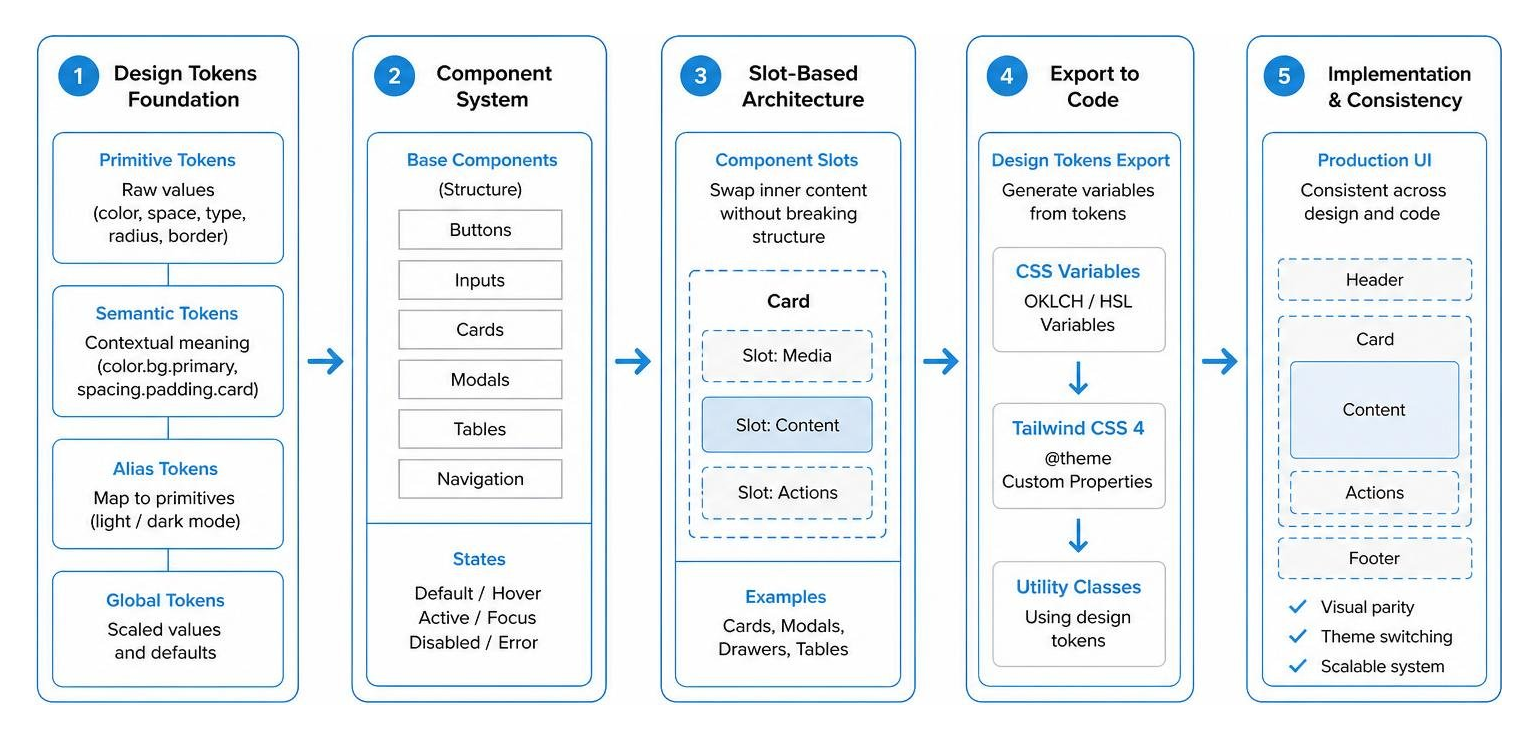
color.bg.primary or spacing.padding.card) map specific values to context, enabling native light and dark mode switching instantly.The intersection of AI coding tools and high-performance WebGL frameworks has transformed modern front-end execution. Tools like Cursor IDE, Claude Code, and Codex allow developers to convert structured design rules into production-ready code quickly.
Rather than relying on generic AI code outputs, designers supply AI assistants with prompt-driven design tokens. Using resources like the Premium Design Skill File | TypeUI, teams enforce strict UI guidelines directly inside AI development environments. These instruction files outline typography boundaries, spacing rules, and contrast constraints, preventing AI tools from generating low-contrast text or inconsistent layouts.
To add visual depth, platforms incorporate custom motion primitives. Component libraries like FutureUI – Premium Animated React Components for Modern Web utilize GSAP physics engines and WebGL background shaders. Incorporating hardware-accelerated particle physics, domain-warped fluid smoke, and interactive 3D carousels creates memorable micro-interactions while maintaining fast page performance.
Inspiration for high-end digital design goes beyond static visual showcases. While platforms like Awwwards and Behance offer visual inspiration, understanding functional interaction requires studying real-world user flows.
Reviewing annotated screen recordings on Page Flows reveals how leading digital platforms navigate complex onboarding, checkout funnels, and search interactions. Designers can explore curated galleries featuring The Ultimate List of Beautiful Web UI Designs That Actually Work to see how aesthetic design translates into practical conversion paths.
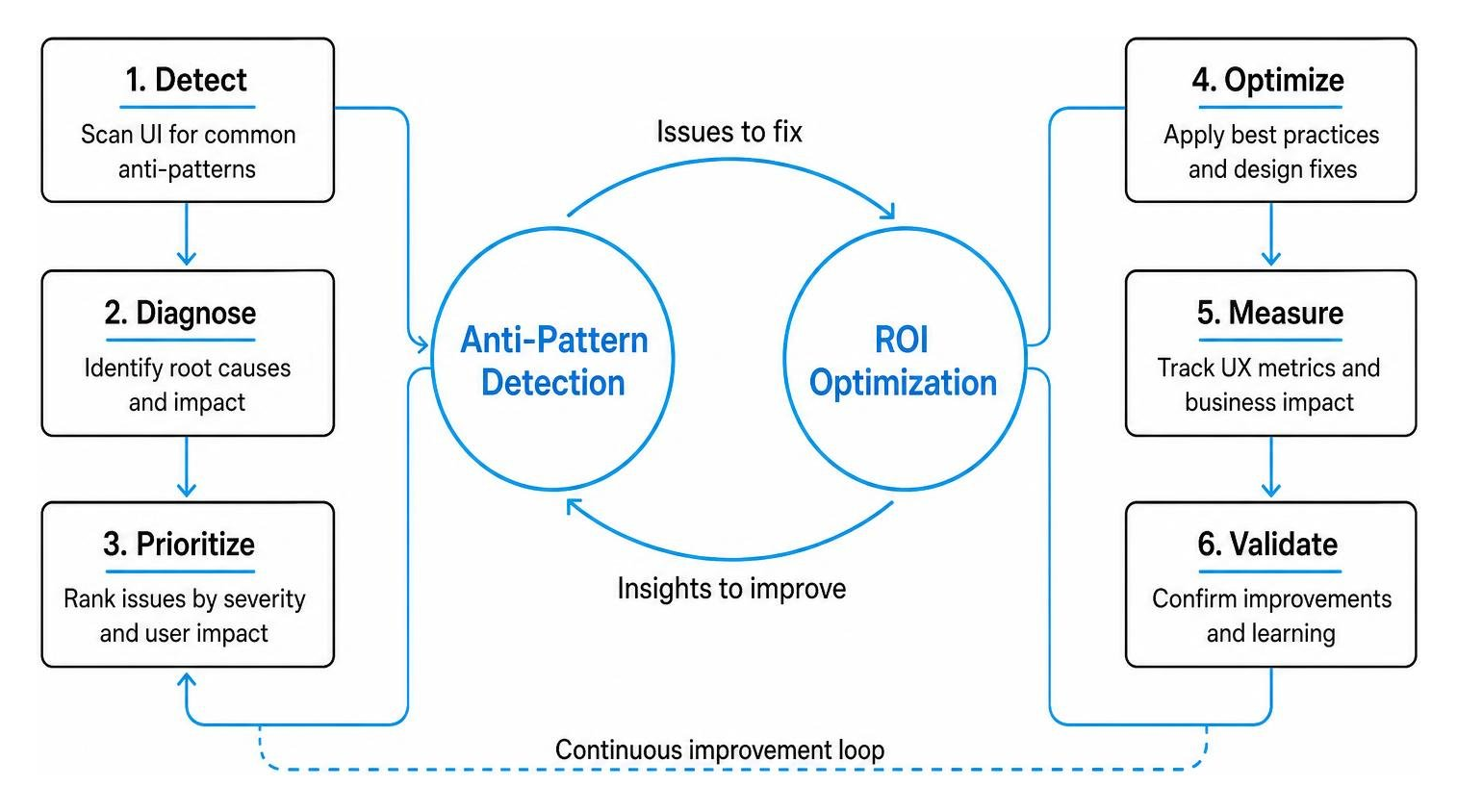
Avoiding common UI anti-patterns is essential for maintaining product quality:
Investing in a custom design system yields measurable returns on investment. Eliminating redundant front-end adjustments reduces development cycles from weeks to days, accelerating time-to-market while delivering steady conversion rate optimization gains.
Standard website templates rely on generic layout structures and bloated code libraries designed to fit any generic business. Premium UI UX design utilizes custom component architecture tailored to specific brand goals, user journeys, and technical requirements. It optimizes performance, emphasizes accessibility, and eliminates third-party page-builder drag.
Luxury digital brands must adhere to WCAG 2.2 AA guidelines. Key requirements include minimum color contrast ratios (4.5:1 for body text), full keyboard navigation support, clear visual focus indicators, scalable typography, and structured ARIA landmark roles for screen readers.
AI tools like Cursor IDE and Claude Code parse structured design system rules and CSS tokens to generate accurate front-end code. By feeding AI tools precise design skill files, developers rapidly convert Figma components into clean, semantic React or Tailwind code without sacrificing design integrity.
Creating a luxury digital presence requires more than visual polish—it demands custom architecture, disciplined spatial rhythm, accessible design systems, and rapid front-end performance.
At BMG Media Co., we have spent over 15 years engineering completely custom digital platforms for ambitious businesses worldwide. Headquartered in Birmingham, Michigan, our team builds every website, custom application, and enterprise platform from scratch. No templates. No page builders. No shortcuts. Every line of code and every user interface flow is crafted to reflect your visual identity and achieve your growth objectives.
If you are ready to elevate your digital product with premium ui ux design, discover why businesses trust our Why Your Business Needs a Custom Website Design and Development Strategy guide or explore our dedicated Custom Web Design Services to launch your project today.
