July 2026

The best web UI design does two things at once: it looks great and it works. Users form an opinion about a website in just 50 milliseconds — faster than a single blink. That’s your entire window to earn trust, signal credibility, and keep someone from hitting the back button.
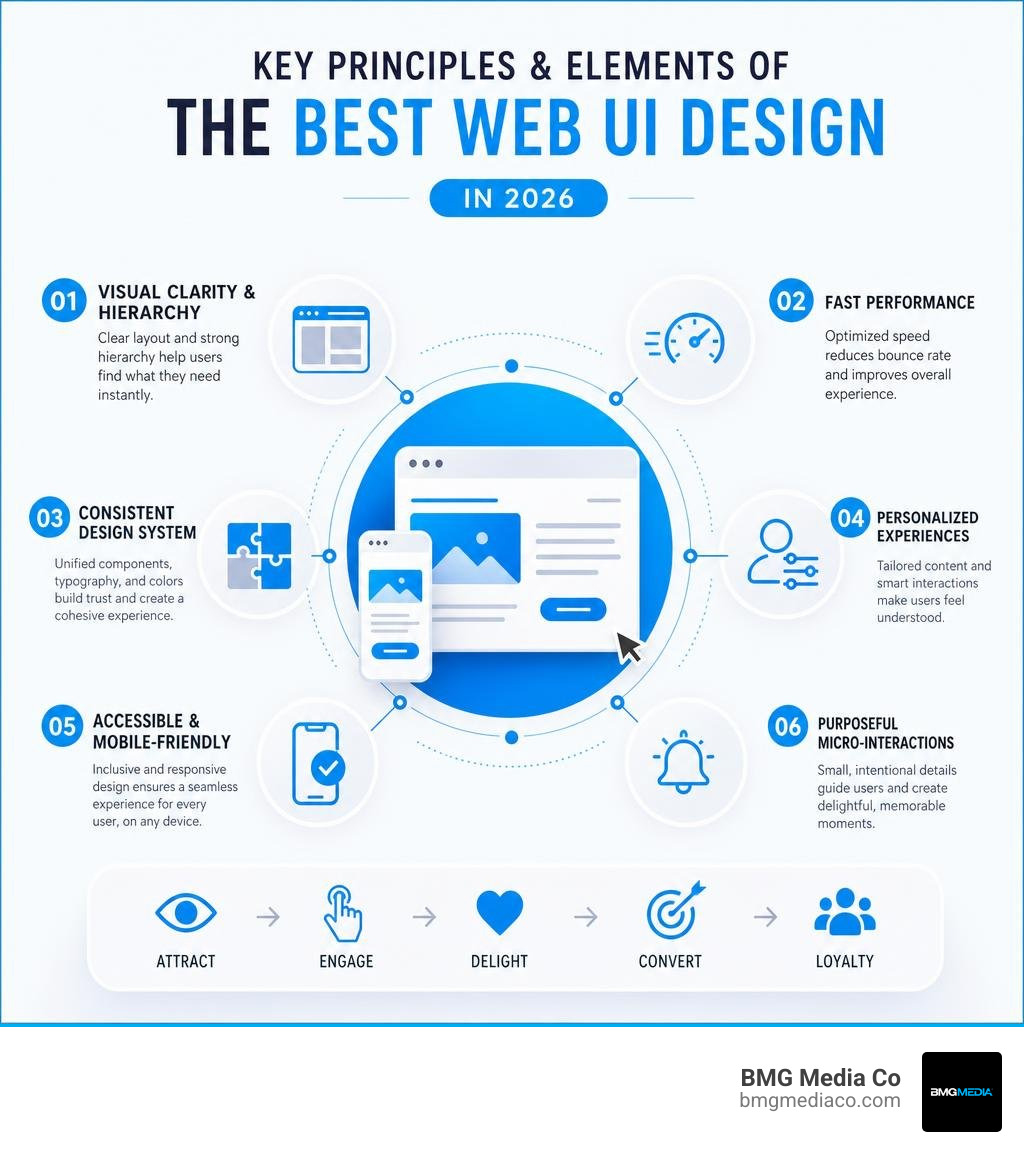
Here are the hallmarks of the best web UI designs in 2026:
| What Makes It Great | Why It Matters |
|---|---|
| Visual clarity and hierarchy | Users find what they need instantly |
| Fast load times | Reduces bounce rate and improves SEO |
| Consistent design system | Builds brand trust across every page |
| Personalized experiences | Retains 61–74% of users over 28 days |
| Accessible and mobile-friendly | Reaches every user on every device |
| Purposeful micro-interactions | Creates emotional connection and delight |
Good UI isn’t just about making something beautiful. It’s about making something that works beautifully — guiding users toward a decision without friction, confusion, or distraction.
That gap between “looks nice” and “actually converts” is exactly where most websites fall apart. Brands spend money on aesthetics and ignore functionality. Or they optimize for performance and end up with something cold and forgettable. The best interfaces do neither.
I’m Blake George, founder of BMG Media Co., a custom web design and development agency with over 15 years and 1,000+ projects built from scratch — every one of them engineered around the principles of best web UI design. This list breaks down what separates the interfaces worth studying from everything else.
Best web ui design terms you need:
To understand what elevates a user interface from average to outstanding, we must look beyond mere decoration. The best web UI design is a harmonious blend of aesthetics, functionality, and emotional resonance. When these elements align, they create memorable user experiences that keep visitors coming back.
A key starting point is understanding the relationship between user experience (UX) and user interface (UI) design. While UX focuses on the overall logic, structure, and flow of the user journey, UI brings that journey to life through visual hierarchy, typography, color schemes, and interactive elements. To dive deeper into how these two disciplines collaborate, explore our breakdown of UX vs UI Design: Understanding the Difference and Importance.
In 2026, the industry standard has shifted heavily toward emotional design and micro-interactions. A micro-interaction—such as a button that subtly changes shape when hovered over or a progress bar that animates smoothly—provides instant visual feedback, making the interface feel responsive and alive. This approach aligns with foundational Web Design Principles You Need to Know, which prioritize user-centric layout structures and intuitive visual cues. Investing in these details pays off: a classic study by Forrester revealed that every $1 invested in UX can yield up to $100 in return, demonstrating the direct financial impact of thoughtful interface design.
As designers, we love to experiment with cutting-edge visual patterns. Features like immersive 3D elements, gamified reward systems, and experimental navigation menus are fantastic tools for capturing attention. However, they must be implemented with caution. When an interface becomes too experimental, it increases cognitive load—the mental effort required for a user to accomplish a task. If visitors have to spend time figuring out how to navigate your site, they will leave.
The key is to use innovation selectively. For example, interactive 3D models and augmented reality (AR) previews work wonderfully for e-commerce brands like IKEA or Nike, allowing users to visualize products in real-time. Meanwhile, gamification elements—such as streaks, badges, and progress bars—keep users engaged without disrupting the core utility of the application.
When introducing dynamic elements, custom animations should serve a functional purpose rather than acting as visual noise. They can guide the user’s eye to a call-to-action or explain a complex transition. To see how motion can elevate your brand without sacrificing speed, read about Why Custom Animations Are the Future of Brand Engagement.
In 2026, personalization is no longer a luxury—it is a baseline requirement. Modern web platforms are expected to adapt in real-time to user preferences, behaviors, and demographics. The data speaks for itself: brands that deliver tailored in-app messages and personalized interfaces retain between 61% and 74% of their users over a 28-day period.
Alongside personalization, accessibility and sustainability have become non-negotiable pillars of responsible design:
The visual landscape of 2026 is defined by a bold departure from the sterile, ultra-minimalist templates of the past decade. Designers are embracing expressive layouts that command attention while maintaining high usability.
Several dominant trends are currently reshaping how we approach layout, color, and typography:
Artificial intelligence has fundamentally transformed the day-to-day workflow of modern UI designers. According to recent industry surveys, 72% of designers now actively use generative AI in their workflows, and an overwhelming 91% report that it directly improves the quality of their creative outputs. Far from replacing human talent, these tools are automating repetitive tasks—like generating layout variations, organizing design tokens, and building responsive prototypes—allowing designers to focus on high-level strategy and user empathy.
This shift is reflected in how designers view the future of their profession: 36% of designers state that the industry is getting better, and those who increase their AI usage are 25% more likely to report growing job satisfaction. Furthermore, the nature of the products we design is shifting. This year, 51% of Figma users working on AI-driven products are building autonomous agents, compared to just 21% last year. As the World Economic Forum estimates that 39% of today’s professional skills will be transformed or outdated by 2030, mastering AI-assisted design workflows is essential for staying competitive.
When embarking on a new project, research is the most critical phase. Rather than browsing general, unorganized design feeds, professional teams rely on specialized UI galleries that organize inspiration by specific design patterns, user flows, and platform types.
For comprehensive inspiration, explore our curated list of 20 of the Most Beautiful Websites in the World That Actually Work. For targeted research, platforms like Mobbin, Saaspo, and UI Garage (which hosts nearly 7,000 filterable design patterns) allow you to study real-world user journeys. Instead of looking at isolated screenshots, you can analyze entire user flows—such as onboarding, checkout, and subscription screens—to see how market leaders solve complex usability challenges.
To understand how the best web UI design principles operate in the wild, let’s look at four industry leaders that excel at merging aesthetics with effortless functionality:
Finding great inspiration is only half the battle; the real work lies in translating those ideas into high-performing, custom products.
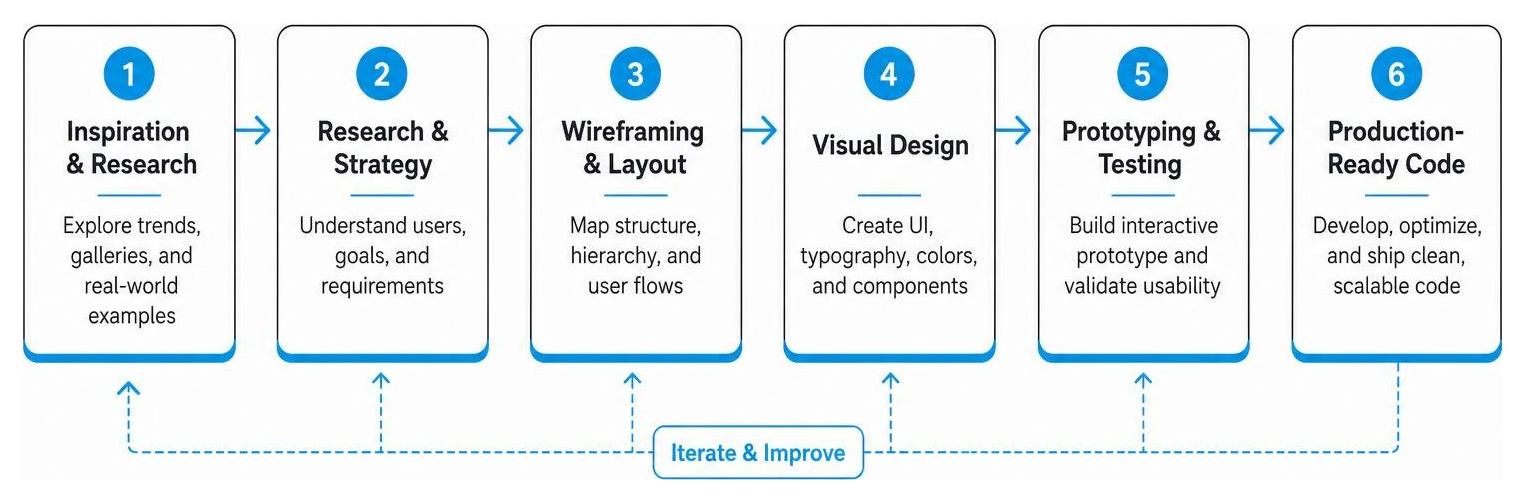
To turn visual ideas into business results, our team follows a structured, iterative process:
For premium brands, relying on generic, off-the-shelf templates and pre-built component libraries is a recipe for mediocrity. While these tools can be useful for rapid prototyping, they inevitably fall short when it comes to performance, scalability, and unique brand storytelling.
Here is how generic UI kits compare to a custom-engineered design system:
| Feature | Generic UI Kits & Templates | Custom-Engineered Design Systems |
|---|---|---|
| Visual Identity | Standardized, cookie-cutter aesthetic | 100% unique, tailored to your brand |
| Performance | Bloated code, slow loading times | Lightweight, clean, optimized for speed |
| Scalability | Rigid structures, difficult to customize | Modular, flexible, built for long-term growth |
| Code Quality | Heavy reliance on third-party frameworks | Hand-crafted, semantic, secure code |
| Core Web Vitals | Often struggles with cumulative layout shifts | Engineered for perfect speed and performance |
When teams build products using popular off-the-shelf frameworks—such as The Foundation for your Design System – shadcn/ui , luxen-ui/luxen-ui , Beyond UI — Premium Figma UI Kit and Design System , nuvoqueonline/ui , Vanilla UI , or the Shadcn UI Figma Kit – Complete Design System for Modern Web Apps | ShadcnStore —they often inherit significant technical debt.
These pre-packaged kits are designed to be everything to everyone. To achieve this, they ship with massive amounts of unused CSS, heavy JavaScript files, and generic styling variables. The result is a sluggish website that struggles with Core Web Vitals, hurts your search engine rankings, and looks remarkably similar to hundreds of other sites on the web.
Furthermore, customizing these frameworks to match a unique brand identity often requires writing complex overrides that make the codebase messy and difficult to maintain. When you build from scratch, you write only the code you need. This results in lightning-fast load times, flawless security, and an interface that perfectly reflects your brand’s unique identity.
A successful web UI design in 2026 is defined by its ability to balance striking visual aesthetics with flawless usability. It must feature a clear visual hierarchy, intuitive navigation, fast loading speeds, and responsive layouts that work perfectly on any device. Additionally, incorporating purposeful micro-interactions, dark mode options, and comprehensive accessibility features (ADA compliance) is essential for delivering an inclusive, high-converting user experience.
AI acts as a powerful co-pilot in the modern design workflow. It automates repetitive, time-consuming tasks—such as generating layout variations, managing design tokens, and resizing assets for multiple screen sizes. Generative AI tools also help designers rapidly prototype ideas and test user flows. This efficiency allows creative teams to dedicate more time to strategic thinking, user empathy, and custom visual storytelling.
A custom design system is built from the ground up to match your brand’s specific business goals and visual identity. Unlike pre-made templates, which are bloated with unnecessary code and generic layouts, a custom design system features clean, lightweight, and highly optimized code. This ensures superior website performance, faster load times, robust security, and seamless scalability as your business grows.
At BMG Media Co., we believe your website should be as unique as your business. Headquartered in Birmingham, Michigan, we have spent over 15 years crafting premium, 100% custom web design and development solutions for brands across Southeast Michigan—including Bloomfield Hills, Troy, Rochester Hills, Farmington Hills, West Bloomfield, Novi, and Northville—as well as national markets like Chicago, Dallas, Austin, Houston, New York, Denver, Miami, and Los Angeles.
We don’t use templates. We don’t use page builders. We don’t rely on bloated, generic frameworks. Every line of code, every transition, and every user flow we build is handcrafted from scratch to deliver unrivaled speed, flawless security, and a beautiful user interface that actually works.
If you are ready to move past cookie-cutter templates and build a digital experience that truly stands out, explore our Custom Web Design and Development Services and let’s build something extraordinary together.

