August 2026
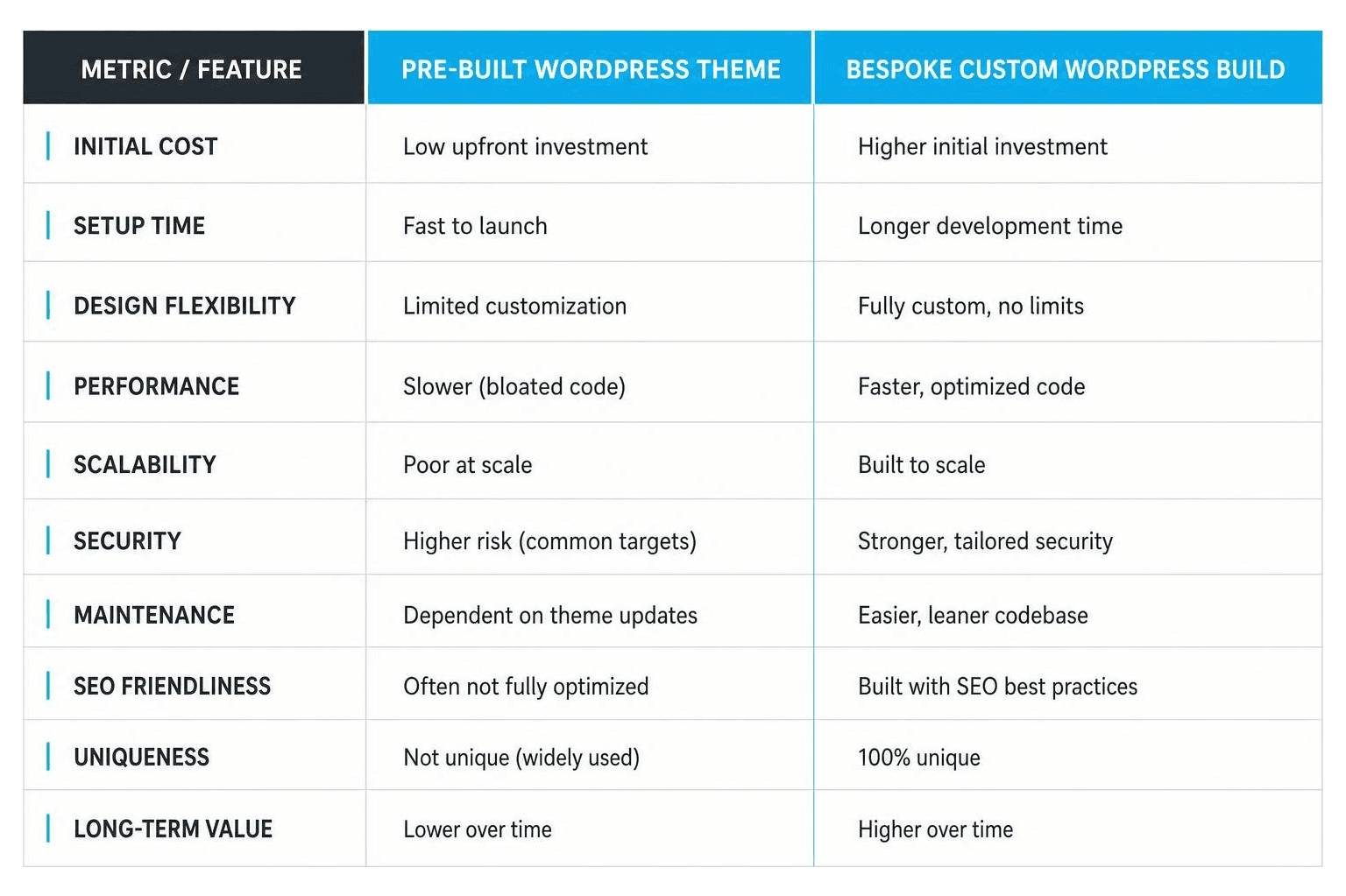
Selecting between an off-the-shelf commercial theme and a bespoke wordpress custom design is one of the most critical foundational decisions a business can make for its digital presence. While pre-packaged marketplace themes promise low initial upfront costs and rapid deployment schedules, they inevitably introduce severe performance bottlenecks, security vulnerabilities, and rigid design limitations as your organization grows.
Pre-built marketplace themes are engineered to appeal to the widest possible audience. To achieve this broad functionality, theme authors package dozens of disparate layout options, redundant asset libraries, complex configuration panels, and mandatory third-party plugins directly into the core theme build. As a result, even a simple landing page endures excessive HTTP requests, bloated CSS spreadsheets, and massive JavaScript payloads that drag down page load speeds.
A fundamental guideline we use at BMG Media Co. is the 50-page threshold. When a enterprise site expands beyond 50 pages or handles high incoming traffic volumes, off-the-shelf theme architectures begin to collapse under their own weight. Visual page builders like Elementor, Divi, or WPBakery inject dozens of unnecessary nested DOM elements, inline style tags, and render-blocking resources into every page header. This technical debt compounds steadily over time, degrading Core Web Vitals performance, inflating database queries, and lowering overall search engine rankings.
| Metric / Feature | Pre-Built WordPress Theme | Bespoke Custom WordPress Build |
|---|---|---|
| Initial Cost | Low upfront investment | Higher initial investment |
| Development Speed | Immediate deployment | Tailored design & coding phase |
| Code Efficiency | Multi-purpose bloat, extra scripts | Hand-crafted, zero extra weight |
| Core Web Vitals | Often fails speed tests | Engineered for maximum performance |
| Scalability | Hindered by page builder constraints | Infinite flexibility and backend stability |
| Security Risks | Dependent on third-party updates | Minimal attack surface, custom code |
| Long-Term TCO | High cost of ongoing maintenance | Low cost of ownership, easy updates |
Investing in a bespoke site means every single line of code serves a dedicated, intended purpose. Clean, modular architecture directly improves audience conversion rates, organic search visibility, and security compliance. For more actionable insights on strategic digital asset construction, explore Why Your Business Needs a Custom Website Design and Development Strategy and our in-depth guide on Core Web Vitals Optimization for High-Performance Sites.
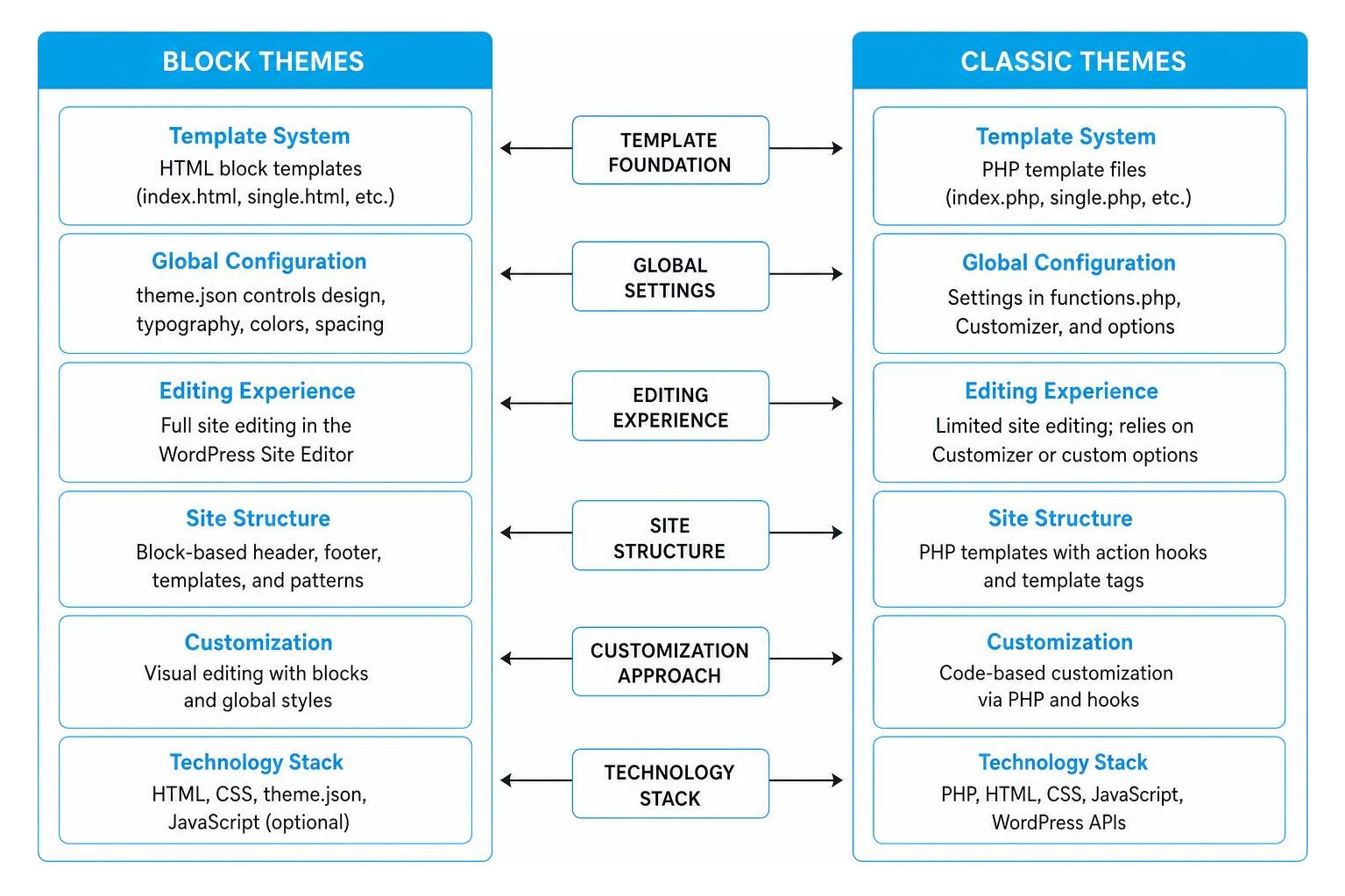
WordPress theme development sits at a historic technical fork in the road: modern Block Themes versus traditional Classic Themes. Understanding how these two distinct engineering models function under the hood is essential when planning a durable, scalable wordpress custom design tailored to your long-term business roadmap.
Introduced natively in WordPress 5.9 and continually refined in subsequent core releases, Block Themes utilize HTML block template files paired with a centralized global theme.json configuration file. This modern paradigm allows content editors and administrators to visually manage every regional component of the site—including headers, footers, global typography settings, spatial scales, and dynamic single-post layouts—directly within the native WordPress Site Editor environment without modifying template code.
Conversely, Classic Themes rely on traditional PHP execution files (such as index.php, header.php, sidebar.php, and single.php), template hierarchy tags, core action hooks, and centralized CSS stylesheets. While Classic Themes deliver granular backend control for complex custom PHP processing, custom database queries, and custom database object caching, they lack native, out-of-the-box integration with the full-site visual editing experience without building custom block constructs from scratch.
Your strategic choice of underlying theme architecture determines both how your internal editorial team manages publishing workflows and how your developers engineer upcoming custom functionality.
For enterprise publishing environments requiring intuitive layout control without ongoing developer intervention, Block Themes offer powerful visual flexibility through modular block manipulation. However, if your application relies heavily on complex custom post types, custom taxonomy relational queries via Advanced Custom Fields (ACF Pro), headless front-end setups, or complex third-party REST API integrations, a hand-crafted Classic Theme or custom hybrid architecture provides superior backend security, deterministic code performance, and absolute architectural stability.
To learn more about engineering customized sites without unnecessary front-end scripts or visual bloat, read our comprehensive guide on Professional WordPress Customization for People Who Hate Cookies.
Managing custom stylesheets effectively ensures your wordpress custom design remains maintainable, lightning-fast, and completely safe from unexpected site breakage during core software updates or plugin migrations.
With modern platform enhancements introduced in WordPress 7.0, site administrators and front-end developers gain a powerful administrative capability: adding custom CSS rules directly to individual block instances via the Advanced inspector sidebar panel.

This native functionality transforms localized micro-styling management while eliminating the need to enqueue heavyweight external CSS files for minor layout adjustments:
Review the official WordPress CSS Documentation and the Individual Block Custom CSS in WordPress 7.0 Release Note to learn more about core styling guidelines.
When customizing or extending an existing third-party theme foundation, modifying parent theme files directly is dangerous: any vendor software update will immediately overwrite your custom code changes. The standard, recommended WordPress development approach to prevent code loss is creating a dedicated Child Theme.
A child theme resides in a completely separate directory within the /wp-content/themes/ directory structure and seamlessly inherits all template hierarchy files and parent functionality. Its primary structure requires a dedicated theme folder and a style.css header file declaring its relationship to the parent directory:
Crucially, a child theme’s functions.php file does not override or replace the parent file. Instead, it executes immediately prior to the parent theme’s functions.php execution sequence, enabling developers to safely hook into actions, add custom filters, and enqueue dedicated frontend assets.
For agencies, development teams, and enterprise administrators seeking theme-independent code management, the standalone WP Designer Plugin Directory provides an isolated editing environment. It securely stores custom SCSS stylesheets and server-side PHP code snippets within /wp-content/uploads/wp-designer/, ensuring custom functionality remains untouched even if you switch active parent themes completely. Read the official WordPress Child Themes Developer Guide for deeper architectural blueprints.
Modern enterprise WordPress engineering relies on organized design systems built strictly around Design Tokens. Rather than hardcoding static hex values or pixel dimensions throughout disparate stylesheets, design tokens act as central, semantic variables that maintain user interface consistency across massive enterprise web properties.
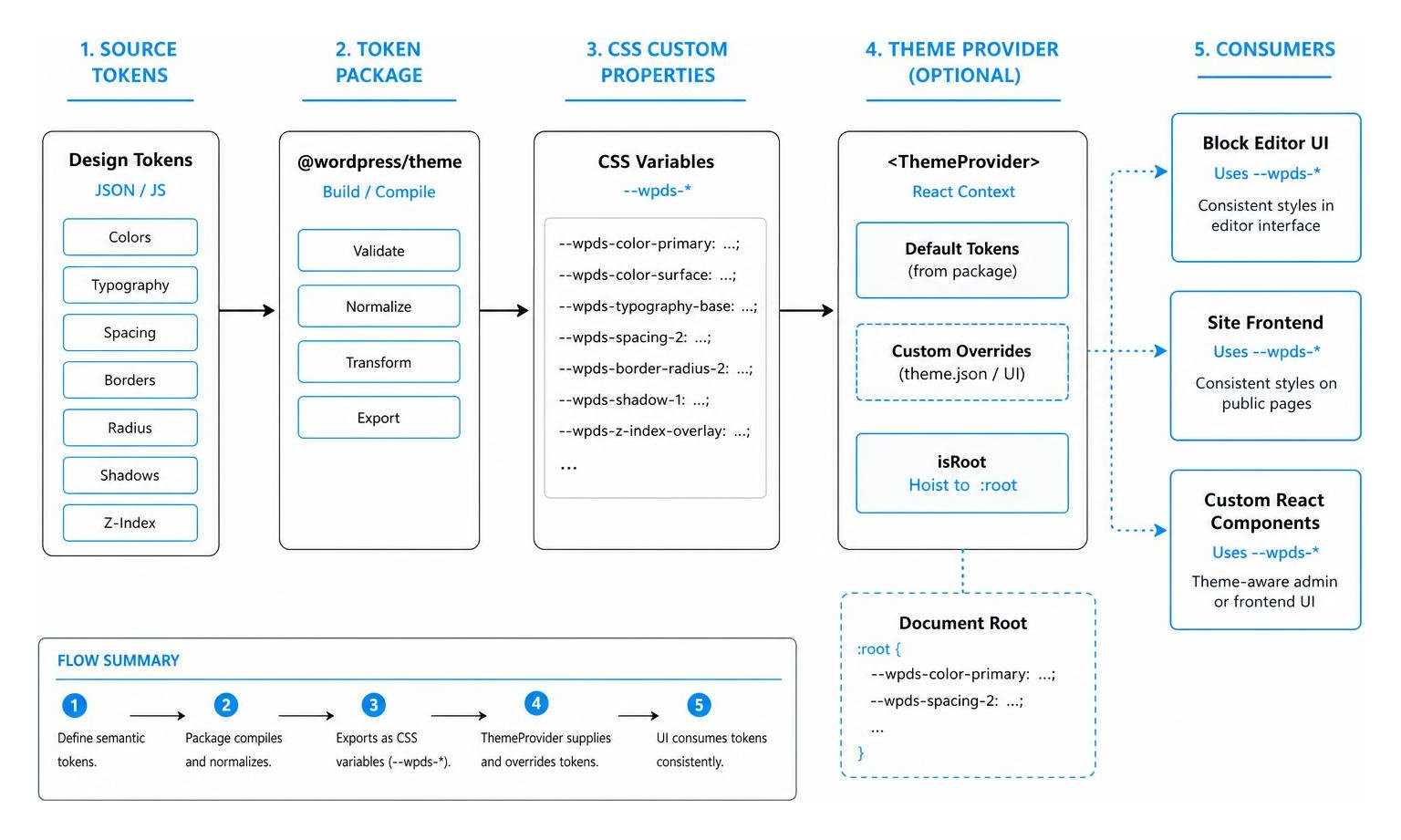
The official @wordpress/theme package exposes these design tokens directly through modern CSS custom properties using the standard –wpds-* variable namespace. Utilizing this official core package simplifies custom React interface creation within the block editor, guaranteeing WCAG AA color contrast accessibility compliance automatically across light and dark editing modes.
When engineering custom editorial controls, custom block sidebars, or React-driven administrative web applications, wrap your component tree inside the ThemeProvider primitive element:
To discover how design tokens function alongside dynamic post data structures, consult the official WordPress Theme Package Documentation and review our practical resource on ACF Gutenberg Field Guide: Blocks Made Easy.
A block theme relies on HTML template files and a theme.json configuration file, allowing full visual management via the WordPress Site Editor. A classic theme uses PHP template files, hooks, and traditional stylesheets, requiring manual template editing to adjust primary site layouts.
In WordPress 7.0, select any block within the editor, open the right-hand Inspector Sidebar, expand the Advanced panel, and enter your declarations into the Custom CSS field using the & nesting selector.
Using a child theme ensures your code modifications, style overrides, and custom PHP functions are preserved when the parent theme receives security patches or updates.

A successful wordpress custom design requires more than just high-end visual layout; it requires clean architecture, zero template bloat, speed optimization, and long-term security.
Since 2009, BMG Media Co. has engineered hand-crafted custom WordPress sites for brands across the globe from our headquarters in Birmingham, Michigan. We refuse to use commercial templates or heavy page builders. Every line of code, custom block, and database query is hand-crafted from scratch to deliver unrivaled load speeds, effortless editor controls, and superior search visibility.
Ready to upgrade your enterprise digital presence with a high-converting build? Contact BMG Media Co. today to explore our full suite of Custom Web Design and Development Services.
