July 2026

Advanced custom fields display frontend is the challenge every WordPress developer hits eventually — you’ve built out your fields in ACF, they show up perfectly in the admin, and then… nothing on the actual page.
You’re not alone. Over 80% of ACF support forum topics are about exactly this problem: getting field data to appear on the front end of a WordPress site.
Here’s the quick answer:
How to display ACF fields on the frontend:
the_field('field_name') to echo a value directly, or get_field('field_name') to store it as a variable inside your theme’s PHP template files (e.g. single.php, page.php)metadata.bindings attribute in the block markup — no PHP template neededblock.json with a PHP renderTemplate file that calls ACF functions to output field data inside the block editorThe right method depends on whether you’re running a classic theme or a block theme — and which field types you need to display.
ACF has over 2 million active installations and is used by roughly 1 in 5 WordPress sites — which makes frontend display one of the most practically important skills in the WordPress ecosystem.
I’m Blake George, founder of BMG Media Co and a custom WordPress developer with 15+ years of experience building field-driven, template-engineered sites across industries. Advanced custom fields display frontend is something my team works with on virtually every custom WordPress build we deliver — from simple post meta output to complex repeater-driven layouts. In this guide, I’ll walk you through every method, step by step, so you can get your fields displaying correctly no matter your setup.
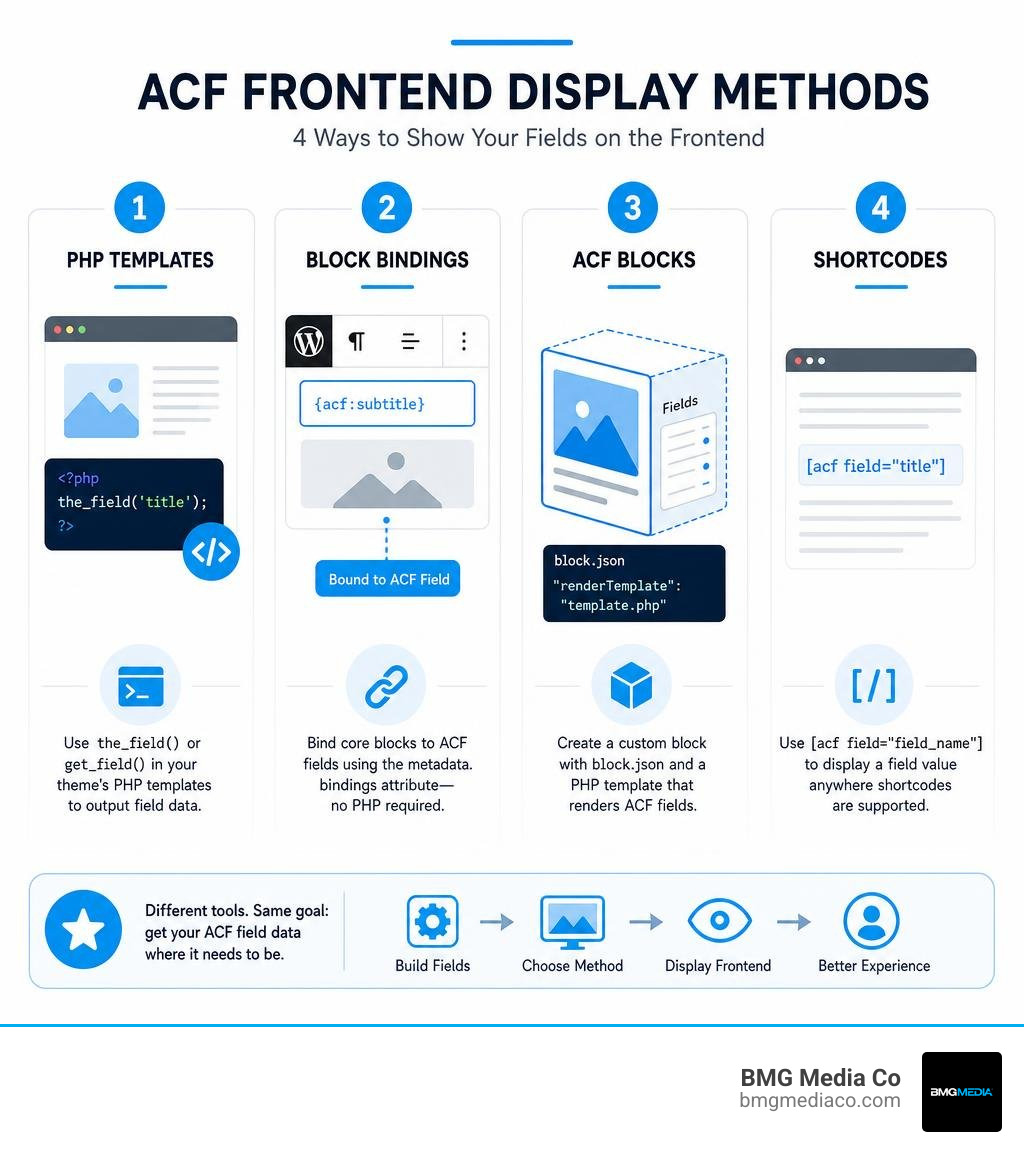
When we talk about displaying your custom fields on the front end, we have to look at how your theme is structured. In classic WordPress development, we relied strictly on PHP templates. Today, in June 2026, the modern WordPress landscape has evolved to support fully block-based themes and hybrid approaches.
There are three primary methods to handle advanced custom fields display frontend:
Choosing the right approach depends entirely on how your site’s templates are built. If you are working on a legacy site or a custom theme built from scratch, classic PHP templates are highly reliable. If you are leveraging the modern site editor, Block Bindings or ACF Blocks will keep your editorial workflow clean. To understand how these values are formatted and fetched, you can review the official guide on ACF | Displaying Values in Your Theme .
If you are working with a classic theme, your custom fields will not magically appear on the front end just because you created them in the WordPress admin dashboard. This is a very common point of confusion. As highlighted in the How To Display New Fields On Front End? – ACF Support forums, duplicating a field or creating a new one in the backend does nothing to your front-end layout until you write the corresponding code in your PHP files.
To display simple text, number, or basic select fields, you will use two primary functions:
the_field('field_name'): This function immediately echoes the value of the custom field to the page. It is perfect for straightforward text outputs where no conditional logic is required.get_field('field_name'): This function retrieves the custom field value and returns it. This allows you to store the value in a PHP variable, run conditional checks, or format it before outputting.For example, to prevent empty HTML tags from rendering on your page when a field is left blank, we always recommend wrapping your output in conditional logic. You would write a statement checking if get_field('your_field_name') has a value, and only then outputting the container div and the value using the_field('your_field_name').
By default, these functions fetch data for the current post in the global loop. However, if you need to fetch a custom field from a specific page, a different post type, or a global Options Page, you must pass the Post ID or the string ‘options’ as a second parameter inside the parentheses.
Block themes utilize HTML templates instead of traditional executable PHP files. This means that dropping a raw PHP function like the_field() into an HTML template file will not work; the server will simply render it as plain text or comment it out.
To bridge this gap, modern WordPress development uses two elegant paths detailed in ACF | How ACF Makes Displaying Custom Fields in WordPress Block Themes Easier :
block.json file. By defining a custom block and pointing the renderTemplate property to a dedicated PHP file, you can write traditional PHP and HTML. This gives you the best of both worlds: a visual drag-and-drop editing experience for your content creators, and absolute control over the front-end markup for your development team.While displaying simple text strings is straightforward, modern websites often require more interactive elements. This is where we utilize complex field types such as Repeaters, Galleries, and Flexible Content. Managing these multi-dimensional data structures requires an understanding of nested loops and array handling on the front end.
To build interactive experiences without cluttering your core templates with hardcoded structures, you can read our guide on How to Build a Custom Blog Without Using a Single Template.
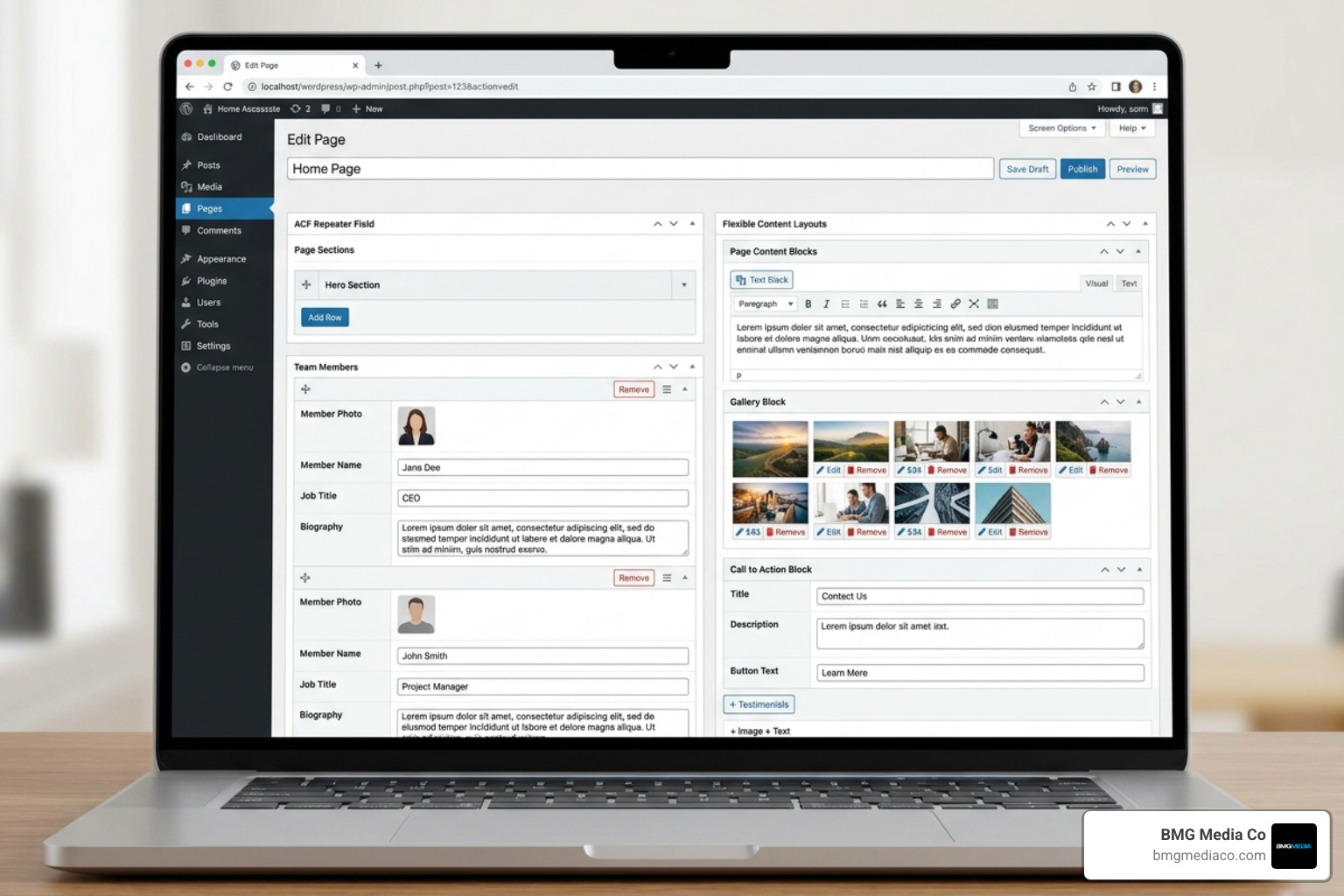
Repeater fields allow content editors to add an infinite number of rows containing specific sub-fields. To display this data on the front end, you must loop through the rows.
The standard method involves using a combination of have_rows('repeater_field_name') and the_row(). While the loop is active, you use get_sub_field('sub_field_name') or the_sub_field('sub_field_name') to retrieve and display the values of the individual columns in that specific row. This structure acts as a reliable contract between your editor and your template, as explained in ACF | WordPress Custom Field Template Explained for Classic and Block Themes .
For Gallery fields, ACF returns an array of image objects or IDs. To display a gallery, we recommend:
foreach loop.Flexible Content fields act as a lightweight, structured page builder. They allow editors to define distinct layouts (such as a Hero section, a Call to Action banner, or a Testimonial slider) and stack them in any order on a page-by-page basis.
To render Flexible Content on the front end, you must run a loop using have_rows('flexible_content_field_name'). Inside this loop, you use get_row_layout() to determine which layout the editor selected for that specific row. By setting up a conditional switch statement or a series of elseif checks, you can dynamically load the exact HTML and CSS components required for each layout block. This approach keeps your code highly organized and modular.
Displaying custom fields inside archive lists, search results, or Query Loops requires careful management of the post loop context. When you are on a single post page, WordPress automatically knows which post ID to fetch. However, inside a loop, you must ensure that your ACF functions are grabbing the custom field values from the specific post being iterated, rather than the global page ID.
To understand how to scale these dynamic layouts for complex business requirements, read our insights on How to Scale with Advanced SEO Web Optimization and Custom WordPress Development.
| Display Method | Post ID Context | Customization Flexibility | Best Used For |
|---|---|---|---|
| Classic PHP Loop | Automatic via the_post() |
Maximum (Direct PHP control) | Custom theme archives and custom post type templates |
| Gutenberg Query Loop | Must resolve via block context | Medium (Depends on block settings) | Block themes and editor-managed archive pages |
When rendering ACF fields inside a modern Gutenberg Query Loop block, a common bug occurs where the custom field displays the same value (usually from the main page) for every single item in the loop.
To resolve this issue within custom ACF Blocks or templates inside a Query Loop, you must access the block’s context array. Inside your rendering PHP file, you can check if $block['context']['postId'] is set. If it is, you must pass this specific ID as the second argument in your get_field() or the_field() calls. This explicitly instructs WordPress to fetch the custom field data associated with that specific looped post, ensuring your grid displays unique, accurate data for every card.
Displaying custom fields is only half of the equation; sometimes, you need to allow your users to submit or edit data directly from the front end. ACF provides a powerful, built-in solution for this called acf_form().
To implement a front-end form, you must use two key functions:
acf_form_head(): This function must be placed at the very top of your template file, before any HTML or get_header() calls. It registers the necessary CSS and JavaScript assets, handles the security nonces, validates the submitted data, and processes the database save actions.acf_form(): This function is placed inside your template where you want the form to physically render. It accepts an array of settings allowing you to control which field groups to show, whether to create a new post or edit an existing one, and what redirect URL to send the user to upon successful submission.For a deeper dive into extending WordPress functionality with custom forms and plugins, check out our guide on WordPress Plugin Development From Zero to Hero in Five Steps.
Any time you display user-generated or custom field data on the front end, security and performance must be your top priorities.
To keep your site safe and fast, always adhere to these development standards:
esc_html() for standard text, esc_url() for links, and esc_attr() for HTML attributes. If your field contains HTML (like a WYSIWYG editor), pass it through wp_kses_post().escaping_html to true in your field type’s supports array to handle custom output filtering, as outlined in ACF | Creating a new field type .If your custom field is blank on the front end, run through this quick troubleshooting checklist:
get_field('field_name') matches the exact field name in your ACF admin panel, not the field label.Yes, you can display ACF fields across a multisite network. When retrieving fields from a different site in your network, you must use the switch_to_blog($blog_id) function before calling your ACF functions, and then call restore_current_blog() immediately after to return to the active site context. For a complete blueprint on managing complex network architectures, refer to The Ultimate WordPress Multisite Custom Setup Guide.
Yes, the Repeater field, Gallery field, Flexible Content field, and ACF Blocks are premium features that require an active license of ACF PRO. While the free version of ACF is outstanding for simple site setups, the PRO version is standard for enterprise-grade, custom-built websites that require structured, repeatable content layouts.
Successfully mastering advanced custom fields display frontend transforms WordPress from a basic blogging platform into a fully customized content management engine. Whether you are writing clean, logical PHP loops for a classic custom theme or leveraging the modern Gutenberg Block Bindings API, separating your structural data from your presentation layer is the key to building clean, maintainable websites.
At BMG Media Co., we believe in clean code, exceptional performance, and absolute design freedom. We never use restrictive page builders or bloated, off-the-shelf templates. Every site we build is hand-crafted from scratch, utilizing advanced tools like ACF PRO to create seamless editing experiences for our clients and lightning-fast loading speeds for their users.
If you are ready to take your digital presence to the next level with a high-performance, custom-engineered WordPress solution, Partner with BMG Media Co for Custom Software and WordPress Development. Let’s build something exceptional together.
