
October 2026
How to Build a Headless WordPress Decoupled Architecture That Actually Works

Headless vs. Decoupled WordPress: Defining the Modern Stack
Headless WordPress decoupled architecture is one of the most powerful — and most misunderstood — approaches to building a modern website on WordPress.
Here is a quick answer before we go deeper:
Headless WordPress = WordPress handles content only. A separate frontend (Next.js, Astro, Nuxt, etc.) fetches that content via API and renders the pages. The WordPress theme layer is gone entirely. Decoupled WordPress = The frontend and backend are separated, but WordPress may still serve some PHP-rendered output. It is a spectrum, not a binary.
The key difference in plain language:
| Architecture | WordPress Role | Frontend | How Content is Delivered |
|---|---|---|---|
| Traditional | Full stack (backend + frontend) | PHP themes | Server-rendered HTML |
| Decoupled | Partial backend | PHP + selective API | Mixed — some PHP, some API |
| Headless | Backend only | Next.js, Astro, Nuxt, SvelteKit | 100% via REST or GraphQL API |
WordPress powers roughly 43% of all websites — including sites for The Walt Disney Company, NASA, and the White House. But its default monolithic structure does not always match the technical demands of modern, high-performance digital products. That gap is exactly what headless and decoupled architectures are designed to close.
The challenge? Going headless costs 2.5 to 3x more in year one than a classic WordPress build and adds significant engineering complexity. Done right, it unlocks performance, scalability, and flexibility that a traditional WordPress setup simply cannot match. Done wrong, it is an expensive mistake that teams have to roll back.
This guide cuts through the hype and gives you a clear, honest picture of when headless makes sense, how to build it, and what it will actually cost you.
I’m Blake George, founder of BMG Media Co. — a custom web development agency with over 15 years and 1,000+ custom builds across industries where headless WordPress decoupled architecture has become an increasingly critical part of our enterprise project toolkit. What follows is the practical playbook we use when evaluating, scoping, and shipping decoupled WordPress projects for clients who need more than a traditional setup can deliver.
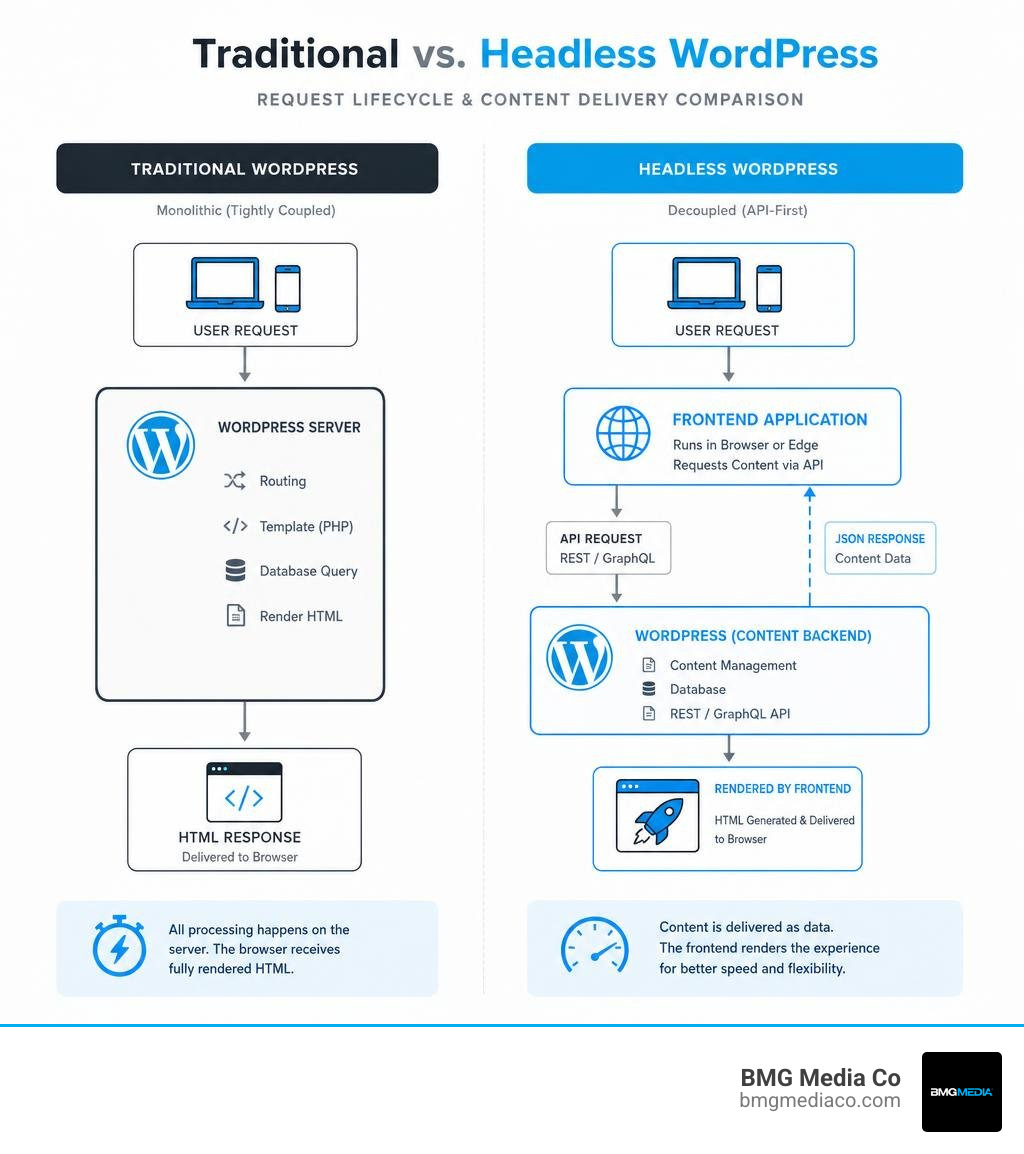
When diving into modern web engineering, terms get thrown around like confetti. To make the best architectural decisions, we must first demystify the technical boundary between a decoupled setup and a true headless system.
Choosing the right path requires understanding how your database, content editor, and end-user interface communicate. For an in-depth breakdown of these structural dynamics, explore the resources on headless vs decoupled WordPress: Choosing the Right Architecture.
What is a Decoupled WordPress Setup?
A decoupled WordPress architecture separates the database and content management backend from the frontend presentation layer, but it does not necessarily throw away the traditional WordPress rendering pipeline.
In many cases, a decoupled architecture is used to “Frankenstein” modern user experience features on top of an existing PHP-based theme. For example, we might build a custom, highly interactive live-search interface or a dynamic, real-time product filter using React, while leaving the rest of the page templates to be rendered by standard WordPress PHP.
This selective API integration allows businesses to introduce modern, app-like interactions without undergoing a complete, ground-up rebuild. It is a hybrid rendering model where the frontend and backend are separated by a soft boundary. This approach is highly useful when a business wants to upgrade specific user flows without losing the native functionality of their legacy PHP plugins. To understand how custom backend configurations fit into your broader digital strategy, read our analysis on Why Your Business Needs a Custom CMS or Ecommerce Build.
What is a Headless WordPress Decoupled Architecture?
A true headless WordPress decoupled architecture goes a step further: it cuts the “head” (the frontend PHP rendering engine) off completely. WordPress is stripped down to its core administrative interface and database, serving strictly as an API-first content repository.
In a headless setup, the public-facing website is an entirely separate application built on a modern JavaScript or static framework. The frontend application makes structured API requests (typically using JSON payloads via the WP REST API or WPGraphQL) to fetch raw content, then renders that content independently.
There are no WordPress themes, no standard PHP templates, and no direct database queries from the user’s browser. This complete separation of concerns means your frontend is entirely agnostic of WordPress’s underlying PHP environment. The backend only cares about content modeling and editorial workflows, while the frontend focus is entirely on performance, design precision, and user experience. For a foundational look at how this transformation works, refer to the official discussion on What Is Headless WordPress (And How Do You Use It)?
When to Choose a Headless WordPress Decoupled Architecture
Let’s be completely honest: headless WordPress is not a magic bullet. If you are running a standard marketing site under 100 pages, going headless is often like buying a commercial jet to commute to work. It is expensive, highly complex, and entirely unnecessary. A well-optimized, custom classic WordPress site utilizing object caching and a global CDN can easily deliver top-tier performance at a fraction of the cost.
However, when your technical requirements scale, headless shifts from a luxury to a necessity. We recommend a headless or decoupled setup in four specific scenarios:
- Omnichannel Content Delivery: You need to manage content in one central hub and distribute it simultaneously to a marketing website, a mobile app, smart devices, and external digital displays.
- SaaS Design Systems: Your marketing site needs to live on the same design system and share React or Vue components directly with your core software product.
- Programmatic SEO at Scale: You are managing a directory or programmatic site with over 50,000 pages that requires rapid, automated build-time generation across edge nodes.
- Multi-Tenant Networks: You run an enterprise ecosystem where multiple external sites or independent regional partners consume data from a single central WordPress instance via API.
To help visualize how these setups stack up, here is a direct comparison:
| Feature | Classic WordPress | Decoupled WordPress | Headless WordPress |
|---|---|---|---|
| Development Cost | Baseline | Moderate | High (2.5x – 3x) |
| Engineering Complexity | Low to Medium | Medium | High |
| Lighthouse Performance | 80-95 (with optimization) | 85-98 | 95-100 (by default) |
| Attack Surface | Standard | Reduced | Minimal (Admin is hidden) |
| Plugin Compatibility | 100% Native | Selective | API-exposed only |
| Editorial Preview | Instant | Requires Setup | Requires Custom Pipeline |
The Benefits of Going Headless
The primary driver behind headless adoption is performance. By rendering your frontend as static HTML at build time or serving it from edge-optimized networks, you achieve sub-200ms Time to First Byte (TTFB) globally.
Security is another massive win. Because the frontend is completely separated, you can isolate the WordPress admin panel on a private subdomain or behind a secure VPN, effectively hiding the standard wp-admin login from the public internet. This drastically reduces your security attack surface, making SQL injections and brute-force database attacks nearly impossible.
Finally, it grants your development team complete framework flexibility, allowing them to build with modern, component-driven tools without being constrained by the traditional WordPress theme directory. You can read more about how developers approach these high-performance environments in Headless WordPress Architecture: When and How to Implement It — A Guide by Riad Hasan – DEV Community.
The Disadvantages and Hidden Trade-offs
The benefits of headless come with a steep operational tax. The most immediate shock for marketing teams is the loss of the visual editorial workflow. Out-of-the-box visual page builders like Elementor or Divi are completely incompatible with a headless frontend because they rely on injecting complex, non-standard HTML directly into classic PHP themes. If your marketing team expects to drag, drop, and visually assemble layouts without developer assistance, a true headless architecture will feel like a massive step backward.
Additionally, you hit what we call the “plugin compatibility cliff.” Any WordPress plugin that relies on frontend hooks (such as wphead or thecontent) to inject elements like popups, live chat widgets, or contact forms will fail to render on your decoupled frontend. To make them work, your engineering team must manually write custom API integrations and rebuild those frontend elements from scratch.
You are also moving from maintaining a single, unified technology stack to managing a double-stack architecture: a PHP/MySQL backend and a Node.js frontend, doubling your hosting, deployment, and monitoring overhead. For a deeper dive into these operational realities, explore the headless WordPress tradeoffs explained by industry enterprise leaders.
Selecting the Frontend Framework and API Layer in 2026
Choosing your frontend stack and data-fetching protocol is the most critical technical decision in your headless journey. In 2026, the ecosystem has matured to offer highly specialized tools for different use cases.
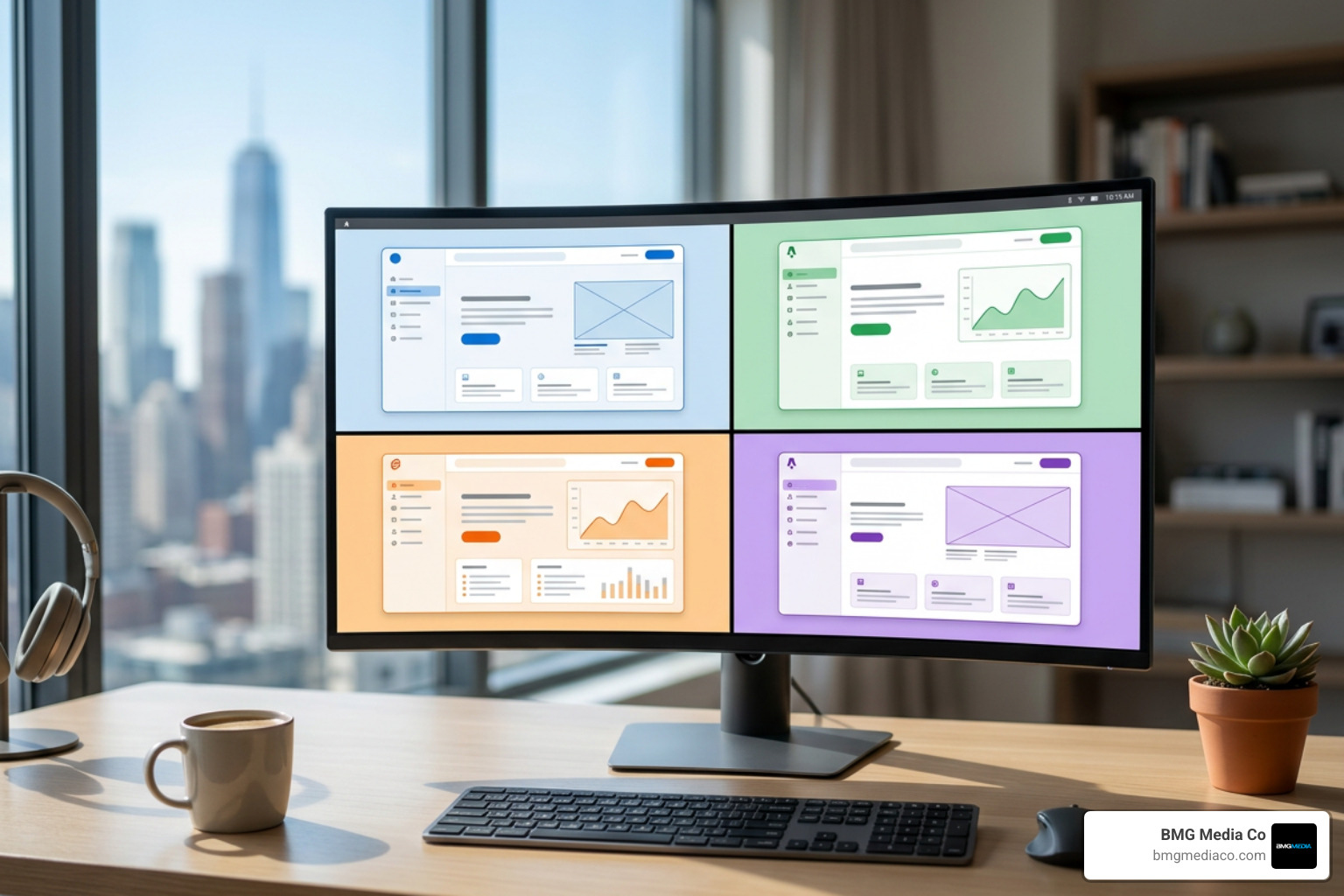
If your architecture relies heavily on React, you will want to understand how modern frontend frameworks interact with your design systems. Learn more about our custom JavaScript capabilities in ReactJS Technology.
WPGraphQL vs. REST API for Data Fetching
WordPress comes out of the box with a highly capable REST API. However, for modern headless builds, we almost always default to the community-driven WPGraphQL plugin.
The REST API is inherently “chatty.” If you want to render a single blog post page that includes the author’s bio, their profile image, and a list of related custom fields, a standard REST setup often forces you to make multiple separate API requests. This leads to over-fetching (retrieving hundreds of lines of JSON data you don’t need) and under-fetching (missing crucial related data, requiring subsequent requests).
WPGraphQL solves this by allowing the frontend to write a single, nested query that requests the exact data fields required to render that specific page — and nothing else. This drastically reduces payload sizes and speeds up build times.
Furthermore, WPGraphQL features native integration with Advanced Custom Fields (ACF) Pro and supports TypeScript code generation, allowing frontend developers to work with fully typed API schemas. When paired with WPGraphQL Smart Cache, you can cache API queries at the database level, preventing heavy traffic from overwhelming your WordPress application server.
Choosing the Right Frontend for Your Headless WordPress Decoupled Architecture
The right frontend framework depends entirely on the nature of your website:
- Astro: If you are building a content-first website, a digital magazine, or a programmatic SEO site, Astro is the premier choice in 2026. By utilizing its “islands architecture,” Astro ships 0KB of JavaScript to the client by default, rendering pure static HTML and only hydrating interactive components when they enter the viewport. Astro-based headless sites routinely score a perfect 99 or 100 on Google Lighthouse without complex optimization. A 10,000-page site built on Astro and WPGraphQL can run full rebuilds in 10 to 12 minutes, with incremental updates taking under 30 seconds.
- Next.js: If you are building a highly interactive SaaS marketing site, an enterprise portal, or an e-commerce store that shares a complex React design system with an application, Next.js remains the industry standard. Its App Router offers robust support for Incremental Static Regeneration (ISR) and Server-Side Rendering (SSR). However, keep in mind that Next.js apps typically ship between 80KB and 200KB of framework JavaScript to the browser even on completely static pages.
- Nuxt: For teams that prefer Vue over React, Nuxt is a phenomenally polished alternative. It mirrors many of Next.js’s routing and rendering capabilities while offering the elegant, developer-friendly developer experience native to the Vue ecosystem.
- SvelteKit: SvelteKit occupies a highly respected niche. By compiling code down to tiny, framework-less vanilla JavaScript at build time, it offers a middle ground of incredible speed and minimal bundle sizes for highly custom interactive applications.
Step-by-Step Setup: Docker, Plugins, and Local Development
To ensure a seamless development cycle and production-ready deployment, we always orchestrate our headless stacks using Docker. This ensures absolute environment parity between a developer’s local machine and our production servers.
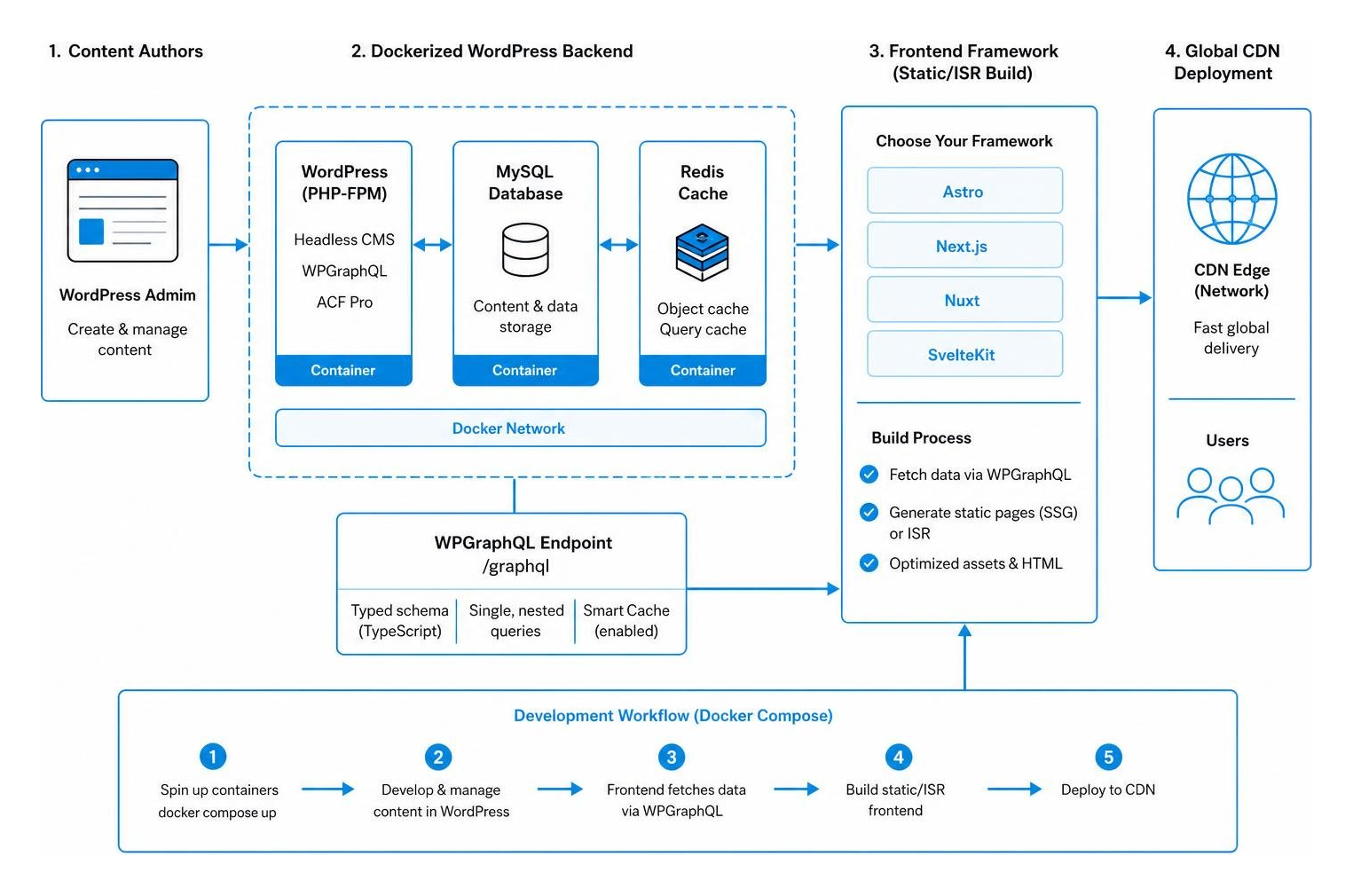
For a highly detailed technical blueprint of this setup, consult the Headless WordPress with Docker: 2026 Setup Guide.
Essential Plugins and Backend Configuration
Before launching your frontend, your WordPress backend must be configured to act purely as a structured data engine.
- Install WPGraphQL: This replaces the default REST API as your primary data pipeline.
- Install Advanced Custom Fields (ACF) Pro: This is essential for modeling complex custom data structures. Ensure you enable the “Show in GraphQL” toggle on all field groups.
- Install WPGraphQL Yoast SEO or Rank Math Schema integrations: This exposes your SEO meta tags and schema markup directly to your GraphQL schema.
- Configure Application Passwords: Set up secure, server-to-server authentication credentials for draft previews and mutations.
- Disable the Frontend Redirect: By default, WordPress will try to render a PHP theme when someone visits the backend URL. You must add a custom filter in your functions.php file or use a dedicated redirect plugin to route all public-facing backend traffic directly to your frontend domain, while keeping the wp-admin portal accessible to editors.
Dockerizing the Decoupled WordPress Stack
A production-ready Docker Compose environment for a headless stack typically orchestrates four core services:
- Database Service: A MySQL or MariaDB container. We configure a strict database healthcheck to ensure WordPress does not attempt to launch before the database is fully initialized and accepting connections.
- WordPress Service: A PHP-FPM container running the official WordPress image. We map a named volume for the wp-content/uploads directory so that media assets persist independently of the container lifecycle.
- Nginx Reverse Proxy: This container handles routing. It is configured to route all administrative traffic (wp-admin, wp-login, and API endpoints like /graphql) to the PHP-FPM container, while proxying all other public web traffic directly to our frontend node.
- Frontend Service: A Node.js container running your Next.js or Astro application in development mode with hot-reloading enabled.
To optimize performance in production, we mount a custom php.ini file inside our WordPress container to enable OPcache. Enabling OPcache in production provides a 30% to 50% reduction in PHP processing time per request, allowing your backend to handle API queries and content updates with blazing efficiency.
We also split our environment variables: WP_SITEURL is mapped to the internal backend subdomain (e.g., admin.yoursite.com), while WP_HOME is mapped to the primary frontend domain (e.g., yoursite.com). This prevents routing conflicts and ensures WordPress generates correct internal URLs.
The Real Costs and Operational Realities of Going Headless
One of the biggest mistakes we see businesses make is underestimating the financial and resource commitments of a headless build. Because you are building a custom application from the ground up, the initial development and ongoing maintenance costs are significantly higher than traditional WordPress. To understand how custom engineering scales over time, read our guide on How to Scale with Advanced SEO, Web Optimization, and Custom WordPress Development.
Year One vs. Steady State Cost Analysis
Statistically, a headless WordPress build is 2.5 to 3x more expensive in year one and 1.5 to 2x more expensive in steady state compared to a classic WordPress build.
For a standard 200-page website, a realistic first-year budget for a headless build runs between $18,000 and $51,000, compared to $6,400 to $16,200 for a high-quality, custom classic WordPress build. This discrepancy is driven entirely by engineering hours. A headless build adds 2 to 4x the engineering cost because your developers must write custom code for routing, search, form submissions, SEO schema injection, and preview pipelines.
The development timeline reflects this complexity: a 200-page headless build typically requires 8 to 16 weeks of full-time engineering work, whereas a comparable custom classic WordPress build can be shipped in 3 to 6 weeks.
Your hosting footprint also splits. Instead of a single managed WordPress host, you now pay for optimized managed WordPress hosting for your backend (such as WP Engine Atlas, Kinsta, or Pressable) and an edge-optimized frontend hosting platform (like Vercel for Next.js, or Cloudflare Pages for Astro). While Cloudflare Pages has an incredibly generous free tier that can easily support a site getting 100,000 pageviews a day, the overall maintenance overhead of managing two distinct staging and production environments remains a permanent operational cost.
Solving the Editorial Workflow and Preview Bottleneck
The moment a headless site goes live, content editors are often shocked to find that clicking “Preview” in WordPress results in a 404 error or a blank page. Because the frontend lives on a completely separate server, WordPress has no native way to render a draft post.
To solve this, we must build a dedicated preview pipeline. In a Next.js setup, this involves configuring a secure, token-authorized API route on the frontend. When an editor clicks “Preview” in the WordPress dashboard, WordPress generates a signed URL containing a secret draft token and redirects the editor’s browser to the Next.js preview endpoint. Next.js validates the token, bypasses static generation to enter “Draft Mode,” fetches the unpublished revision directly from the database using an authenticated GraphQL query, and renders the preview in real-time.
If you cannot afford the engineering hours to build a robust preview system, you cannot afford to go headless. Skipping this step destroys editorial trust and cripples your marketing team’s day-to-day workflow. For a practical look at setting up preview pipelines and token authentication, check out Headless WordPress with Next.js: Why and How to Go Decoupled – WP Pioneer.
Technical SEO and Deployment Strategies for Decoupled Sites
A common myth in the marketing world is that headless WordPress inherently improves your SEO. The truth is that headless can supercharge your SEO by providing exceptional Core Web Vitals, but it can also completely break your search rankings if your development team misses critical technical configurations.

When managing complex, multi-site or enterprise-scale architectures, ensuring that your technical SEO and content pipelines remain perfectly synchronized is paramount. Learn how to manage advanced multi-site configurations in The Ultimate WordPress Multisite Custom Setup Guide.
Avoiding Common Headless SEO Pitfalls
To keep search crawlers happy, your headless build must address three non-negotiable SEO requirements:
- Sitemap and Robots.txt Proxying: Traditional SEO plugins like Yoast or Rank Math generate XML sitemaps dynamically on your WordPress backend domain (e.g., admin.yoursite.com/sitemapindex.xml). You must configure your frontend server (using Vercel rewrites or Astro middleware) to proxy these sitemaps so they are served directly from your public frontend domain (e.g., yoursite.com/sitemapindex.xml). Additionally, your backend robots.txt must be set to “Disallow: /” to prevent Google from indexing your administrative subdomain and creating massive duplicate content issues.
- Schema Markup Injection: Since traditional SEO plugins cannot inject meta tags directly into your React or Astro templates, your frontend must query the SEO metadata fields exposed by WPGraphQL and inject them directly into the head of your rendered HTML at build or request time.
- 301 Redirect Mirroring: If an editor configures a 301 redirect inside WordPress (using Redirection or Rank Math), that redirect will not execute on your decoupled frontend automatically. Your frontend application must actively fetch the active redirect rules from the WordPress API and execute them at the edge (using middleware or configuration files like vercel.json) before the page renders.
Hosting, Caching, and Deployment Pipelines
To balance rapid page loads with real-time content updates, we utilize a hybrid rendering strategy:
- Static Site Generation (SSG): For static pages like your homepage, about page, and service pages, we pre-render the entire HTML structure at build time.
- Incremental Static Regeneration (ISR): For dynamic content like blogs or product listings, we use ISR. This allows us to serve cached static pages from the edge, while setting a revalidation window (e.g., 24 hours). When a user visits an expired page, the frontend serves the cached version while silently regenerating the page in the background with fresh API data.
- On-Demand Revalidation: To ensure immediate updates, we configure WordPress webhooks. When an editor publishes or updates a post, WordPress sends a secure POST request to our frontend deployment platform, triggering an instant rebuild of only that specific page across the global CDN edge.
Frequently Asked Questions about Headless WordPress
Is headless WordPress actually faster than traditional WordPress?
Not automatically. A headless architecture is not a magical speed upgrade. A custom-coded, classic WordPress theme that is properly cached with tools like Redis and served via a global CDN can easily match the Core Web Vitals of a headless Next.js site.
Headless becomes faster at massive scale because it shifts the rendering load away from your PHP database server to edge CDN nodes, ensuring sub-second load times even during massive traffic spikes that would normally crash a traditional database-driven site.
Can I keep using my existing WordPress plugins in a headless setup?
It depends entirely on how the plugin operates. Plugins that function strictly as database managers or content modelers (like ACF, Custom Post Type UI, Yoast, or Rank Math) work perfectly because their data can be easily exposed to the REST or GraphQL APIs.
However, any plugin that injects HTML, CSS, or JavaScript directly into a WordPress theme (such as Elementor, contact form plugins, popups, or live chat widgets) will not render on a decoupled frontend. These elements must be completely rebuilt on your frontend framework and integrated via API.
How do you handle redirects in a decoupled architecture?
Redirects must be handled at the frontend hosting or edge server level. The most efficient method is to write a middleware script on your frontend framework (e.g., Next.js middleware) that queries the WordPress Redirection API.
When a user requests a URL, the middleware checks the redirect database at the CDN edge and instantly routes the user to the new destination before any page rendering takes place, preserving link equity and preventing slow, multi-hop redirect chains.
Conclusion
Building a headless WordPress decoupled architecture that actually works requires moving past the industry buzzwords and understanding the real engineering, financial, and operational commitments. It is an enterprise-grade architecture designed for businesses that demand extreme performance, uncompromising security, and the flexibility to distribute content across multiple platforms simultaneously.
At BMG Media Co., we don’t believe in shortcuts. We don’t use bloated page builders, and we don’t rely on cookie-cutter templates. Every single project we take on is built 100% custom from scratch to match our clients’ exact business goals and long-term growth trajectories.
Whether you need a blazing-fast, edge-optimized Astro build for a high-traffic content platform, or a robust, Next.js marketing site integrated with a SaaS design system, our team of dedicated engineers has the deep WordPress expertise to build a decoupled solution that delivers measurable business results.
If you are ready to stop fighting platform limitations and build a future-proof digital presence, explore our core capabilities and Partner with BMG Media Co for Custom WordPress Development today. Let’s build something extraordinary together.