July 2026
WordPress maintenance is the ongoing process of keeping your website secure, fast, and fully functional after it launches. Here’s a quick breakdown of what it covers:
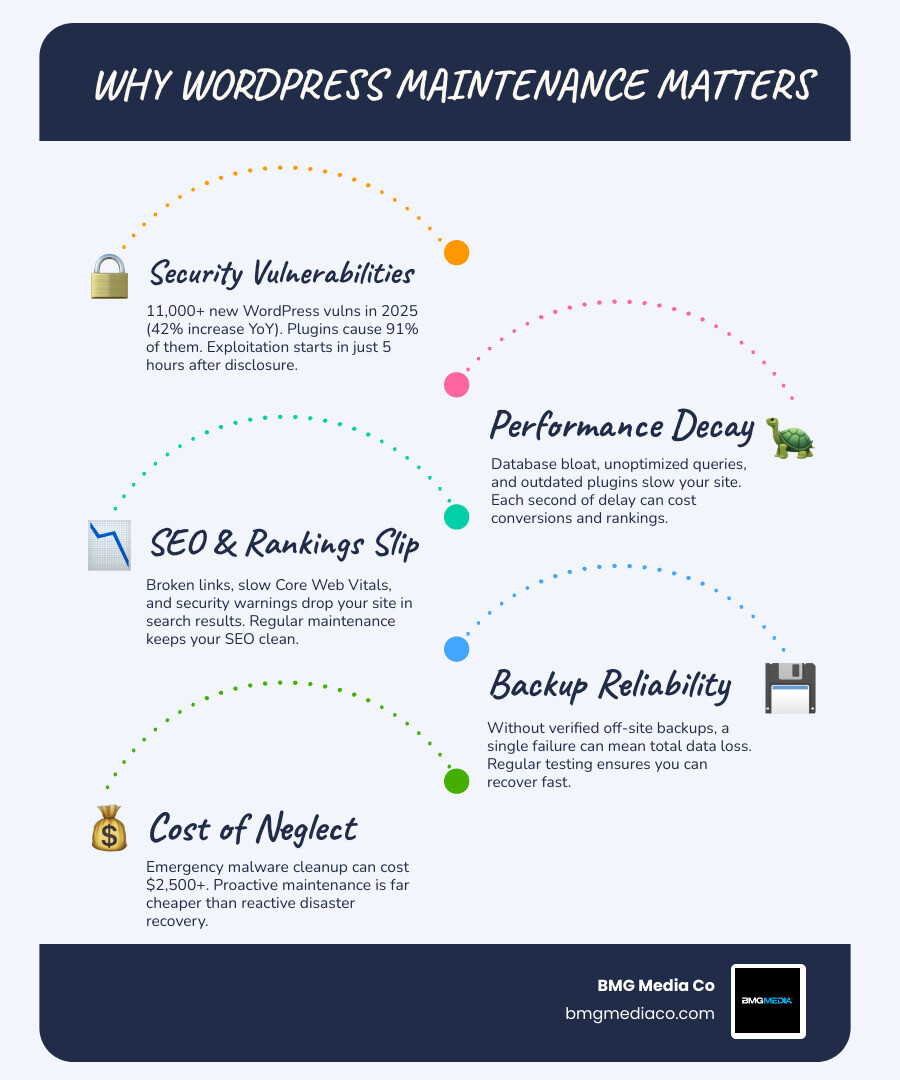
Without regular maintenance, a WordPress site doesn’t just stagnate — it actively deteriorates. Plugins accumulate vulnerabilities. Databases bloat. Search rankings slip. And when something finally breaks, the cost to fix it is almost always far higher than the cost of preventing it in the first place. Emergency malware cleanup alone can run $2,500 or more.
The numbers back this up. In 2025, over 11,000 new WordPress vulnerabilities were reported — a 42% jump year over year. Plugins accounted for 91% of them. And the median time between a vulnerability being disclosed and it being actively exploited? Just five hours. That’s not a lot of runway if you’re updating plugins once a month.
I’m Blake George, founder of BMG Media Co., a custom WordPress development agency I’ve run since 2009 — and over the course of building more than 1,000 custom websites, WordPress maintenance has been one of the most consequential factors separating sites that compound in value from sites that quietly become liabilities. This guide breaks down everything you need to know to protect your investment.
Many business owners treat their websites like billboards: build it once, put it up, and walk away. But a modern website is a highly complex, living piece of software. It sits on a server that needs constant updates, connects to third-party APIs that evolve daily, and relies on database queries that can slow to a crawl over time.
If you are not actively looking after your site, you are waiting for a crash. Proactive wordpress maintenance is the shield that ensures your digital storefront stays open, fast, and completely secure.
Understanding What is a Secure Site? Importance of HTTPS for Your Website is only the first step in protecting your brand. True security and performance require a continuous commitment to maintenance. When you Keep Your Site on Track with Performance Monitoring, you prevent minor performance dips from turning into catastrophic traffic losses.
With WordPress powering over 40% of the internet, it is the number one target for malicious bots and hackers. The vast majority of successful breaches do not happen because a hacker hand-targeted a specific business. Instead, automated bots crawl the web looking for known, unpatched vulnerabilities in WordPress core, plugins, or themes.
When a vulnerability is disclosed, the clock starts ticking. Because the median time to first exploitation is only five hours, a site that is updated irregularly is a sitting duck. To make matters worse, nearly half of all discovered vulnerabilities are unpatched at the exact moment they are disclosed to the public.
If you wait weeks or months to apply patches, you are leaving your virtual front door wide open. In fact, 64% of WordPress professionals have experienced a full security breach at some point, yet only 27% had a documented recovery plan. For detailed official guidelines on keeping your software secure, you can consult the WordPress site maintenance – Documentation.
A secure site that takes seven seconds to load is still a failure. Search engines like Google demand speed. Google’s Core Web Vitals measure real-world user experience metrics, focusing heavily on visual stability and how quickly a page becomes interactive. If your site is bogged down by bloated databases, massive unoptimized images, or outdated PHP versions, your search engine rankings will suffer.
Regular performance maintenance ensures your pages load in under three seconds — the threshold where user abandonment rates spike. By implementing Core Web Vitals Optimization for High Performance Sites, you protect your visibility in search results.
Additionally, keeping your site fast and technically flawless is one of the most reliable ways to increase conversions. For practical ways to turn speed into sales, read our guide on 12 Maintenance Tricks to Boost Your WordPress Conversion Rate.
To keep your site running smoothly, you need an organized schedule. Grouping your maintenance tasks into daily, weekly, monthly, quarterly, and annual intervals keeps the workload manageable and ensures nothing slips through the cracks. Think of it as routine housekeeping to prevent technical debt from piling up.
For a solid foundation on basic site upkeep, check out the official guide on WordPress Housekeeping.
Your daily and weekly routines are your first line of defense. These tasks focus on security, uptime, and catching problems before they impact your visitors.
Longer-term tasks focus on deep cleaning, system optimization, and technical audits.
When shopping for a wordpress maintenance plan, you will find options ranging from cheap automation to high-touch enterprise support. It is critical to understand exactly what you are paying for.
Cheap plans often rely entirely on automated scripts that push updates directly to your live site. If an update breaks your layout, those automated systems will not be there to fix it. Premium services, on the other hand, provide human QA, isolated testing environments, and dedicated developer hours.
| Maintenance Tier | Price Range | Target Audience | Core Services Included |
|---|---|---|---|
| Budget Plans | $30 – $100 / month | Small blogs, brochure sites | Automated updates, off-site backups, basic security scanning. No manual testing. |
| Mid-Tier Plans | $100 – $300 / month | Growing businesses, lead-gen sites | Managed updates, staging environment testing, uptime monitoring, minor support tasks (30-45 mins). |
| Premium Plans | $300 – $1,000+ / month | Enterprise sites, high-traffic portals | Manual visual regression testing, performance optimization, dedicated developer hours, priority support. |
| WooCommerce / Custom | $500 – $3,000+ / month | E-commerce stores, complex platforms | Continuous staging testing, checkout flow validation, database scaling, immediate emergency response SLAs. |
To understand how high-performance maintenance fits into a broader growth strategy, explore our insights on How to Scale with Advanced SEO Web Optimization and Custom WordPress Development.
The best maintenance plan is proactive. It is designed to prevent disasters before they happen through scheduled updates, security hardening, and continuous monitoring.
If your maintenance provider only acts when you email them to say your site is down, you do not have a maintenance plan — you have an emergency hotline. A true partner works silently in the background to ensure those emergencies never happen.
Different websites have different risk profiles:
A common point of confusion is the difference between a managed hosting provider and a standalone website maintenance service.
Managed hosts (like Pantheon or SiteGround) maintain the server infrastructure. They ensure the hardware is fast, the PHP version is updated, and the server-level firewall is active. However, they do not manage your WordPress application itself. If a plugin update breaks your theme’s custom CSS, your hosting support team will tell you to hire a developer.
A dedicated maintenance service bridges this gap by managing the actual application, testing plugins, resolving code conflicts, and making content edits.
Updating plugins directly on a live production site is a recipe for disaster. A single code conflict can trigger the “White Screen of Death” or silently break your forms.
A professional maintenance workflow always utilizes an isolated staging environment. The staging site is an exact clone of your live site. Updates are applied and tested on staging first. Only after the site’s layout and functionality are verified through visual regression testing are the updates pushed to the live production server.
For a deeper look into professional development standards and how custom code is managed, read about WordPress Plugin Development From Zero to Hero in Five Steps.
AI and automation tools can streamline routine maintenance tasks, but they must be used with caution.
Using an AI agent to scan for updates, draft report summaries, and flag performance regressions can save hours of manual work. However, there must always be a human approval gate for high-risk actions. Allowing an AI to automatically apply major core updates or run database optimizations directly on a live site without human oversight is incredibly risky.
To see how modern workflows balance automation with human expertise, you can read about the WordPress Maintenance Checklist with AI Agent for WordPress.
Over our years of managing enterprise sites, we have seen the same maintenance mistakes repeated constantly. Avoiding these common pitfalls will save your business time, money, and stress:
OPTIMIZE TABLE) on a high-traffic live site can lock your database tables, causing immediate downtime and lost transactions. Always run these tasks during low-traffic windows or test them on staging first.Hosting-level backups are complete server snapshots managed by your hosting provider. They are excellent for disaster recovery (e.g., if the entire server crashes). Application-level backups are managed within WordPress, capturing specific database tables and media files. Having both ensures you can restore a single broken page or recover from a total server failure with ease.
First, restore your site from your most recent backup to get it back online. Next, clone your site to a staging environment. On the staging site, deactivate your plugins and reactivate them one by one until you find the plugin causing the conflict. Once identified, you can look for an alternative plugin, contact the developer for a patch, or have a custom developer resolve the code conflict.
Before hiring a provider, always ask:
At BMG Media Co., we don’t believe in shortcuts. We build 100% custom websites from scratch — completely free of bloated page builders, heavy templates, and unnecessary dependencies. Because our sites are built with clean, custom-engineered code, they are naturally faster, more secure, and significantly easier to maintain than standard template-built sites.
But even the most perfectly written code needs regular care to stay at peak performance. Whether you are running a high-traffic e-commerce store in Chicago, a corporate portal in Detroit, or a scaling business in Austin, professional maintenance is the key to protecting your digital investment.
We build websites for the long haul. If you are tired of dealing with slow load times, security scares, and broken updates, we are here to help. To learn more about our philosophy on clean, high-performance web development, read our guide on Professional WordPress Customization for People Who Hate Cookies.
Ready to hand over your technical worries to a team of dedicated experts? Get Premium Custom WordPress Support from BMG Media Co. today, and let us focus on your website while you focus on growing your business.
