May 2026

Building web apps with Django and Python is one of the fastest, most reliable ways to create a secure, scalable web application today. Whether you’re starting from scratch or replacing an outdated system, Django gives you a powerful head start.
Here’s how to build a web app with Django and Python:
python -m venv venvpip install django to get starteddjango-admin startproject myproject to generate the base structurepython manage.py startapp myapp to add functionalitymodels.py, then run makemigrations and migrateviews.py and urls.py/adminDjango is an open-source Python web framework built on a “batteries-included” philosophy. That means it ships with authentication, a database interface, an admin panel, and security tools right out of the box — no extra setup required.
It powers real-world platforms like Instagram, Pinterest, and Disqus. That’s not a coincidence. Django is designed for teams that need to move fast and build something that lasts.
I’m Blake George, founder of BMG MEDIA, a web design and development agency with over a decade of experience building high-performance digital platforms — including projects that leverage frameworks like Django for building web apps with Django and Python that are both scalable and conversion-focused. In this guide, I’ll walk you through everything you need to know to get started and build smart.
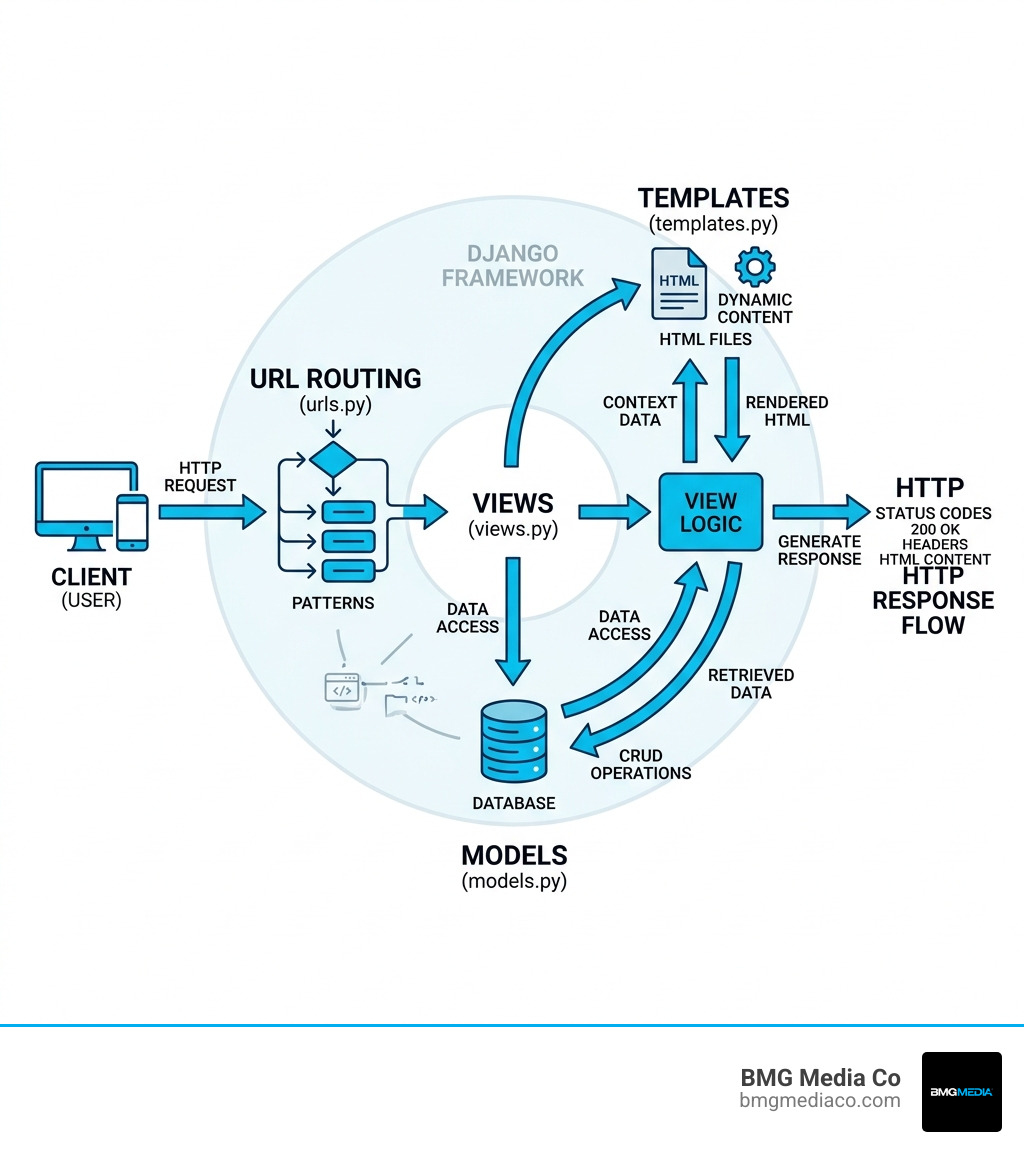
Key building web apps with django and python vocabulary:
When we talk about building web apps with Django and Python, we are looking at a framework that was literally designed for “perfectionists with deadlines.” In web development, we often have to choose between moving fast and building something robust. Django is one of the rare tools that lets us do both.
The “batteries-included” philosophy is the cornerstone of Django’s appeal. Unlike micro-frameworks that require you to hand-pick every third-party library for basic tasks like authentication or database management, Django comes with these features pre-configured. This reduces the “boilerplate” code—the repetitive setup work—that usually eats up the first few weeks of a project.
Research shows that Django is a powerhouse in the educational and professional sectors. For instance, over 56,000 learners have enrolled in the “Building Web Applications in Django” course on Coursera, with a staggering 96% approval rating. This popularity isn’t just hype; it’s based on the framework’s ability to handle complex, data-driven sites with ease.
| Feature | Django (Full-stack) | Micro-frameworks (e.g., Flask) |
|---|---|---|
| Authentication | Built-in and secure | Requires third-party plugins |
| Admin Interface | Automatic, customizable CRUD | Must be built from scratch |
| ORM | Powerful, integrated | Optional/Manual setup |
| Project Structure | Opinionated and standardized | Flexible/Unstructured |
| Scalability | High (Used by Instagram/Pinterest) | Variable (Depends on architecture) |
For a deep dive into how these components come together in the latest versions, resources like Web Development with Django: A definitive guide to building modern Python web applications using Django 4 provide excellent technical blueprints.
The primary reason we advocate for building web apps with Django and Python is security. In an era where data breaches are a constant threat, Django takes a proactive stance. It is designed to help developers avoid common security mistakes automatically.
We don’t just build for today; we build for the next five to ten years. Building web apps with Django and Python ensures your tech stack stays relevant. With the release of Django 4.2 and the upcoming Django 6, the framework has embraced asynchronous programming (async). This allows the framework to handle a much higher volume of concurrent connections, making it ideal for real-time applications and high-performance APIs.
The community support is another massive factor. With over 250,000 developers worldwide and a 70% satisfaction rate in the most recent industry surveys, you are never alone when solving a problem. The Django documentation is widely considered the “gold standard” of technical docs—it is organized into tutorials for beginners, topic guides for concepts, and reference guides for APIs.
Before we dive into the code, we need to talk about the “Django way” of organizing things. One of the most common beginner mistakes is skipping the setup of a virtual environment. We always recommend using venv or virtualenv to isolate your project. This prevents “version hell,” where an update for one project accidentally breaks another project on the same computer.
Once your environment is active, you use the django-admin utility to kick things off. This generates a standardized folder structure that every Django developer recognizes. This consistency is a huge advantage; if a new developer joins our team at BMG Media Co, they know exactly where to find the configuration files because Django projects always look the same.
While many frameworks use the MVC (Model-View-Controller) pattern, Django uses a slight variation called MVT. Understanding this is crucial for building web apps with Django and Python.
{{ user.name }}.This separation of concerns means your designers can work on the templates while your backend developers focus on the logic in the views, without stepping on each other’s toes. For those starting their first project, the official Writing your first Django app, part 1 guide is the perfect place to see this in action.
One of the most powerful features of Django is its migration system. In the old days of web development, if you wanted to add a “Phone Number” field to your user profile, you had to manually write SQL code to alter the database table. If you made a mistake, you risked losing all your data.
In Django, you simply add phone_number = models.CharField(max_length=20) to your models.py file and run two commands:
python manage.py makemigrations: This tells Django to look at your changes and create a “plan” for the database.python manage.py migrate: This executes the plan and updates your database safely.Django defaults to SQLite for local development because it requires zero setup, but it’s fully compatible with professional-grade databases like PostgreSQL, MySQL, and MariaDB for production.
As you progress in building web apps with Django and Python, you’ll move beyond simple “Hello World” pages and start handling complex user interactions.
Handling forms is where most web applications get messy. Django solves this with the Form and ModelForm classes. Instead of manually checking if an email address is valid or if a password is long enough, you define these rules in your form class. Django then handles the validation and provides helpful error messages to the user automatically.
A key best practice we follow is the “Post/Redirect/Get” pattern. When a user submits a form (a POST request), Django processes the data and then redirects the user to a new page. This prevents the annoying “Confirm Form Resubmission” popup if the user hits the refresh button in their browser.
We can’t talk about Django without mentioning the Admin Interface. By just registering your models with a few lines of code, Django generates a fully functional, secure back-office website. You can use this to add, edit, or delete data without writing a single line of HTML. It’s one of the most loved features in the ecosystem because it gives your clients or internal staff a way to manage content immediately.
When you’re ready to move from your laptop to a live server, there are several critical steps to ensure your app stays online and secure. We always follow the “12-factor app” methodology for scalable deployments.
For a comprehensive checklist on going live, Building Modern Web Applications with Django: A Complete Guide is an invaluable resource.
Think of a Django project as the entire website or “container.” It holds the global settings, database configurations, and main URL routes. A Django app is a self-contained module that does one specific thing—like a “Blog” app, a “User Profiles” app, or a “Payment Processing” app. A project can contain many apps, and you can even reuse an app in a different project.
Absolutely. Django is one of the most scalable frameworks available. It is used by Instagram to handle billions of photos and by Disqus to power millions of comments. Its ability to work with load balancers, database clusters, and asynchronous tasks makes it a top choice for enterprise-level software.
While you can start learning the Python logic of Django without knowing HTML, you will eventually need a basic understanding of HTML and CSS to build the “Template” part of the MVT pattern. You don’t need to be a master designer, but knowing how to structure a page will help you turn your data into a beautiful user interface.
Building web apps with Django and Python is a journey that takes you from a simple “Hello World” to a high-performance, secure application capable of serving millions of users. The framework’s “batteries-included” approach, combined with the power of Python, makes it an unbeatable choice for businesses that value both speed and quality.
At BMG Media Co, we specialize in taking these powerful technical foundations and turning them into custom, award-winning digital experiences. Based in Birmingham, Michigan, our team is dedicated to building fully custom web applications—no templates, no shortcuts. We’ve completed over 1,000 sites, helping businesses navigate the complexities of modern web development to achieve real, measurable results.
If you’re looking to build a high-performance web application that is tailored to your unique business needs, we’re here to help. Explore our Custom Web Design and Development Services to see how we can bring your vision to life. Let’s build something great together.

