May 2026
WordPress custom plugin development is the process of building a purpose-built PHP extension that adds exactly the functionality your site needs — nothing more, nothing less.
Here is a quick breakdown of what that means in practice:
| Concept | What It Means |
|---|---|
| What it is | A custom-coded PHP plugin that extends WordPress without touching core files |
| Who it’s for | Businesses needing functionality that off-the-shelf plugins don’t cover |
| Core skill required | PHP (plus HTML/CSS, JavaScript, and the WordPress API) |
| Why it matters | 97% of WordPress vulnerabilities come from plugins — custom code is a smaller, private target |
| Starting point | A single PHP file with a plugin header, functions, and hooks |
Nearly 60,000 plugins exist in the official WordPress directory. Yet for many businesses, not one of them does exactly what they need. That gap is where custom plugin development lives.
A custom plugin keeps your logic separate from your theme, survives WordPress updates, and gives you full ownership of your site’s behavior. It is the safest, most scalable way to extend WordPress — and it starts with understanding just a few core concepts.
I’m Blake George, Founder of BMG Media Co, and over the past 15+ years leading WordPress custom plugin development projects for more than 1,000 clients across healthcare, real estate, and manufacturing, I’ve seen how the right custom plugin can transform a slow, generic site into a high-converting business tool. In this guide, I’ll walk you through the entire process — from setting up your environment to deploying a production-ready plugin.
In the current landscape of May 2026, the “there’s a plugin for that” mentality has reached a breaking point. While the official repository is a treasure trove, many off-the-shelf solutions are built to be all things to all people. This results in “bloatware”—plugins that load 50 features when you only need one, slowing down your site and tanking your Core Web Vitals.
Think of an off-the-shelf plugin as a massive Swiss Army knife. It’s handy, but if you only need a precision screwdriver to fix a watch, carrying around a saw, a corkscrew, and a bottle opener just gets in the way. WordPress custom plugin development allows us to build the exact “specialist instrument” your business requires.
According to Patchstack’s 2024 and 2025 reports, a staggering 97% of all WordPress vulnerabilities originate from plugins, not the core software. Public plugins are open-source, meaning hackers can study the code to find “zero-day” exploits. Custom plugins, however, act as a “black box.” Because the code isn’t public, there is no economic incentive for a hacker to spend weeks trying to find a vulnerability that only exists on one specific site.
When you buy a premium plugin, you are essentially renting functionality. If the developer stops updating it or changes the pricing model, you’re stuck. With custom development, you own the intellectual property. This is critical for businesses looking to scale with advanced SEO web optimization and custom WordPress development.
| Feature | Pre-built Plugins | Custom Plugins |
|---|---|---|
| Functionality | Generic / Multi-purpose | 100% Tailored |
| Performance | Potential Bloat | Lean & Optimized |
| Security | Publicly known vulnerabilities | Private “Black Box” |
| Maintenance | Dependent on third-party | Full Control |
| Long-term Cost | Subscription fees | One-time dev + minor maintenance |
For a deeper dive into the official philosophy, check out the Introduction to Plugin Development – Plugin Handbook | Developer.WordPress.org.
Before we write a single line of PHP, we need a “sandbox.” Never, ever develop on a live site. We’ve seen too many “White Screens of Death” from developers trying to live-edit code.
In 2026, the gold standard for local development is WordPress Studio or LocalWP. These tools allow us to spin up a local instance of WordPress on our machines in seconds.
define( 'WP_DEBUG', true ); in your wp-config.php. This will catch errors early rather than letting them fail silently.We also recommend a staging-first workflow. Before any code goes to production, it should be tested on a staging server that mirrors the live environment. This is especially true if you are managing a WordPress Multisite custom setup, where a single plugin error can take down dozens of sub-sites simultaneously.
The “cardinal rule” of WordPress is: Don’t touch the core. If you edit WordPress core files, your changes will be nuked the next time you hit “Update.” Instead, we use plugins to “hook” into the core.
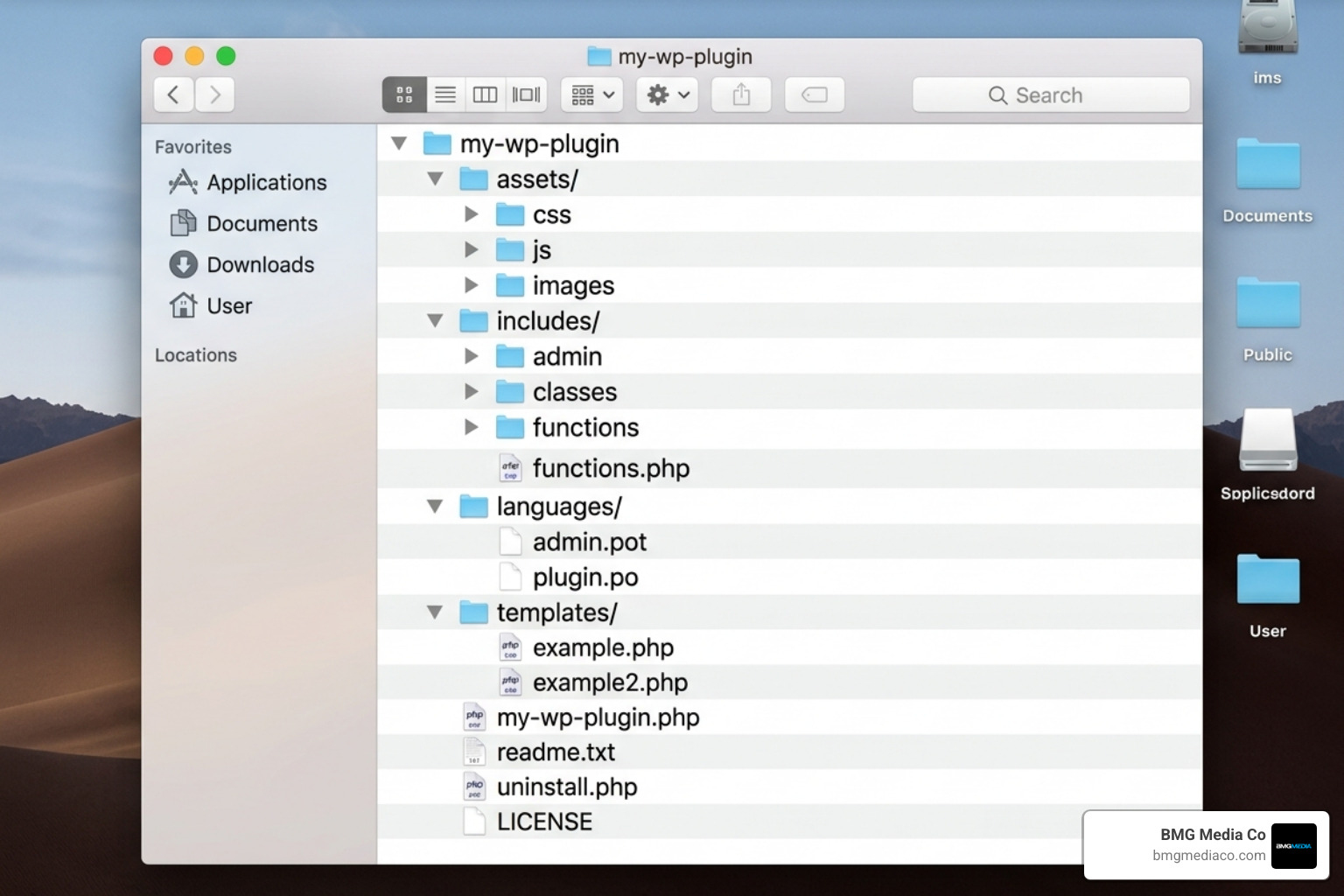
A plugin can be as simple as a single PHP file inside a folder in wp-content/plugins/. However, for scalable WordPress custom plugin development, we follow a standardized organization:
plugin-name/
plugin-name.php (The main entry point)includes/ (Core logic and classes)admin/ (Dashboard-specific code)public/ (Frontend-specific code)assets/ (CSS, JS, and images)languages/ (Internationalization files)uninstall.php (Cleanup logic)WordPress won’t recognize your plugin without a specific commented header at the top of your main file. It looks like this:
<?php
/**
 * Plugin Name: BMG Custom Utility
 * Plugin URI: https://bmgmediaco.com/
 * Description: A high-performance custom solution for Michigan businesses.
 * Version: 1.0.0
 * Author: BMG Media Co
 * License: GPL v2 or later
 */
To prevent naming collisions (where two plugins have a function named get_data()), we use PHP Namespaces or the Singleton pattern. This ensures our code stays isolated and doesn’t break other parts of the site. For a step-by-step on building this from scratch, refer to How to Create a Custom WordPress Plugin From Scratch | Envato Tuts+.
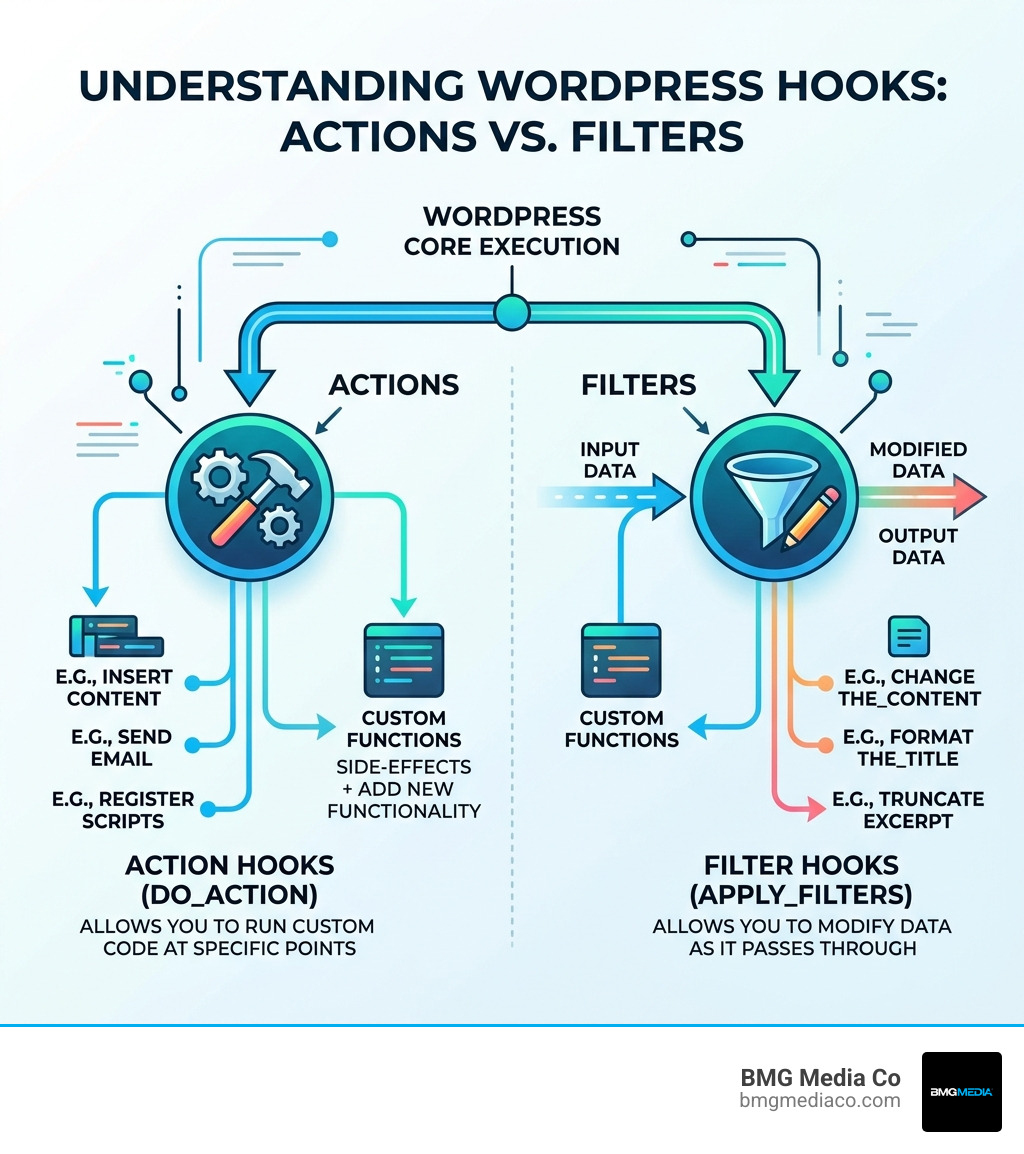
Hooks are how your plugin talks to WordPress. There are two types:
Think of an Action as a notification (“Hey, I just finished loading!”) and a Filter as a request for modification (“Here is the content; please change it before showing the user.”).
Security isn’t something you “bolt on” at the end; it must be baked into the DNA of your plugin. Since we often build WordPress sites for doctors, where HIPAA compliance and data privacy are paramount, we follow a “Trust No One” policy regarding data.
A “nonce” (number used once) is a unique security token that proves a request came from your site and not from a malicious third party. It’s like a secret handshake between the user’s browser and your server. If the handshake doesn’t match, the plugin rejects the action.
dbDelta()If your plugin needs its own database table, don’t use raw SQL queries that might drop existing data. We use the dbDelta() function. It examines the current table structure, compares it to your desired structure, and only makes the necessary changes. This is the safest way to handle updates without data loss.
Once the foundation is secure, we can add the “heavy hitters”:
[bmg_calculator] tag.Many top WordPress web design companies rely on these advanced features to create truly unique user experiences.
In 2026, speed is a ranking factor. A slow plugin doesn’t just annoy users; it kills your SEO. We focus on “Green Web” standards—writing efficient code that requires less CPU power, which is both faster and better for the environment.
Testing should also include “Unit Testing” with PHPUnit, ensuring that a small change in one part of your plugin doesn’t break everything else. If you’re wondering how to set up your medical blog or business site for peak performance, the answer almost always lies in how the plugins are coded.
The final step is preparing your plugin for the real world. This involves more than just uploading a ZIP file.
When a user clicks “Activate,” your plugin might need to create a database table or set default options. Conversely, when they “Deactivate,” you should stop running processes but keep the data. We only delete data when the user clicks “Delete,” which is handled by an uninstall.php file. This prevents accidental data loss during a quick troubleshooting session.
Every custom plugin should include a readme.txt following the WordPress.org standard. This includes:
Most plugins are released under the GPL v2 license, which is the same license as WordPress itself. This ensures the software remains free and extensible for the community.
Staying on top of these standards is why BMG Media Co was recognized among the best WordPress development companies.
The cost varies based on complexity. A simple utility plugin might take 10–20 hours, while a complex integration with an ERP system could take 100+ hours. In 2026, professional developer rates typically range from $80 to $150 per hour. We recommend budgeting roughly 15% of the initial development cost for annual maintenance to keep up with WordPress core updates.
Adding code to functions.php is like gluing your car’s GPS directly to the dashboard. If you change the dashboard (the theme), you lose the GPS. By using a plugin, your functionality is “decoupled.” You can change your site’s design as often as you like, and your custom features will keep working perfectly.
Look for developers who contribute to core, have a portfolio of custom work (not just “installing themes”), and understand modern PHP. Vetting is key. You want someone who follows the standards highlighted in reports like the top WordPress developers of January 2021, but with an updated 2026 skill set.
WordPress custom plugin development is the ultimate way to unlock the full potential of your website. It moves you away from the “bloat and break” cycle of generic plugins and toward a high-performance, secure, and fully owned digital asset.
At BMG Media Co, we don’t do templates. We are Michigan-based experts who believe in precision engineering. With over 1,000 sites completed, we specialize in building custom WordPress solutions that solve real business problems. Whether you need a proprietary pricing calculator, a complex CRM integration, or a HIPAA-compliant portal, we have the award-winning expertise to build it from scratch.
Ready to stop compromising with off-the-shelf plugins? Get more info about our custom web design services and let’s build something extraordinary together.
