July 2026

A custom Facebook feed WordPress plugin lets you automatically display your Facebook page posts directly on your website — no manual updates, no coding required.
Here’s what you need to know at a glance:
| Question | Quick Answer |
|---|---|
| What does it do? | Embeds live Facebook posts onto any WordPress page, post, or widget area |
| How do you add it? | Install the plugin, connect your Facebook account, paste a shortcode |
| Is it SEO-friendly? | Yes — PHP rendering makes feed content crawlable by Google |
| Is it GDPR compliant? | Yes — top plugins include built-in consent settings |
| Free or paid? | Free version available; photos, videos, and comments require Pro |
| Works with groups? | No — Meta deprecated group feed access in April 2024 |
Your website is often the first place a potential customer forms an opinion about your brand. But most business websites sit completely still between updates — static, silent, and slowly losing relevance.
Meanwhile, your Facebook page is active. Posts go up. Customers engage. Events get announced. That content just never makes it back to your site.
That’s the gap a custom Facebook feed plugin closes.
Instead of asking visitors to leave your site and find your Facebook page, you bring the social proof to them. Real posts. Real engagement. Updated automatically. And because the best plugins render content directly in the page’s HTML rather than using an iframe, Google can actually read and index that content — giving you an SEO boost alongside the social proof.
One developer described the before-and-after this way: before the plugin, they were manually embedding livestream videos one at a time. After? The feed handled it automatically.
I’m Blake George, founder of BMG Media Co., a custom WordPress development agency that has built over 1,000 websites from scratch — and I’ve seen how the right custom Facebook feed WordPress plugin can turn a static website into a dynamic, trust-building asset. In the sections below, I’ll walk you through everything from setup to performance optimization so you can make the right call for your site.
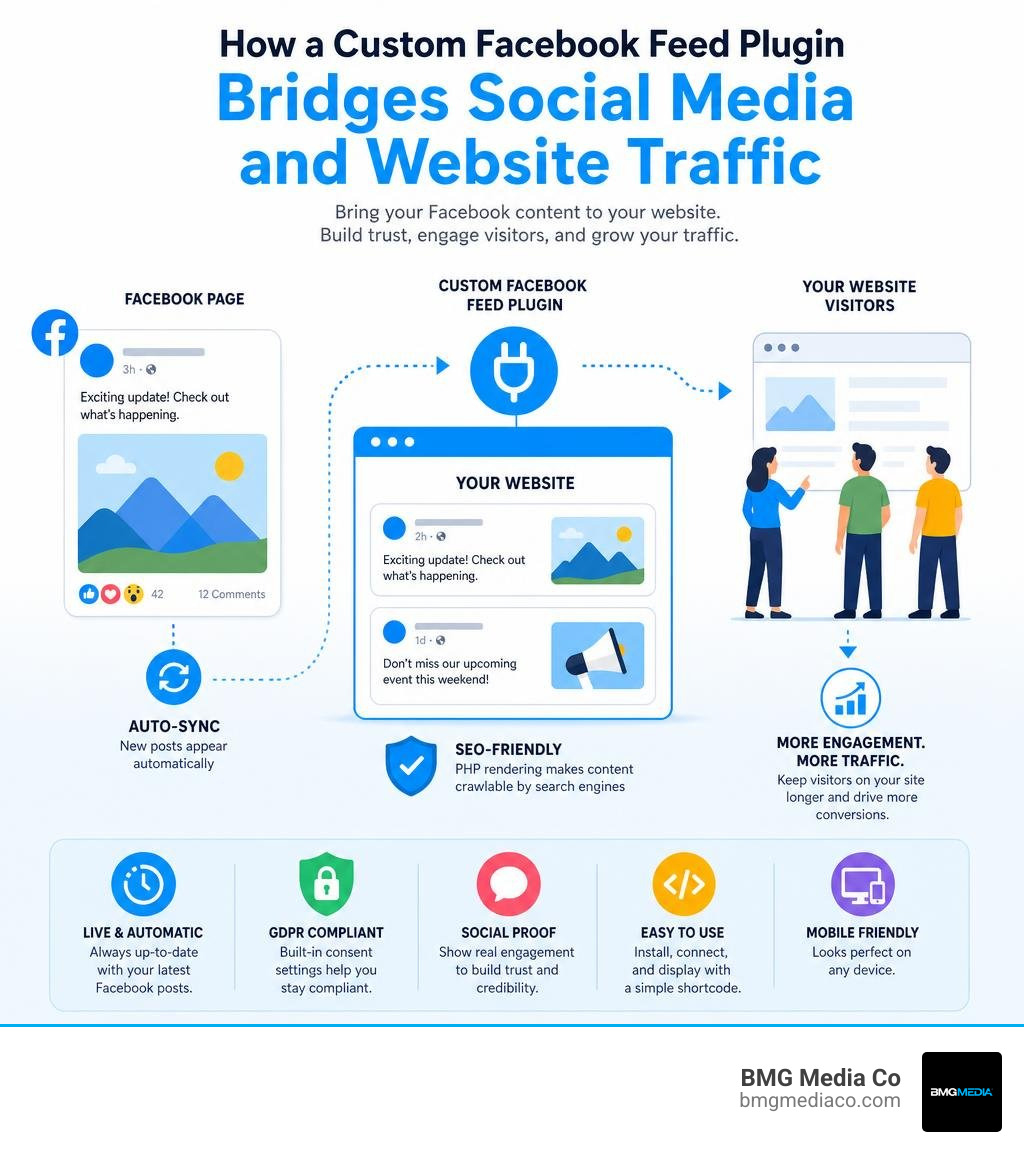
Custom facebook feed wordpress plugin glossary:
At its core, a custom facebook feed wordpress plugin acts as a secure translator between your website and Meta’s servers. It connects to the official Facebook Graph API, securely fetches your latest public page updates, and displays them in a beautifully styled layout on your site.
The magic happens behind the scenes. Instead of relying on slow, uncustomizable iframes that wall off your content, a high-quality feed plugin uses PHP rendering. This means the plugin retrieves the raw data from Facebook, processes it on your server, and outputs it as clean, native HTML directly on your webpage.
This approach solves the major limitations of standard iframe embeds:
By bypassing standard iframe limitations, you bridge the gap between social engagement and professional web design. Learn more about custom web design to see how custom-rendered elements elevate your overall digital presence.
In the digital landscape of July 2026, keeping your website content fresh is non-negotiable. However, manually writing blog posts or updating news pages can be incredibly time-consuming. Using a custom facebook feed wordpress plugin allows you to leverage the social media updates you are already creating to keep your website dynamic.
There are three major business benefits to displaying a live Facebook feed:
To achieve this level of seamless integration, many businesses look to dedicated solutions like the Smash Balloon Custom Facebook Feed, which has become an industry standard for out-of-the-box social media widgets.
If you managed a WordPress site prior to late 2020, you might remember how easy it was to embed a Facebook post. You simply pasted the URL into the editor, and WordPress automatically converted it into a visual post. This native feature was powered by a protocol called oEmbed.
However, Meta changed its API policies, requiring all oEmbed requests to go through a developer account and use secure access tokens. As a result, WordPress officially dropped native support for Facebook and Instagram oEmbeds. This left thousands of older websites with broken, empty links where active social posts used to live.
A robust custom Facebook feed plugin acts as a savior for legacy content. It registers secure handlers behind the scenes, automatically restoring native oEmbed support. Once configured with your Meta credentials, the plugin automatically fixes broken embeds across your historical blog posts and lets you seamlessly paste new Facebook links into the Gutenberg editor.
Setting up your feed is designed to be a straightforward process, even for business owners with minimal technical experience. The entire configuration happens directly inside your WordPress dashboard.
Before you begin, make sure you meet the basic API requirements:
To get started with the official plugin, follow these simple steps:
If you are looking to build a deeply customized, performant site without relying on standard, commercialized widgets, check out our Beginners Guide to Custom Plugins to understand how custom-coded API integrations offer a cleaner, zero-bloat alternative.
One of the most powerful features of a premium feed integration is the ability to aggregate content from multiple sources. For example, if your business operates several regional offices across Southeast Michigan — such as Troy, Birmingham, and Ann Arbor — you may want to showcase updates from each local Facebook page on a single, centralized corporate website.
To display multiple feeds, you simply need to find the unique Page ID for each Facebook page. You can then specify which feed to load by passing parameters directly inside your shortcodes:
For advanced layouts, you can even integrate these shortcodes directly into your theme’s PHP template files using a helper function: doshortcode(“[custom-facebook-feed id=PageAID]”). This is particularly useful for complex, multi-site environments. If you are managing a large-scale network of sites, refer to The Ultimate WordPress Multisite Custom Setup Guide to learn how to deploy uniform social integrations across your entire ecosystem.
While the free version of the custom facebook feed wordpress plugin is an excellent starting point for basic text updates, serious business websites quickly run into its limitations. The free tier is strictly limited to displaying plain text and links, which can look underwhelming on a modern, highly visual website.
To help you decide which version fits your goals, here is a detailed feature comparison:
| Feature | Free Version | Pro Version |
|---|---|---|
| Content Types | Text & Links only | Photos, HD Videos, Live Streams, Albums, Events |
| Layout Options | Single Column Timeline | Grid, Masonry (Pinterest-style), Carousel Slider |
| Social Proof | Basic post text | Comments, Likes, Shares, and Reactions |
| Filtering | None (Displays all posts) | Filter by specific hashtags or keywords |
| oEmbed Support | Restores basic oEmbeds | Advanced oEmbed customization and caching |
| Popup Lightbox | No (Links go to Facebook) | Yes (Keep visitors engaged on your site) |
The free version of the plugin is designed for simplicity. It is fully responsive and mobile-friendly right out of the box, ensuring your text-based updates scale down elegantly on mobile devices.
It inherits your active theme’s styles and allows you to display a clean, chronological timeline of your page’s textual announcements. However, because it cannot display photos, videos, or user comments, it may not provide the rich visual engagement that modern web design demands.
Upgrading to the Pro version unlocks the true marketing potential of your social media feed. Instead of plain text, you can showcase gorgeous image grids, high-definition videos, and even broadcast active Facebook Live streams directly on your homepage.
Key premium features include:
For professional web developers and high-growth brands, a social media widget is more than just a visual design choice — it is a technical integration that can impact site speed, security, and search rankings.
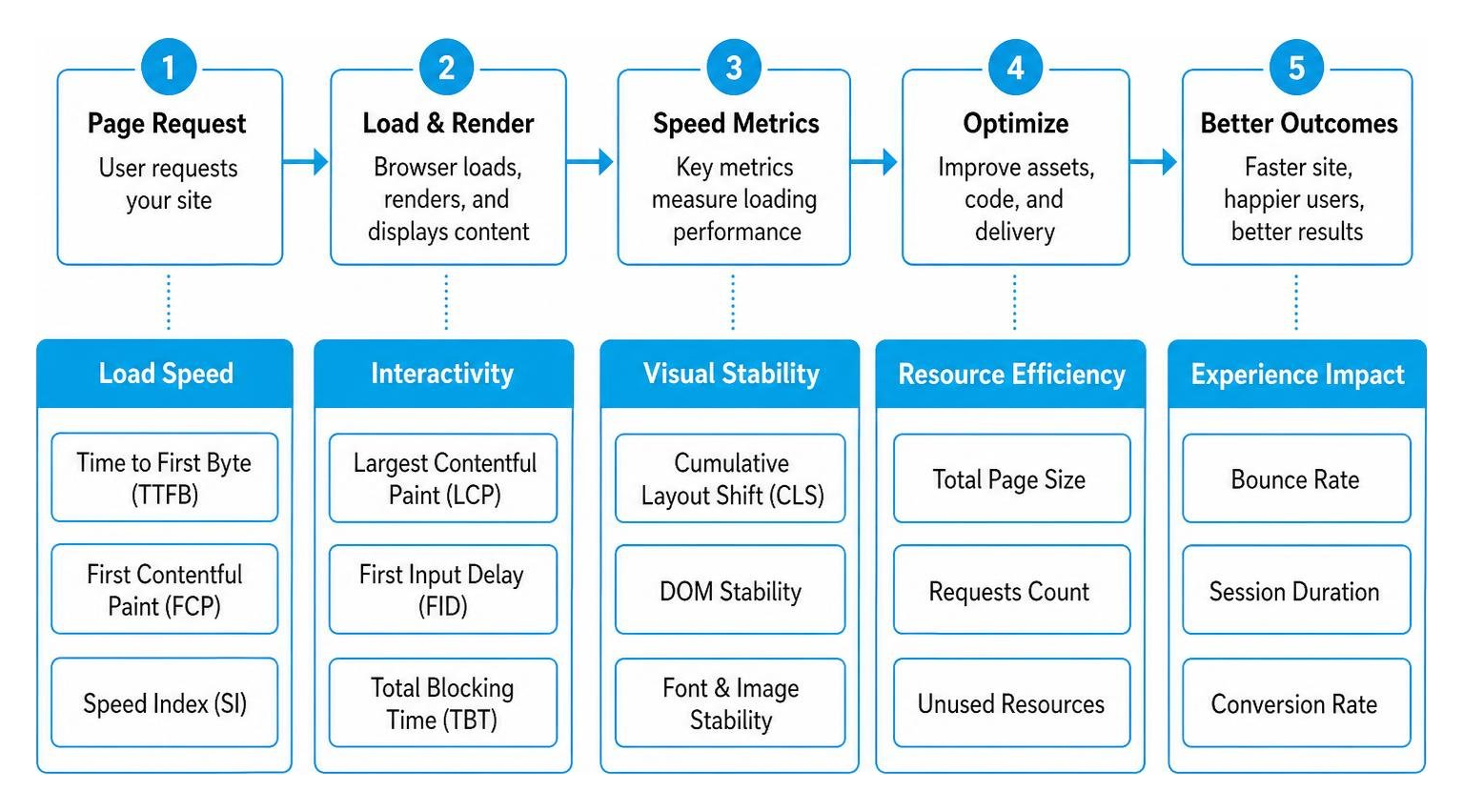
When integrating third-party assets, it is critical to balance aesthetic appeal with technical performance. To explore how advanced optimization strategies can elevate your brand, read How to Scale with Advanced SEO Web Optimization and Custom WordPress Development.
Many standard social media widgets rely on client-side JavaScript or standard iframes to pull content from Facebook’s servers. To a search engine crawler like Googlebot, these widgets look like empty spaces because the content is loaded after the initial page rendering.
A premium custom facebook feed wordpress plugin solves this by utilizing server-side PHP rendering. The plugin fetches the text from Facebook’s API, converts it into standard HTML, and injects it directly into the webpage’s source code before it is sent to the visitor. Because the post content is part of the raw HTML, search engines can easily crawl, index, and rank your social updates as fresh, keyword-rich content.
This is highly beneficial for businesses that use Facebook as their primary news outlet. To see how custom architectural choices can maximize your content’s reach, learn How to Build a Custom Blog Without Using a Single Template.
With strict global privacy regulations like GDPR and CCPA, website owners must be incredibly careful about how they handle third-party scripts. Standard Facebook integrations often load tracking cookies and external assets directly from Meta’s servers the moment a page loads, which can violate privacy laws if user consent has not been granted.
Top-tier feed plugins feature built-in, 1-click GDPR compliance settings. When enabled, the plugin blocks all direct requests to Facebook’s servers until the visitor explicitly gives consent through a popular cookie banner plugin.
Instead of loading live assets immediately, the plugin displays a locally cached, static placeholder image. Once the user consents, the dynamic, interactive features are instantly unlocked.
Loading raw images and videos directly from Facebook’s servers on every single page view is a recipe for slow loading speeds and poor Core Web Vitals scores.
To protect your site’s performance, a high-quality plugin utilizes a multi-tiered caching system:
For a deeper dive into maintaining a fast, secure, and highly optimized backend, explore our resources on Technology: WordPress.
Integrating third-party social APIs can occasionally present technical hurdles. Below, we address some of the most common questions and troubleshooting steps.
If your feed suddenly stops updating or displays an error message, it is usually due to one of three common issues:
As of April 2024, Meta made significant updates to its Graph API, completely deprecating third-party access to Facebook Group feeds. Consequently, no legitimate feed plugin can display group posts.
Additionally, due to strict privacy and data-protection laws, Meta does not allow third-party plugins to stream content from personal Facebook profiles. Feeds are strictly limited to public business pages.
If you are using a commercial plugin like Smash Balloon or WP Social Ninja, you can access detailed developer documentation, active support forums on WordPress.org, or submit a support ticket directly through their official websites.
If you want to understand how custom-built plugins are developed and supported at an enterprise level, check out our guide on WordPress Plugin Development From Zero to Hero in Five Steps.
Adding a custom facebook feed wordpress plugin is an excellent, cost-effective way to bridge the gap between your active social media presence and your static business website. It builds immediate brand trust, keeps your content fresh, and boosts your search engine visibility.
However, for premium brands, luxury businesses, and enterprise organizations across Metro Detroit and nationally, relying on generic, off-the-shelf plugins can introduce unwanted compromises. Commercial plugins often come with complex, multi-tiered subscription pricing, aggressive dashboard upsell ads, and unnecessary script bloat that can degrade your Core Web Vitals and site speed.
At BMG Media Co., we believe your website deserves better than a collection of generic plugins.
Headquartered in Birmingham, Michigan, our expert team builds 100% custom WordPress websites completely from scratch. No templates. No page builders. No Elementor bloat.
We can design and build a lightweight, secure, and bespoke integration directly with the Facebook Graph API. This gives you absolute control over your design, lightning-fast performance, and zero dependency on third-party subscription plugins.
Ready to elevate your digital presence with a high-performance, custom-coded solution? Get custom software solutions tailored to your business and let’s build something extraordinary together.

