July 2026
WordPress maintenance and conversion optimization are two sides of the same coin — and ignoring either one is quietly costing your business money right now.
Here is a fast answer if you need it:
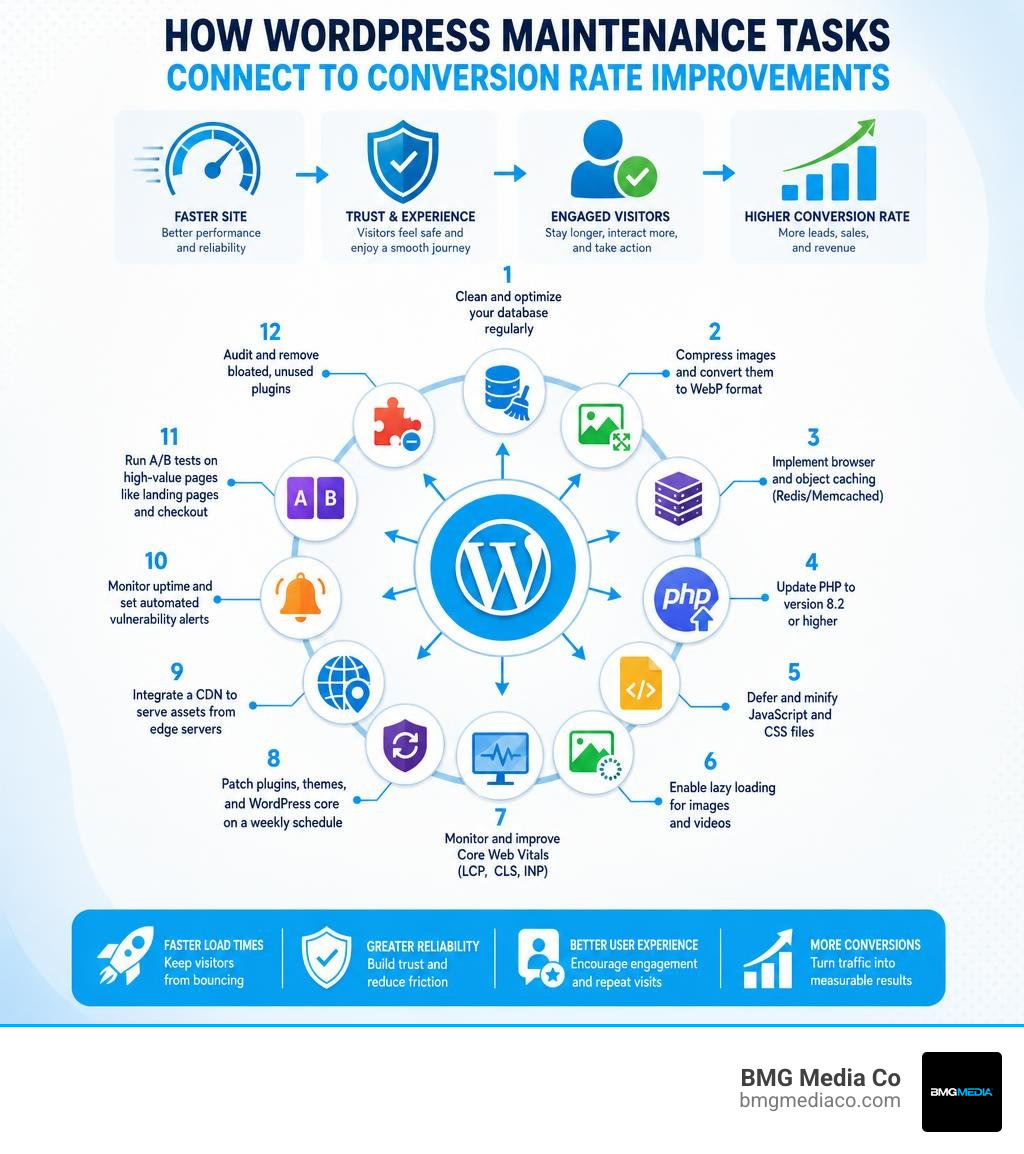
The 12 maintenance tricks that directly boost WordPress conversion rates:
Picture this: a potential customer clicks your ad, your site takes four seconds to load, and they bounce to a competitor who loads in under two. You paid for that click. You got nothing from it.
That is not a marketing problem. That is a maintenance problem.
A one-second delay in page load time reduces conversions by 7%. A site that loads in one second converts at a rate five times higher than one that loads in ten. And yet most business owners treat their WordPress site like a parked car — assuming it will run fine until something visibly breaks.
It does not work that way. Every plugin update, every new piece of content, every theme change gradually degrades your site’s performance over time. Developers call this speed regression. Left unchecked, it erodes your search rankings, inflates your bounce rate, and silently kills your conversion funnel — all without a single error message telling you it is happening.
The good news: the same maintenance habits that keep your site fast and secure are the exact same habits that keep your conversion rate climbing.
I am Blake George, founder of BMG Media Co., a custom WordPress development agency I launched in Birmingham, Michigan in 2009. Over the past 15+ years, I have led the development of more than 1,000 custom websites where WordPress maintenance and conversion optimization were never treated as separate disciplines — because at a high-performance level, they simply are not. In the sections below, I will walk you through the 12 most impactful maintenance moves you can make right now to turn your WordPress site into a genuine revenue engine.
To understand how routine technical care drives sales, we must look at how modern visitors interact with the web. In July 2026, user expectations are higher than ever. A website is no longer just an online brochure; it is a dynamic storefront where every micro-interaction affects user trust. If your site feels sluggish, displays layout errors, or triggers browser security warnings, visitors will leave before they even see your offer.
This is where the direct connection between website maintenance and conversion rates becomes clear. When you invest in structured, proactive technical care, you are directly removing the technical friction points that cause visitors to abandon their journey.
To build a solid foundation, we recommend starting with a comprehensive Guide to Conversion Rate Optimization in WordPress that outlines how performance, design, and user flow work together. Keeping your platform structurally sound ensures that your marketing efforts are not wasted. As we explain in our breakdown of The Significance of Regular Website Updates: How Often Should You Update Your Website?, consistency in your technical schedule is what prevents sudden drops in both performance and customer trust.
When most businesses think of Conversion Rate Optimization (CRO), they think of changing button colors, rewriting headlines, or redesigning hero sections. While those design choices are important, they are completely useless if the underlying technology is failing.
WordPress is a dynamic content management system. It relies on a database, server-side code (PHP), and a network of themes and plugins to render pages. Over time, several issues naturally occur:
If your site is slow or vulnerable, your conversion rate will drop. This is why we always recommend starting with a detailed diagnostic audit. Understanding the current health of your site is critical, which is Why Your Site Needs SEO Technical Audit Services Right Now to map out and resolve hidden performance bottlenecks before they impact your bottom line.
Neglecting maintenance is a quiet profit killer. When a site begins to slow down or suffer from minor visual bugs, the impact on your marketing budget is immediate.
Consider your paid traffic. If you are running Google Ads or social media campaigns to target local markets like Troy, MI or Farmington Hills, MI, you are paying for every single click. If 53% of mobile visitors abandon a site that takes longer than 3 seconds to load, more than half of your ad spend is wasted the moment your page load times slip.
To see the real-world impact of technical improvements, businesses must track objective performance metrics. We break down exactly how to measure these financial returns in our guide on the Best Way to Redesign WordPress Site: Before and After ROI Metrics. By comparing hard data from before and after technical optimizations, you can see how much revenue was previously lost to slow load times and checkout friction.
Page speed is the ultimate conversion factor. The math is simple and brutal: a one-second delay in page load time reduces conversions by 7%. Conversely, a site that loads in 1 second has a conversion rate 5x higher than a site that loads in 10 seconds.
Modern users do not wait. They expect websites to load in under 3 seconds. To prevent your marketing funnel from collapsing, you must treat speed optimization as a core engineering task rather than a minor plugin setting.
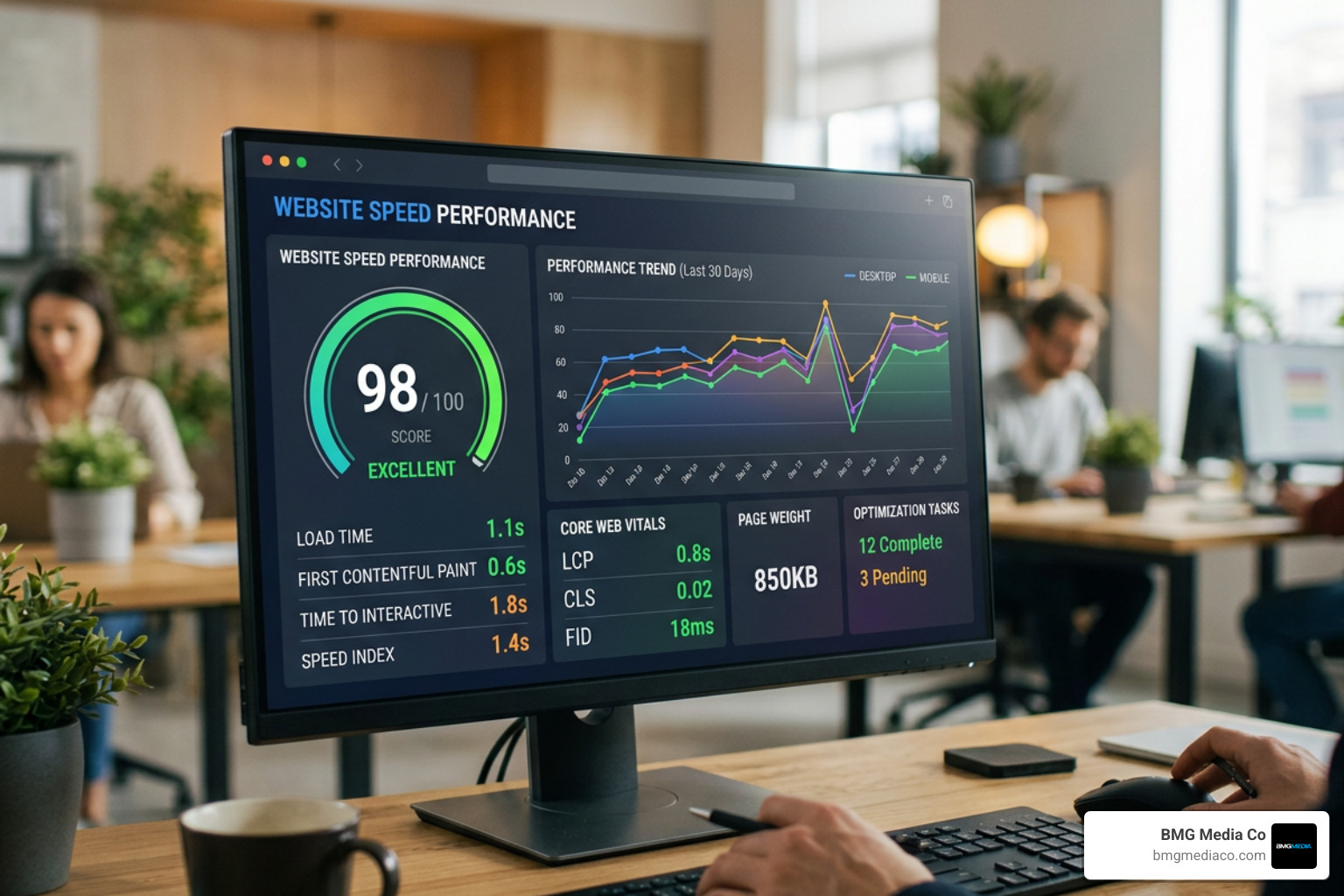
When we run performance diagnostics for clients, we look at how the entire server-to-browser communication is structured. For a deep dive into how to analyze your site’s current performance and prevent speed drops during traffic spikes, read our complete guide on Performance Web Testing: Don’t Let Your Load Time Explode.
Google uses Core Web Vitals as direct ranking signals, meaning slow, unstable websites are actively penalized in organic search results. More importantly, these metrics measure the actual, real-world user experience of your visitors:
To systematically improve these scores and secure your organic rankings, explore our technical breakdown of Core Web Vitals Optimization for High-Performance Sites.
Many site owners attempt to fix speed issues by installing multiple caching plugins. However, true high-performance speed engineering starts at the server level.
Implementing persistent object caching using Redis or Memcached reduces database load by storing query results in the server’s memory. This means the server does not have to rebuild the page from scratch for every single visitor. Additionally, keeping your server software updated is critical; PHP 8.2 processes code 20% faster than PHP 7.4.
For businesses that require maximum reliability and speed, transitioning to a dedicated, high-performance environment is essential. We offer custom, enterprise-grade solutions through our High-Performance Managed Hosting and Support services to ensure your server architecture is fully optimized for conversions.
To help you systematically optimize your site, we have compiled the 12 most effective maintenance tricks that directly improve user experience and boost conversion rates.
When implementing these steps, we always recommend avoiding bloated, pre-made themes and heavy page builders. Instead, custom development allows you to build a clean, lightweight site from the ground up. To understand how custom code simplifies your long-term maintenance, see our Beginner’s Guide to Custom Plugins to learn how bespoke solutions replace bloated third-party add-ons.
Images make up the majority of a webpage’s file weight. Compressing your media library and converting JPEGs and PNGs to WebP format can reduce file sizes by 30% without losing visual quality.
Lazy loading ensures that images and videos are only loaded when they are about to enter the user’s viewport. This dramatically reduces the initial page load time, especially on long, content-heavy landing pages.
Web fonts can add hundreds of kilobytes of render-blocking data. By limiting your site to two font families and subsetting them to only include the characters you actually use, you can reduce font file sizes by up to 90%.
Minification removes unnecessary spaces, comments, and characters from your code files. Deferring non-critical scripts ensures they do not block the browser from rendering the visual layout of your page. To understand how code structure affects user perception, read our analysis of UX vs UI Design: Understanding The Difference and Importance.
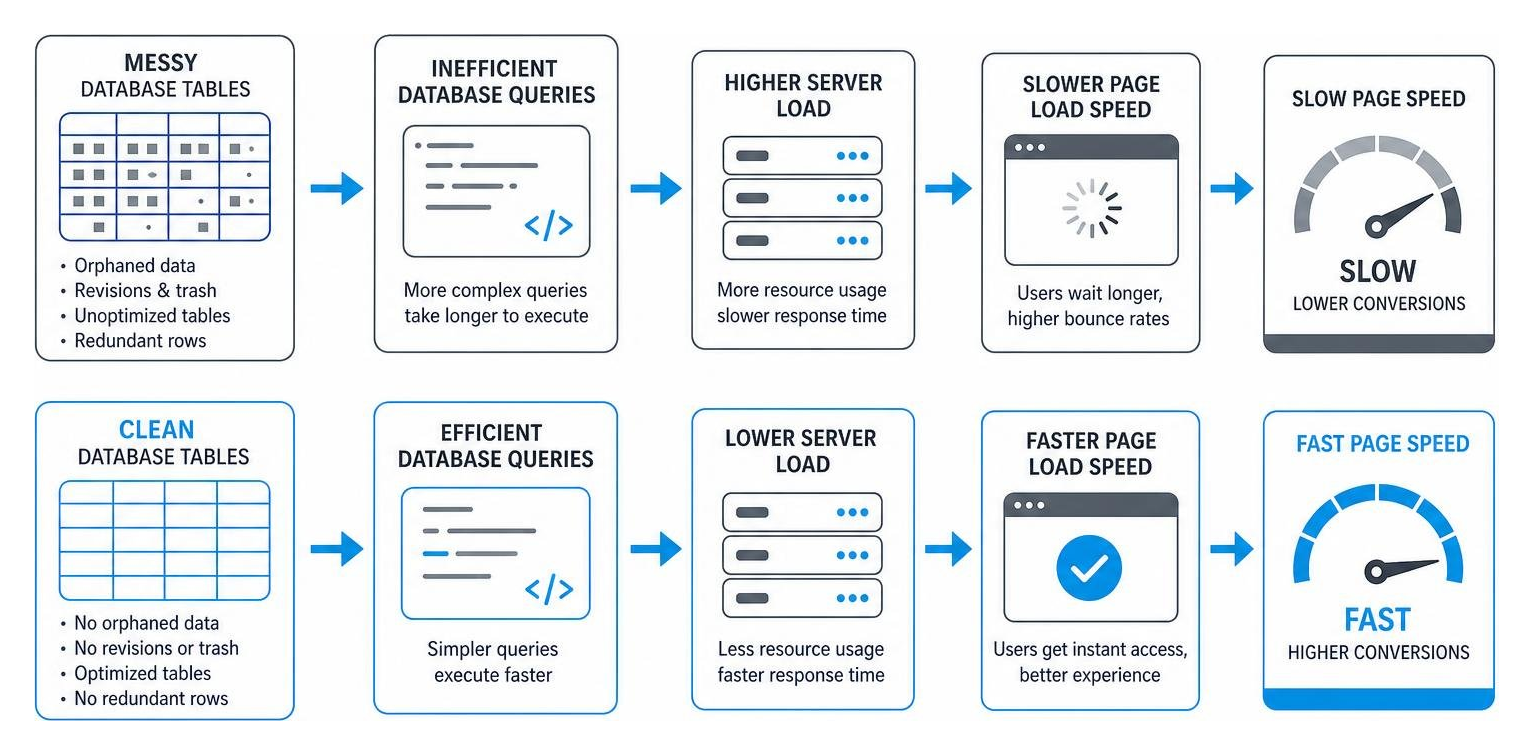
Every time you save a draft or update a page, WordPress stores a copy in the database. Over time, thousands of old revisions accumulate, slowing down database queries. Regularly cleaning these tables keeps your site responsive.
Transients are temporary options stored in your database to cache plugin data. If they are not cleared regularly, they can bloat your database and slow down backend operations.
Every active plugin adds code that your server and the visitor’s browser must process. Deactivating and completely deleting unused plugins reduces security risks and improves performance. If you need specific features, building a tailored solution is always better than relying on generic plugins. Learn how we build clean, efficient tools in our guide on WordPress Plugin Development From Zero to Hero in Five Steps.
Running your WordPress site on the latest stable version of PHP ensures that your server processes code efficiently, directly reducing your Time to First Byte (TTFB).
Every additional field in a checkout form reduces your conversion rate by 5% to 10%. Simplify your forms, enable inline validation, and make sure the “Add to Cart” and checkout buttons are easy to tap on mobile devices.
E-commerce sites cannot rely entirely on static page caching because cart pages and user accounts must display unique data. Implementing Redis object caching ensures these dynamic pages load instantly.
A Content Delivery Network (CDN) stores static copies of your site’s assets on a global network of edge servers. This ensures that a customer in Chicago, IL or Austin, TX experiences the same lightning-fast load times as a visitor near your physical server.
To stop guessing what works, use A/B testing to compare different layouts, headlines, and checkout designs. For a complete strategy on maximizing your site’s performance, explore our dedicated services for WordPress Conversion Rate Optimization.
A fast website is only effective if your visitors feel safe sharing their payment and contact information. Security and trust are critical elements of the conversion funnel. If a user receives a malware warning, notices broken layout elements, or sees an insecure connection warning in their browser, they will immediately abandon your site.
Proactive security maintenance is not just about preventing hacks; it is about protecting your brand’s reputation and maintaining a stable environment where conversions can happen. To learn how continuous oversight keeps your business secure, read our guide on how to Keep Your Site on Track with Performance Monitoring.
The median time-to-exploit for newly disclosed software vulnerabilities is just 5 hours. This means you cannot wait weeks or months to apply critical security patches. Outdated plugins and themes are the most common entry points for security breaches.
To protect your business, you must implement 24/7 uptime monitoring and automated security alerts. If a vulnerability is found, it must be patched immediately. If an update causes a conflict, you must be able to restore a verified, off-site backup within minutes to prevent costly downtime.
To ensure your site’s technical architecture is completely secure and optimized for search engines, discover how we build custom action plans in The Ultimate Guide to Technical SEO Auditing Services: Get Your Action Plan.
True conversion optimization is an ongoing, data-driven process. Rather than relying on aesthetic assumptions, high-performing websites use heatmaps, session recordings, and user flow analysis to identify exactly where visitors are getting stuck.
A/B testing allows you to test a single change—such as a simplified contact form or a more visible call-to-action—against your current design to measure the exact impact on your conversion rate. To understand how to implement these experiments safely without slowing down your site, read our detailed article on The Importance of A/B Testing in Web Design.
Maintaining a high-performance WordPress site requires specialized technical knowledge, consistent schedules, and immediate response times when issues arise. For many business owners, spending valuable executive hours troubleshooting plugin conflicts at 3 AM is a poor use of time.
When deciding how to manage your website, you have three primary options: handling it yourself, using a basic managed hosting provider, or partnering with a professional custom agency.
| Maintenance Task | DIY (Do-It-Yourself) | Basic Managed Hosting | Custom Agency (BMG Media Co.) |
|---|---|---|---|
| Plugin & Core Updates | Manual (Risk of site breakage) | Automated (No manual testing) | Tested on staging first by developers |
| Uptime & Security | Basic plugins (Slows down site) | Server-level firewall | 24/7 active monitoring & instant patching |
| Speed Optimization | Basic caching plugins | Standard server caching | Custom Redis/Memcached & clean code |
| Database Cleanup | Manual or basic plugins | Not included | Scheduled optimizations & query audits |
| Custom Code Support | None (Relies on heavy plugins) | None | Full support, custom Gutenberg & ACF Pro |
| CRO & A/B Testing | None | None | Data-driven audits & continuous testing |
If you are looking for a trusted partner to handle your technical operations, we provide comprehensive, localized support across Southeast Michigan. Learn how we protect and scale digital investments on our dedicated service page for our Website Maintenance & Support Firm Michigan.
Most businesses see an immediate 2-4 second improvement in page load times after professional optimization. For older, unoptimized websites that currently take 8 seconds or longer to load, we typically achieve a 50-70% improvement in speed. This direct reduction in load times removes friction and immediately improves your conversion metrics.
No. Professional speed optimization targets backend code, server configurations, database queries, and file compression. It does not alter your visual design or remove essential features. In fact, by resolving layout shifts (CLS) and improving button responsiveness (INP), optimization enhances your existing design and makes the user experience much smoother.
We recommend applying security patches and minor updates within 7 days of release. Major core and plugin updates (such as WooCommerce) should be held for 2 to 4 weeks to allow the developer community to resolve initial post-launch bugs. All updates should be tested in a staging environment first rather than applied directly to your live production site.
At BMG Media Co., we believe that wordpress maintenance and conversion optimization are not optional tasks—they are the foundation of your digital success.
We do not believe in shortcuts. We do not use bloated pre-made templates, and we do not build sites with heavy page builders like Elementor that create massive technical debt and slow down your load times. Every website we build is 100% custom-coded from scratch using lightweight, modern tools like ACF Pro and custom Gutenberg blocks. This clean-code approach ensures that your site is fast, secure, incredibly easy to maintain, and engineered to convert visitors into customers from day one.
Whether you are looking to optimize an existing platform or build a high-performance custom site from the ground up, we are here to help. Get a Free WordPress Speed Audit Today and let’s turn your website into a powerful, reliable revenue engine.
