July 2026

Building a wordpress theme from scratch is the single most effective way to create a fast, clean, and fully custom website — one that actually fits your brand instead of forcing your brand to fit a template.
Here’s the short answer if you need it fast:
Minimum requirements to create a WordPress theme from scratch:
wp-content/themes/ with your theme namestyle.css file with the required header comment block (Theme Name, Author, Version, etc.)index.php file as the fallback templateThat’s it. Two files. WordPress recognizes it as a valid theme.
But a production-ready custom theme typically includes at least 10 files:
style.css — theme metadata and stylesindex.php — the universal fallback templatefunctions.php — theme setup, asset loading, feature registrationheader.php and footer.php — modular layout partssingle.php — individual post templatepage.php — static page templatearchive.php — category and date archive templatesidebar.php — widget area templatescreenshot.png — 1200×900px theme preview imageMost developers don’t build from scratch because they think it’s hard. They reach for Elementor, a pre-built theme, or a page builder — and they pay for it later in slow load times, bloated code, and sites that look like everyone else’s.
Page builders trade short-term convenience for long-term performance debt. A custom-coded theme gives you complete control over every line of markup, every asset that loads, and every design decision — with none of the overhead.
The research is clear: custom themes can achieve 30–50% better Core Web Vitals scores than commercial templates. That gap doesn’t just affect user experience. It directly affects your search rankings.
I’m Blake George, founder of BMG Media Co., where we’ve built over 1,000 fully custom WordPress themes from scratch for clients across industries including real estate, healthcare, and enterprise manufacturing — never once relying on a page builder or pre-made template. In this guide, I’ll walk you through the exact process we use to build a wordpress theme from scratch, from your local environment setup all the way to a production-ready, performance-optimized site.
Important wordpress theme from scratch terms:
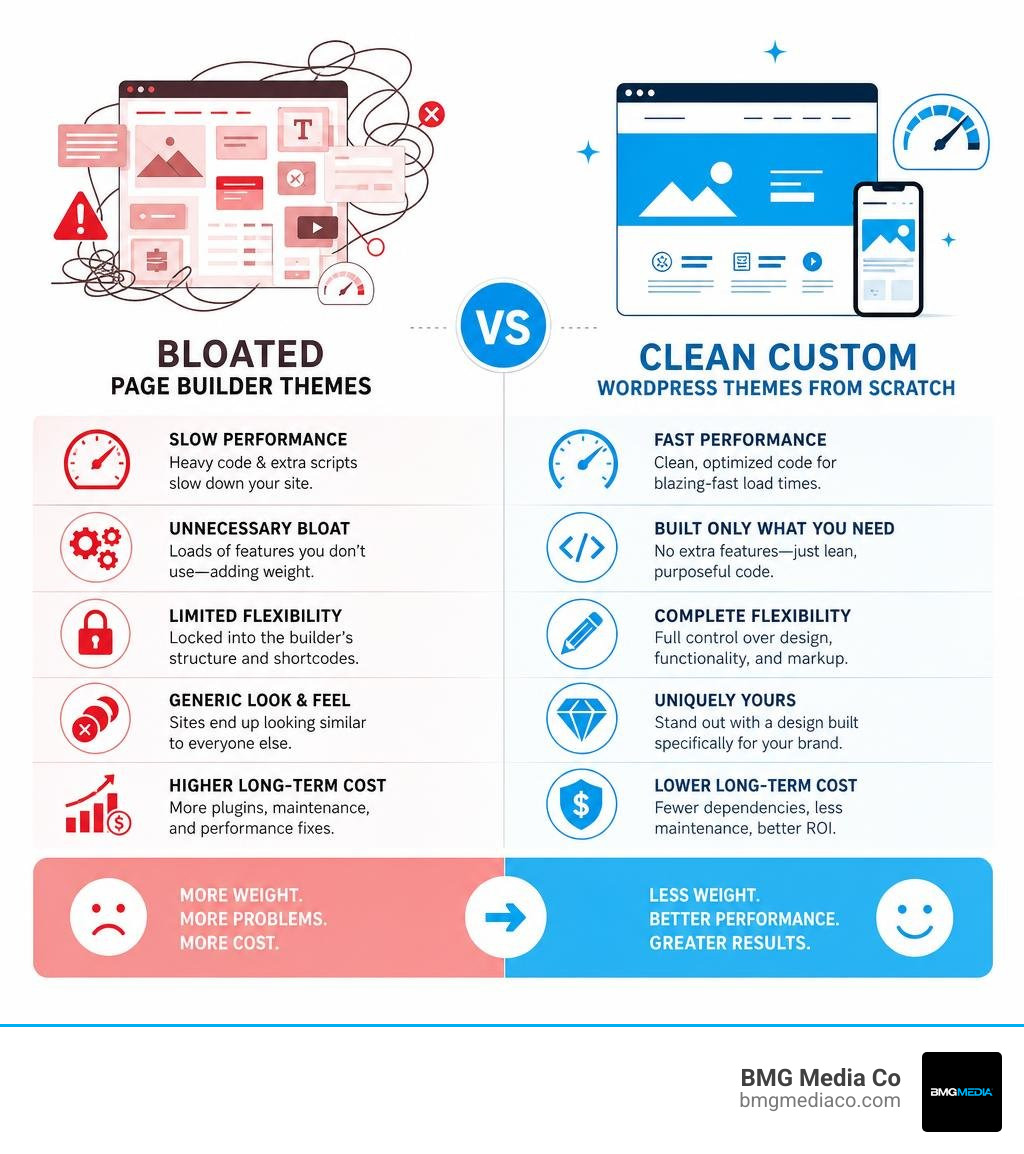
When you decide to build a wordpress theme from scratch, you are choosing an architecture that prioritizes speed, security, and design fidelity. The standard industry approach relies heavily on page builders like Elementor or Divi. While these tools allow non-developers to drag and drop components, they inject hundreds of nested HTML divs, redundant CSS files, and heavy JavaScript libraries into every single page load.
By contrast, a custom PHP template architecture paired with Advanced Custom Fields (ACF) Pro delivers a clean, semantic document structure. In this model, we write the exact HTML and PHP necessary to render the content, and we use ACF Pro to create intuitive, structured input fields in the WordPress admin panel. This keeps the editing experience incredibly simple for clients while keeping the front-end code pristine.
Some developers argue that WordPress’s block themes and Full Site Editing (FSE)—introduced in version 5.9—are the future of the platform. While block themes are excellent for simple, user-editable sites, they often fall short for enterprise-grade applications. FSE relies heavily on block markup saved directly in the database, making version control difficult and limiting complex programmatic logic. For enterprise sites that require seamless API integrations, custom database queries, and highly polished UI/UX, the classic PHP and ACF Pro architecture remains the undisputed gold standard.
To illustrate the difference, consider this comparison:
For more details on how we leverage this architecture to drive results, check out our insights on More info on custom WordPress solutions.
Before you write your first line of code, you need a safe, isolated environment on your computer to run WordPress. Developing a theme on a live, production server is a recipe for disaster. A single PHP syntax error can trigger the dreaded “White Screen of Death,” locking users out of your site.
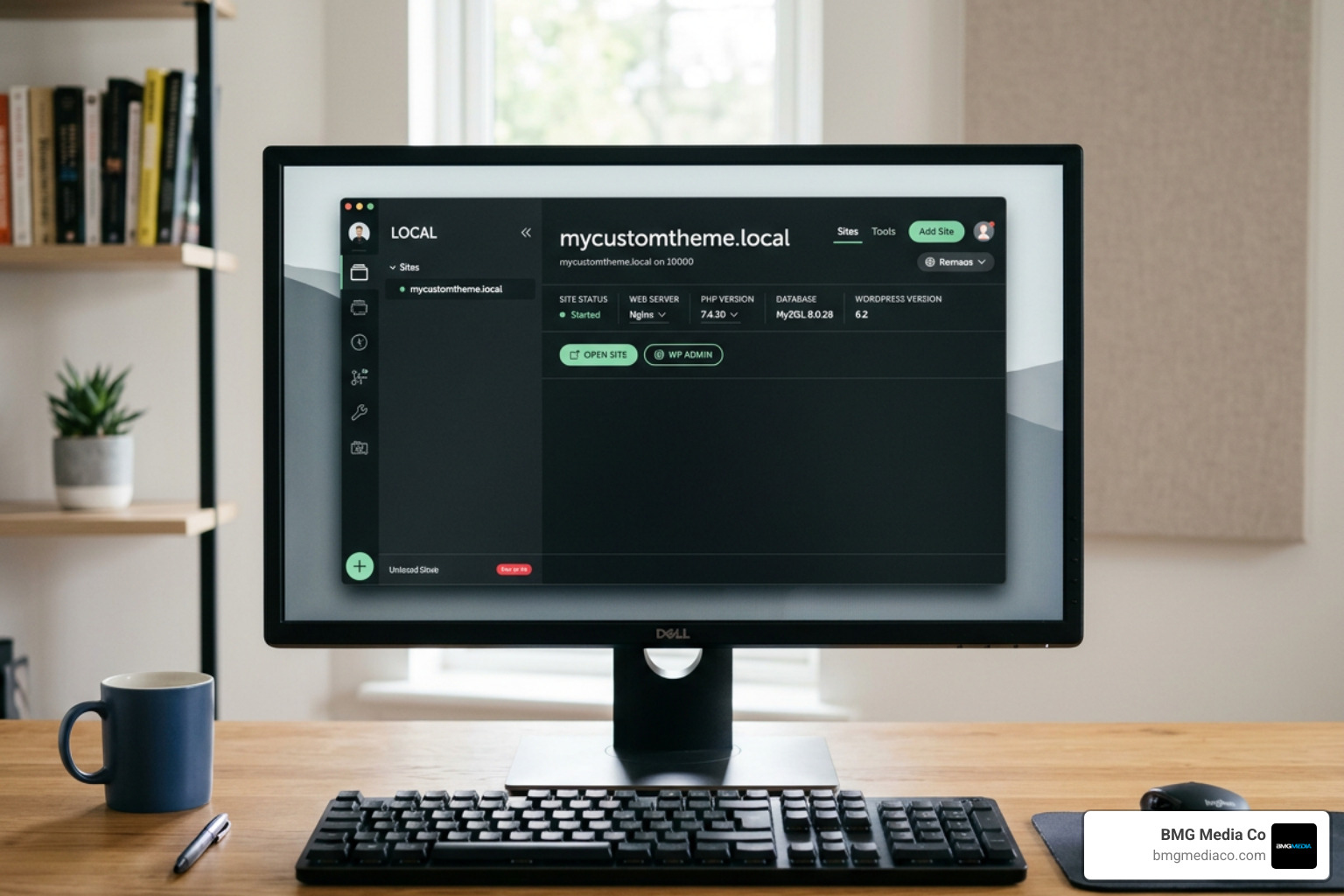
To set up a professional local environment, we highly recommend using LocalWP (formerly Local by Flywheel). It is a free, cross-platform tool that installs a local web server (Nginx or Apache), PHP, and a MySQL database with a single click.
Once LocalWP is installed, follow these quick steps:
mycustomtheme.local.Once the site is running, navigate to your site’s local folder. Open the wp-config.php file in the root directory. To catch errors early during development, locate the line that says define('WP_DEBUG', false); and change it to define('WP_DEBUG', true);. This tells WordPress to display PHP warnings and notices directly on the screen, helping you write cleaner, compliant code.
To build a wordpress theme from scratch, you must understand how WordPress locates and renders files. WordPress uses a strict template hierarchy to decide which PHP file should display a specific page. For instance, when a visitor requests a single blog post, WordPress searches for single-post.php, then falls back to single.php, and if that is missing, it defaults to the universal fallback, index.php.
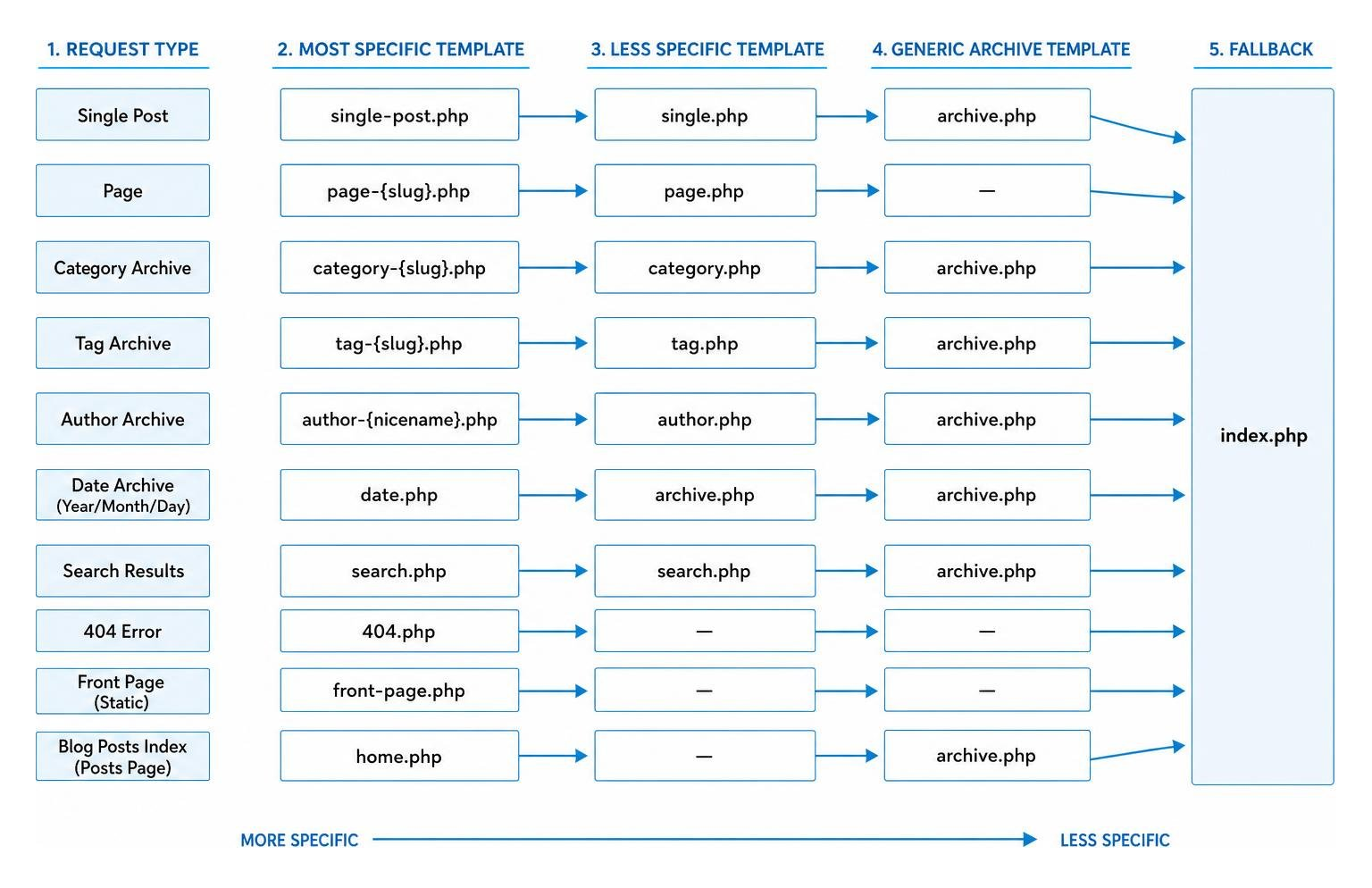
This hierarchy allows you to target specific content types with surgical precision. To begin, navigate to wp-content/themes/ and create a new directory named after your theme (e.g., my-custom-theme).
As mentioned in our introduction, WordPress only requires two files to recognize and register your theme: style.css and index.php.
The style.css file must contain a specific comment block at the very top. This is the theme metadata that WordPress reads to populate the theme details in the admin dashboard. Open your text editor and add the following lines to your style.css:
/*
Theme Name: BMG Custom Theme
Theme URI: https://bmgmediaco.com
Author: BMG Media Co.
Author URI: https://bmgmediaco.com
Description: A premium, high-performance custom WordPress theme built from scratch.
Version: 1.0.0
License: GNU General Public License v2 or later
Text Domain: bmg-custom-theme
*/
Next, create an empty index.php file in the same folder. To make the theme look professional in the WordPress dashboard, drop a 1200px x 900px image named screenshot.png (using a 4:3 aspect ratio) into your theme’s root directory. Once these files are in place, log into your local WordPress admin, navigate to Appearance → Themes, and click “Activate” on your new theme.
A monolithic index.php file containing all your HTML is difficult to maintain. To build a scalable theme, we must modularize our code by dividing a static HTML layout into reusable template files.
Create three new files in your theme directory: header.php, footer.php, and sidebar.php.
In header.php, place the opening HTML structure, including the head tag, the meta charset, and the main site navigation. Crucially, you must call the hook immediately before the closing head tag. This hook allows WordPress and active plugins to inject essential CSS, JavaScript, and metadata.
In footer.php, place your footer layout, closing structural tags, and the mandatory hook immediately before the closing body tag. This hook ensures that admin toolbars and core JavaScript files load correctly.
In your main template files (like index.php), you can easily pull these modular parts back together using standard template tags:
The core engine of any WordPress theme is “The Loop.” This is the PHP code that queries the database, checks if posts exist, and loops through them to display dynamic content.
A standard implementation of The Loop looks like this:
No content found.<?php
if ( have_posts() ) :
while ( have_posts() ) : the_post();
the_title('
', '
');the_content();
endwhile;
else :
echo '
endif;
?>
Inside The Loop, template tags like the_title() and the_content() automatically fetch and format the database content for the current post. To handle single blog posts and static pages differently, you should create single.php and page.php files. WordPress will automatically route traffic to these files based on the template hierarchy.
If you are interested in advanced layouts that bypass traditional structural limitations, explore our guide on How to build a custom blog without templates.
With your basic templates in place, it is time to turn your static assets into a dynamic, client-manageable Content Management System. This transition is managed primarily through the functions.php file in your theme root.
The functions.php file acts as the configuration hub for your theme. Instead of hardcoding menus, stylesheets, or widget areas, you must register them programmatically so they interface correctly with the WordPress admin.
First, never hardcode stylesheets or scripts inside header.php. Instead, enqueue them properly using the wp_enqueue_style() and wp_enqueue_script() functions hooked into the wp_enqueue_scripts action. This ensures that assets are loaded in the correct order and prevents duplicate libraries from loading.
To register theme features, write a setup function and hook it to after_setup_theme. Inside this function, you can register custom navigation menus using register_nav_menus() and enable features like post thumbnails and title tags using add_theme_support(). Additionally, you can register dynamic sidebar widget areas using register_sidebar() to let clients drag and drop widgets into their page layouts.
Standard WordPress installation comes with two primary content types: Posts and Pages. However, real-world business websites require custom data structures—such as portfolios, testimonials, or team members.
To handle these, you should register a Custom Post Type (CPT) using the register_post_type() function in your functions.php file. When registering a CPT, always set 'show_in_rest' => true to ensure the post type supports the modern block editor. After registering a new CPT, remember to visit Settings > Permalinks and click “Save Changes” to flush your permalink rewrite rules, or your new custom URLs will return a 404 error.
Once your CPT is registered, you can pair it with Advanced Custom Fields (ACF) Pro. ACF Pro allows you to assign custom metadata fields (like project dates, client names, or pricing) to your specific post types. To display these fields on the front end, use simple template functions like get_field('field_name').
For a deeper dive into rendering this data, check out our step-by-step Guide to displaying ACF fields on the frontend.
When you build a theme from scratch, you are responsible for its security, accessibility, and speed. Writing clean code is only half the battle; the final product must be secure against attacks, usable by everyone, and incredibly fast.

Security is a non-negotiable part of modern web development. The most common vulnerability in custom themes is cross-site scripting (XSS), which occurs when untrusted database content is rendered directly to the screen without verification.
To prevent this, you must escape all dynamic output using WordPress’s native escaping functions:
esc_html() for standard text strings.esc_url() for links and image sources.esc_attr() for HTML attributes.wp_kses_post() for content that contains allowed HTML tags.Additionally, always secure your PHP files from direct browser access by adding the following line to the very top of every template file: if ( ! defined( 'ABSPATH' ) ) exit;. This ensures that if someone tries to access your template files directly, the script terminates immediately.
Performance and accessibility are deeply connected. A fast site is accessible to users on slow mobile connections, and semantic HTML is accessible to users with screen readers.
To meet WCAG 2.1 AA accessibility standards, ensure your theme maintains a color contrast ratio of at least 4.5:1 for normal text and 3:1 for large text. Always include a “Skip to main content” link as the first focusable element in your header.php to assist keyboard-only users. Never remove default CSS :focus outlines without replacing them with a highly visible alternative.
For performance optimization, avoid loading fonts from external servers like Google Fonts, which can add 200–400ms to your page load time. Instead, host your font files locally within your theme directory and load them using CSS @font-face with font-display: swap configured. This GDPR-compliant approach prevents invisible text during page load and keeps your site loading instantly.
While starter themes like Underscores (_s) provide a helpful framework for beginners, starting from a truly blank directory is superior for premium, enterprise-grade development. Starter themes often include boilerplate CSS, outdated layout helpers, and structural assumptions that you will end up deleting or overwriting. By starting from a completely clean slate, you ensure that 100% of the code in your theme is written purposefully for your project. This results in maximum performance, easier debugging, and a codebase that is entirely free of legacy bloat.
Custom Post Types (CPTs) define the data structure of your website. If you register your CPTs inside your theme’s functions.php file, those post types will disappear from the WordPress admin panel the moment you switch or update your theme. The data still exists in the database, but it becomes an inaccessible “ghost.” To preserve data persistence, CPTs should always be registered using a custom plugin.
To learn how to write your own lightweight functional plugins, read our Beginners Guide to Custom Plugins.
To optimize your Largest Contentful Paint (LCP), avoid using CSS background images for hero sections. The browser’s preload scanner cannot discover background images defined in external stylesheets early enough. Instead, use a standard HTML img tag positioned absolutely within a relative container.
Additionally, assign fetchpriority="high" and loading="eager" to your hero image. This signals to the browser that this specific image is a critical visual asset, forcing it to download and render the image immediately, which significantly improves your Core Web Vitals scores.
Building a wordpress theme from scratch is more than just a development strategy — it is a commitment to quality, performance, and long-term business scalability. By bypassing bloated page builders and generic templates, you create a digital asset that is fast, secure, and uniquely tailored to your brand’s growth.
At BMG Media Co., founded in Birmingham, Michigan in 2009 by entrepreneur Blake George, we have spent over 15 years perfecting the art of the 100% custom WordPress build. From our roots in Southeast Michigan to our active markets in Chicago, Dallas, Austin, New York, and Los Angeles, we help brands scale with premium, high-performance web solutions. We don’t take shortcuts, and we never use cookie-cutter templates.
If you are ready to elevate your brand’s digital presence with a bespoke web experience, Partner with BMG Media Co. for custom web design and development services today. Let’s build something exceptional together.
