October 2026

Fast loading WordPress websites don’t happen by accident. They are the result of deliberate decisions made at every stage of a build — from the theme and page builder you choose, to your hosting stack, to how your images and scripts are delivered.
Here’s a quick answer to what it takes to build a fast WordPress site:
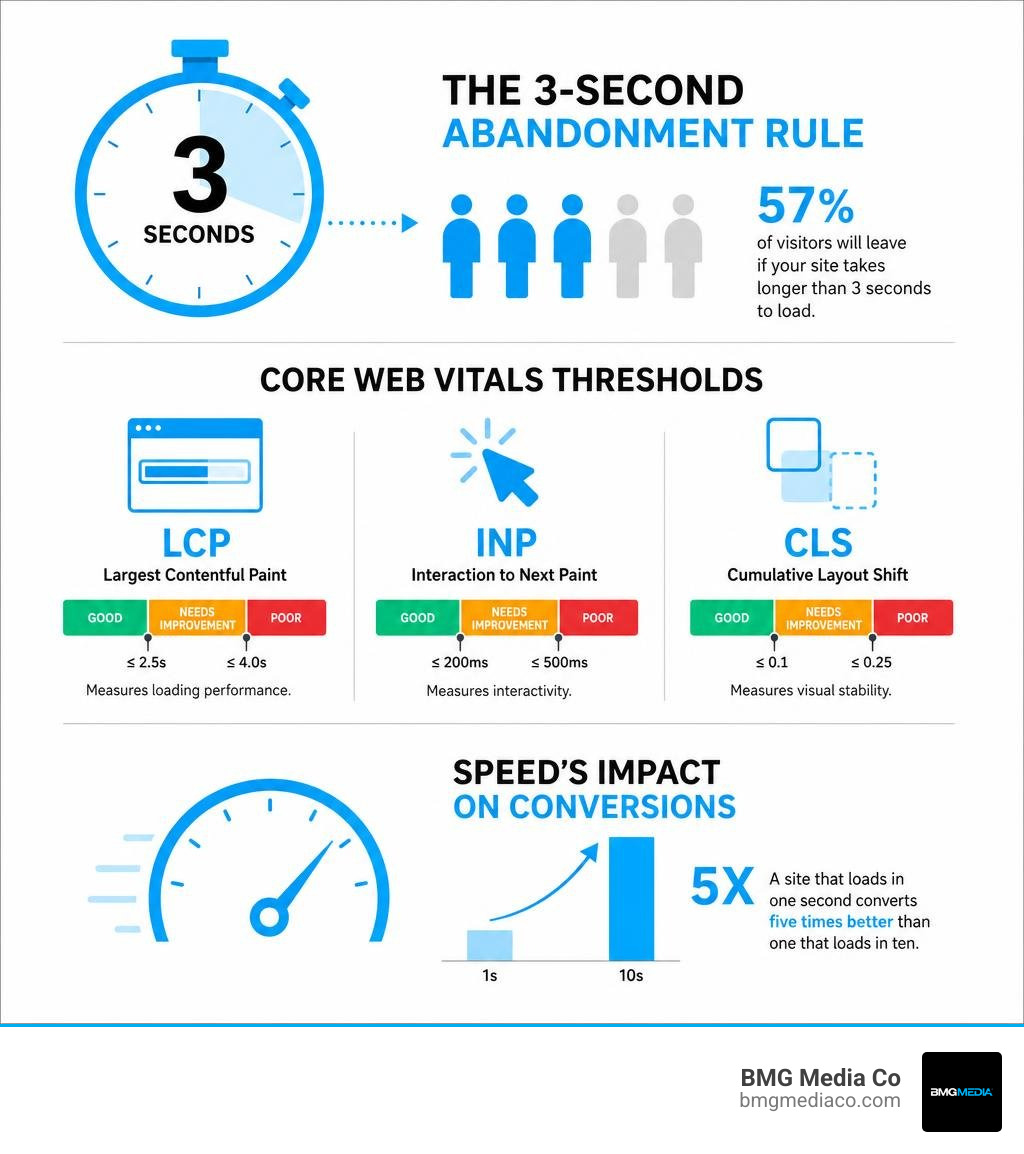
The stakes are real. A site that loads in one second converts five times better than one that loads in ten. And 57% of visitors will simply leave if your site takes longer than three seconds to load. That’s not a small problem — that’s lost revenue, every single day.
The frustrating part? Most WordPress performance issues are entirely preventable. They come from the same handful of root causes: bloated themes, poorly chosen plugins, unoptimized images, and hosting that was never built for performance.
This guide walks through every layer of the problem — and every solution.
I’m Blake George, founder of BMG Media Co., a custom web design and development agency that has built over 1,000 hand-coded WordPress websites since 2009 — every one of them optimized from the ground up for speed, without a single template or page builder in sight. Over the past 15+ years, I’ve seen how fast loading WordPress websites separate businesses that grow online from ones that quietly bleed traffic and leads to competitors who simply invested in doing it right.
Basic fast loading wordpress websites glossary:
In 2026, Google does not guess whether your website provides a good user experience. It measures it mathematically. Through the Core Web Vitals initiative, search algorithms look directly at real-user data to determine how quickly and smoothly your pages load. If your site feels like it is running through molasses, your search rankings will suffer.
To secure a premium position on search engine results pages, we must master three primary metrics:
Because Google prioritizes mobile-first indexing, these metrics are judged primarily on mobile network speeds. If your site is optimized only for desktop users on high-speed fiber connections, you are missing the mark. Achieving healthy Core Web Vitals requires a holistic approach to optimization, which we detail in our guide on Core Web Vitals Optimization for High Performance Sites.
Let’s step away from search engines for a moment and talk about human psychology. Modern consumers expect instant gratification. If your website takes longer than three seconds to load, 57% of those users will abandon it entirely.
The financial impact of this impatience is staggering. A site that loads in 1 second has a conversion rate 5 times higher than a site that loads in 10 seconds. In fact, even a mere one-second delay can lead to a 7% drop in conversions and a 32% increase in bounce rates.
When we run performance diagnostics, we often find that businesses are spending thousands of dollars on advertising campaigns only to drive traffic to a slow landing page that leaks leads. Speed optimization is not just a technical chore; it is a direct lever for conversion rate optimization. To avoid letting your hard-earned traffic slip away, you must treat performance as a foundational element of your design, a concept we explore in Performance Web Testing: Don’t Let Your Load Time Explode.
Many developers attempt to optimize slow WordPress sites by stacking optimization plugins on top of a bloated theme. This is the equivalent of putting premium fuel into a broken engine. To build truly fast loading WordPress websites, we must look at the underlying architecture.
The primary culprit of sluggish performance is asset weight. When a browser requests a page from a standard commercial WordPress site, it is often forced to download megabytes of redundant CSS, heavy JavaScript libraries, and unoptimized custom web fonts. This creates render-blocking bottlenecks that delay the browser from displaying any visual content.
To ensure your site looks exceptional and loads instantly on every device, the underlying codebase must be clean and lightweight. We dive deep into these design principles in The Easiest Way to Make Your Website Look Good on Every Screen.
Off-the-shelf commercial themes are built to appeal to the widest possible audience. To achieve this, theme developers pack them with dozens of layouts, built-in sliders, custom widgets, and settings panels.
The problem? Even if you only use 5% of those features, your visitors’ browsers still have to download, parse, and execute the CSS and JavaScript for the other 95%. This results in massive asset payloads and high HTTP request counts.
Consider how popular lightweight themes compare to bloated alternatives under identical testing conditions:
| Theme / Architecture | Average Load Time | CSS & JS Asset Size | Out-of-the-Box Requests |
|---|---|---|---|
| Custom Clean Code (ACF Pro) | 250ms – 400ms | < 50 KB | 3 – 8 |
| Neve (Lightweight Classic) | 563 ms | ~397 KB | 15 |
| Kadence (Lightweight Classic) | 589 ms | ~443 KB | 18 |
| GeneratePress (Lightweight Classic) | 639 ms | ~428 KB | 15 |
| Standard Commercial Theme | 1,800ms – 2,500ms | 1.2 MB+ | 45+ |
| Divi / Heavy Builder Theme | 2,800ms+ | 2.0 MB+ | 70+ |
While lightweight themes like GeneratePress can reduce CSS and JS sizes by almost half compared to previous generations of commercial themes, they still carry structural limitations. For businesses that require absolute performance, a custom-coded architecture is the only way to eliminate theme overhead entirely.
Page builders like Elementor and Divi have democratized web design, but they have done so at a severe cost to performance. These builders introduce a massive “div soup” — nested layers of HTML wrappers that destroy DOM efficiency and trigger Cumulative Layout Shift.
Every time you drag a widget into a page builder, you are likely loading several external scripts, stylesheets, and legacy shims. For example, Elementor can easily add over 800KB of render-blocking overhead to a page. If you must use these builders, developers have created open-source tools like the ehonep/elementor-performance-toolkit to surgically remove some of this bloat. Similarly, optimization utilities like Feather — Lighter pages. Same theme. work to strip out unused frontend assets without breaking your layouts.
However, these tools are merely band-aids. The modern, high-performance alternative is to build editorial experiences using native WordPress Gutenberg blocks paired with Advanced Custom Fields (ACF Pro). By writing custom blocks, we ensure that only the exact CSS and JavaScript required for the active blocks on a page are loaded. This keeps the DOM flat, minimizes render-blocking resources, and delivers an incredibly fast backend and frontend experience.

Once you have established a clean, block-based or custom-coded foundation, you can apply advanced optimization techniques to push your loading times into the sub-second range.
Media files are the second largest contributors to page weight across the web. To optimize them:
To scale these optimizations across your entire digital presence, we recommend reviewing our comprehensive guide on How to Scale with Advanced SEO Web Optimization and Custom WordPress Development.
Caching is the process of storing temporary copies of your website’s files so the server does not have to rebuild the page from scratch for every single visitor.
For high-traffic sites, full-page caching is critical. It bypasses WordPress and database execution entirely, serving pre-rendered HTML directly to the browser. Solutions like MilliCache: Redis WordPress Full-Page Cache – MilliPress utilize in-memory storage like Redis to deliver cache hits in the 4ms to 12ms range, turning slow database queries into near-instantaneous file delivery.
Going a step further, we can now leverage browser-native speculative loading. By using the Speculation Rules API, plugins can instruct the visitor’s browser to dynamically prefetch or prerender pages in the background based on user behavior (such as hovering over a link for 200ms).
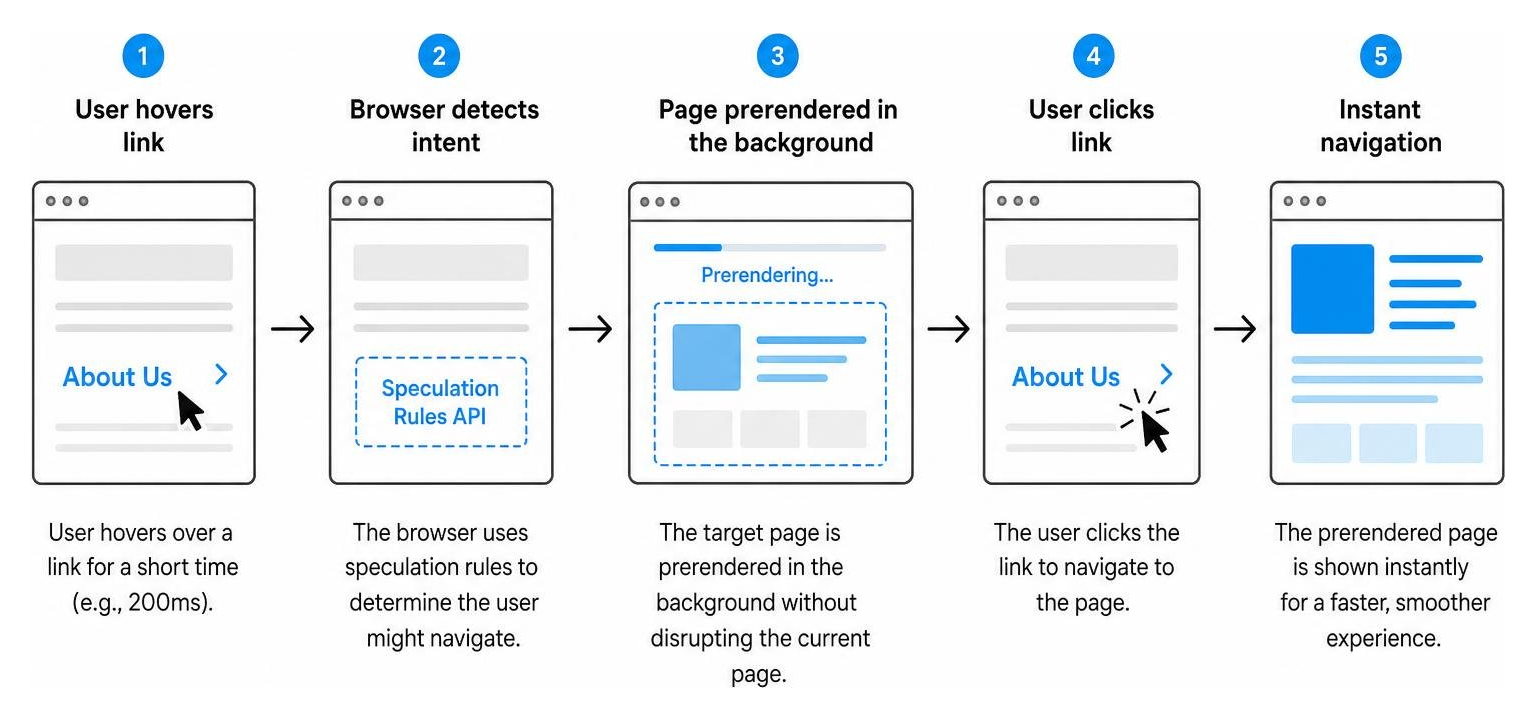
To learn how to configure this cutting-edge feature, read the official documentation on How to use Speculative Loading to prerender pages in WordPress.
To maximize frontend performance, you must manage your asset delivery pipeline with surgical precision. This involves:

Your frontend code is only as fast as the server hosting it. If your server takes 1.5 seconds just to respond to a request (known as Time to First Byte, or TTFB), your site will never be fast, no matter how optimized your images are.
To achieve superior hosting performance, your server configuration should include:
Cheap shared hosting is the primary cause of slow WordPress websites. On shared hosting, your site shares CPU and RAM resources with hundreds of other websites. When another site on your server experiences a traffic spike, your site slows to a crawl.
For business-critical sites, look for container-based or dedicated cloud hosting. These environments isolate your resources, ensuring consistent performance even during traffic surges. To keep a close eye on your hosting environment and maintain peak performance, implement the strategies found in our guide on Keep Your Site on Track with Performance Monitoring.
When diagnosing a slow site, many developers make the mistake of only looking at frontend scores. However, the real bottleneck often lies in the backend database.
Over time, your WordPress database accumulates bloat from post revisions, spam comments, transient options, and orphaned data left behind by uninstalled plugins. This bloat slows down database queries, driving up your TTFB.
To diagnose and fix these issues:
wp_options table for autoloaded data. If your autoloaded data exceeds 800KB, it will slow down every single page request.For deep-dive tutorials on diagnosing backend bottlenecks, check out resources like MakeWPFast – Make WordPress Fast Again.
The vast majority of slow WordPress sites suffer from a combination of five issues:
wp_options table, slowing down server response times.To build a high-performance WordPress site from scratch, you must ditch templates and page builders entirely. We recommend:
To get accurate, actionable performance data, avoid relying solely on basic speed scores. Instead:
For a complete pre-launch performance testing checklist, consult The No-Nonsense Guide to High Performance Web Launches.
At the end of the day, building fast loading WordPress websites is not about installing a handful of optimization plugins and hoping for the best. It is about clean engineering, disciplined asset management, and a refusal to compromise on code quality.
As a premium agency based in Birmingham, Michigan, we keep a close eye on the regional digital landscape. Across Southeast Michigan — from Troy and Rochester Hills to Farmington Hills, West Bloomfield, Novi, and Northville — the core requirement remains identical: your site must load instantly to compete.
At BMG Media Co., we have built our reputation on a simple, non-negotiable principle: every website we build is 100% custom, hand-crafted from scratch. No templates. No page builders. No Elementor bloat. No shortcuts. By writing clean, bespoke code tailored to your exact business goals, we eliminate the structural weight that slows down off-the-shelf sites, giving your business a distinct competitive edge in both user experience and search engine rankings.
Ready to stop losing leads to slow load times? Let’s build something fast, beautiful, and engineered to convert.
Explore our Custom Web Design and Development Services and let’s start a conversation about your project today.

