August 2026
Navigating the landscape of wordpress hosting starts with understanding how hardware resources are allocated. Web hosts don’t simply plug your site into a magic box; they assign computer processing power (CPU), system memory (RAM), and storage (like fast NVMe SSDs) to render your pages dynamically. When a user clicks your URL, the server executes PHP code, pulls data from a MariaDB or MySQL database, and sends HTML back to the browser. How efficiently that happens depends almost entirely on server isolation, resource limits, and overall hardware architecture.
To choose the right engine for your site, you need to understand the fundamental hosting tiers:
When comparing hosting options, always look at the underlying hardware protocols. Traditional hard disk drives (HDDs) or older SATA SSDs simply cannot match the real-time speed of NVMe (Non-Volatile Memory Express) drives, which drastically lower database query response times. To dive deeper into finding an ideal setup, explore The Ultimate Guide to WordPress Hosting Providers: Find Your Perfect Match.
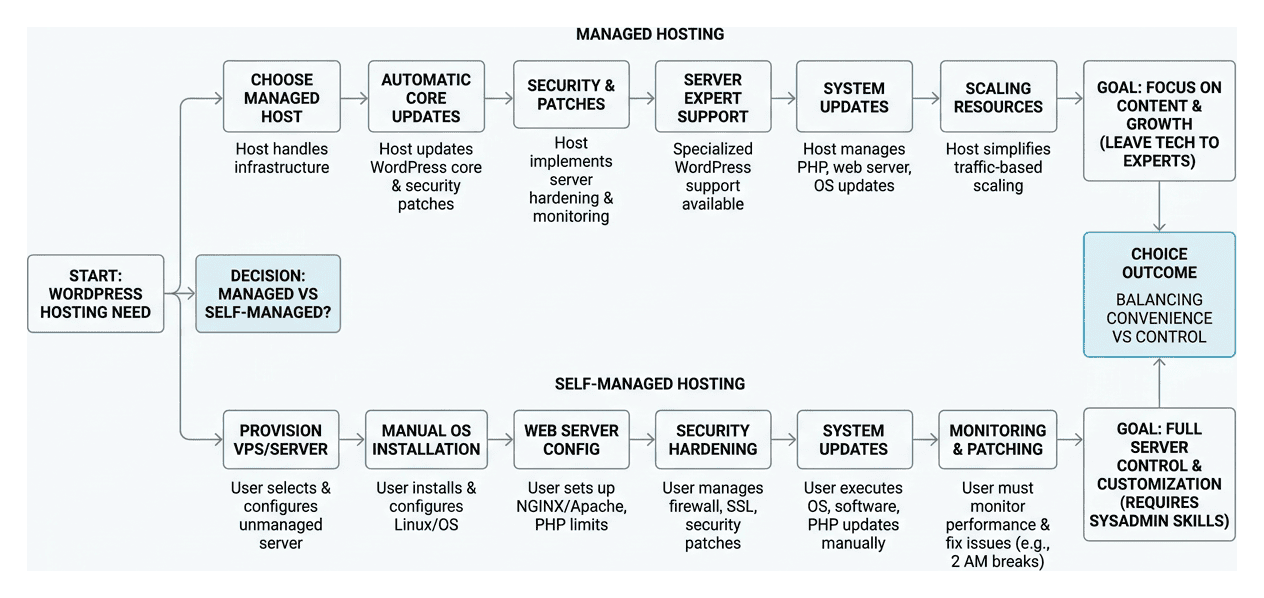
One of the largest forks in the road when shopping for wordpress hosting is choosing between a managed environment and a self-managed server.
Self-managed options (like spinning up an unmanaged Linux VPS) require you to hand-configure server software, set up NGINX or Apache web servers, manage PHP memory limits, configure SSL certificates, and execute security patches yourself. If a server update breaks your site at 2:00 AM, you are the system administrator tasked with fixing it.
Managed WordPress hosting offloads this heavy lifting entirely to server experts. Key features include:
It is easy to get confused by free or ultra-budget platforms like WordPress.com versus self-hosted WordPress (WordPress.org) running on a paid host. While free tiers sound appealing, they come with significant restrictions:
yoursite.wordpress.com) unless you upgrade to paid hosting tiers.
When benchmarking wordpress hosting performance, don’t rely solely on marketing claims. True performance comes down to measurable metrics like Time to First Byte (TTFB), First Contentful Paint (FCP), and overall site load speed.
TTFB measures how quickly a web server responds to an initial request. High-performing hosts consistently achieve sub-second response times—often achieving TTFB metrics under 200 milliseconds—by optimizing server stacks with modern protocols like HTTP/3, NVMe drives, and PHP 8.x execution.
Uptime metrics are equally critical. A host guaranteeing a 99.99% Uptime SLA (Service Level Agreement) means your site will experience less than 5 minutes of unscheduled downtime per year. Top-tier providers achieve this by deploying redundant server clusters with automatic failover protection, ensuring that if one server node experiences a hardware fault, dynamic edge routing redirects traffic instantaneously. Learn more about enterprise-grade hosting setups at Managed WordPress Hosting Frameworks.
A robust hosting infrastructure must treat security and speed as interconnected priorities. Essential baseline features include:
Implementing these proactive hosting measures directly improves overall site stability. Discover more site maintenance best practices in our guide on 12 Maintenance Tricks to Boost Your WordPress Conversion Rate.
When technical issues arise, access to knowledgeable human support is invaluable. Quality managed hosts provide true 24/7/365 support staffed by dedicated WordPress specialists rather than generic tier-1 call center agents reading basic scripts. Look for providers with proven high First Contact Resolution (FCR) rates capable of diagnosing complex issues like database connection dropouts or memory exhaustion in real time.
Furthermore, evaluating a host’s participation in open-source standards provides insight into their industry backing. Hosts officially endorsed by WordPress.org (such as those contributing to the community’s Five for the Future initiative) adhere strictly to GPL software licensing, proper brand usage, and system software standards. To better understand support tiers and technical care, review The Complete Guide to Comparing WordPress Maintenance Services.
Understanding the long-term cost of wordpress hosting requires looking beyond introductory promotional pricing. A common industry pattern is offering deep discounts for the first year, followed by renewal rates that can double or triple in price.
When calculating your annual hosting budget, evaluate these potential hidden costs:
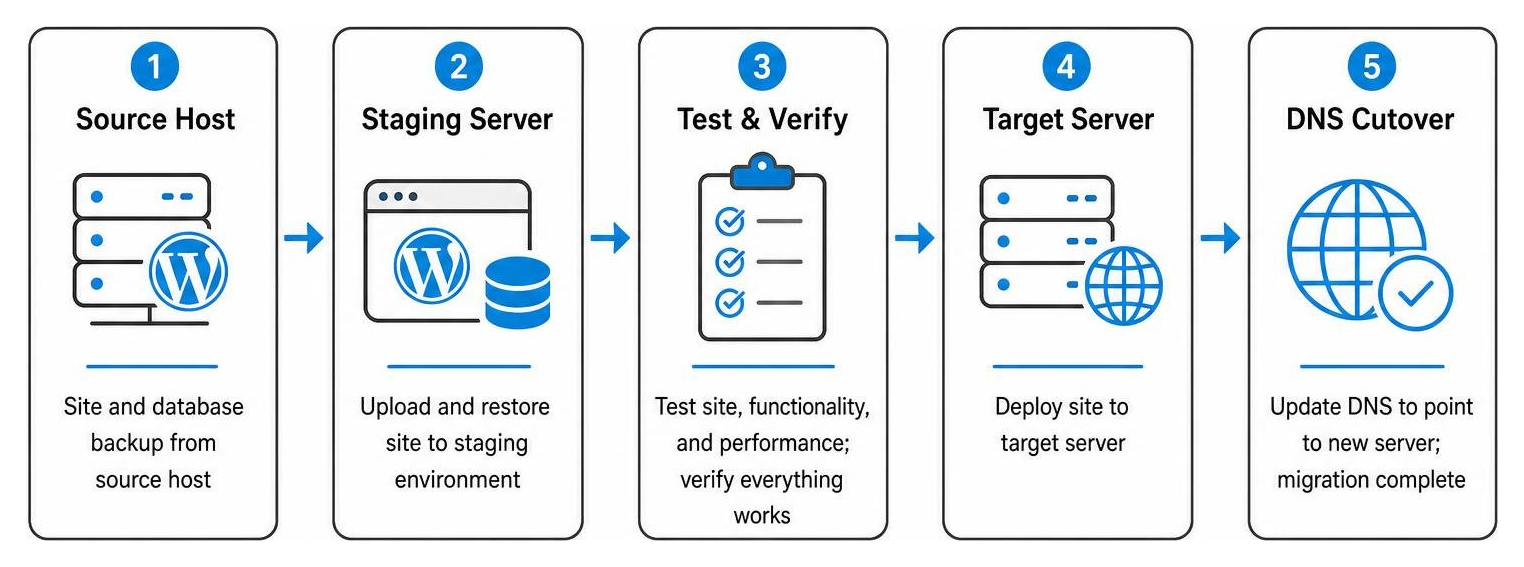
Switching hosting providers shouldn’t disrupt your operational business hours. Moving a live WordPress site smoothly requires a systematic migration workflow:
wp-content assets, themes, plugins, and the complete SQL database.For a deeper look at scaling server infrastructure cleanly during major brand transitions, check out How to Scale with Advanced SEO Web Optimization and Custom WordPress Development.
Comparing hosting tiers requires matching hardware capabilities to your specific technical requirements:
| Hosting Tier | Best For | Typical Resource Specs | Key Strengths |
|---|---|---|---|
| Shared Hosting | Simple personal blogs, local hobby sites | Shared CPU/RAM, 10–25 GB SSD | Extremely low initial cost |
| Managed WordPress Hosting | High-growth SMBs, corporate sites, blogs | Isolated containers, 1–4 vCPUs, 2–8 GB RAM, NVMe | Auto-updates, server-side caching, staging |
| Custom Enterprise Hosting | Large e-commerce, custom web apps | Dedicated resources, 8+ vCPUs, 16+ GB RAM, REDIS, CDN edge | Maximum uptime, custom server stacks, 100% tailor-made |
WordPress Multisite allows you to run an entire network of virtual websites using a single shared core installation and database. This setup is ideal for franchise businesses, multi-language websites, university networks, or real estate firms operating hundreds of sub-agent portals.
Managing a Multisite network requires a hosting platform built for heavy database performance. Because all network sub-domains or sub-folders share a unified database and theme directory, poor server configuration can slow down every site on the network simultaneously. Hosting environments optimized for Multisite utilize advanced object caching (such as Redis or Memcached) to handle high volumes of concurrent database queries smoothly. Read our comprehensive technical walkthrough in The Ultimate WordPress Multisite Custom Setup Guide.
Even the fastest, most expensive wordpress hosting platform cannot save a website built on slow, inefficient software. A major bottleneck in site performance is front-end bloat caused by commercial pre-made themes and generic drag-and-drop page builders (like Elementor or Divi). These generic builders inject thousands of lines of unnecessary code, unoptimized CSS, and heavy JavaScript libraries into the browser—severely degrading Core Web Vitals scores.
At BMG Media Co., we solve this by hand-crafting 100% custom WordPress themes built completely from scratch using Advanced Custom Fields (ACF Pro). We write clean, lightweight code tailored specifically to your exact user interface designs. This eliminates bloated frameworks entirely, providing your server with clean templates that render almost instantly.
When custom functionality is required, we build custom plugins targeted strictly to your business needs rather than stacking dozens of pre-made third-party plugins that bloat server resources. To learn more about streamlined backend development, visit Stop Back-End Bloat With an ACF Front-End Editor and check out our guide on WordPress Plugin Development From Zero to Hero in Five Steps.
Standard web hosting is generic infrastructure designed to host static files, basic HTML, or generic PHP applications. It lacks specialized server-level caching or custom database tuning.
Optimized wordpress hosting uses server architecture pre-configured specifically for the WordPress software stack. This includes NGINX FastCGI rules built to cache dynamic WordPress pages, object caching for faster database execution, automated updates for WordPress core software, and security firewalls trained specifically to block WordPress-targeted exploits.
Page load speed and Time to First Byte (TTFB) directly affect both your Google search rankings and customer conversion rates. Google officially uses Core Web Vitals—including Largest Contentful Paint (LCP) and Interaction to Next Paint (INP)—as search ranking signals. If your web host takes longer than 500 milliseconds to send the initial byte of data, your entire visual rendering timeline is delayed.
Studies show that every additional second a web page takes to load increases visitor bounce rates dramatically. Fast hosting ensures your content renders quickly, keeping users engaged and improving overall organic search performance.
A growing business should upgrade from generic shared hosting to a managed WordPress hosting environment when:

Choosing the right wordpress hosting provider isn’t just about picking the cheapest plan on the market—it is an investment in your site’s foundation, speed, security, and long-term business growth. By taking the time to evaluate server isolation, NVMe storage performance, automated backups, staging capabilities, and true specialist support, you set your business up for sustainable online success.
However, keep in mind that enterprise hosting infrastructure is only half of the performance equation. Even the fastest server stack cannot overcome heavy, unoptimized pre-built themes, slow page builders, or bloated, inefficient code.
At BMG Media Co., we combine powerful server infrastructure with 100% tailor-made, clean web engineering. Founded in Birmingham, Michigan in 2009, our team has designed and delivered over 1,000 custom web projects for clients across Metro Detroit, Southeast Michigan, and major national markets nationwide—including Chicago, Dallas, New York, Los Angeles, and Miami. We build every single website completely from scratch—no pre-made templates, no page builders, no shortcuts—ensuring lightning-fast speed, maximum security, and seamless scalability.
Ready to upgrade your site’s speed, design, and performance? Discover Custom WordPress Engineering Services with BMG Media Co. today, and let’s build something exceptional together.
