July 2026
Affordable website design for small business is more accessible in 2026 than it has ever been — but “affordable” means very different things depending on who’s selling it.
Here’s a quick breakdown of your real options:
| Solution | Typical Cost | Best For |
|---|---|---|
| DIY website builder (Wix, Squarespace) | $17–$40/month | Beginners with time to spare |
| AI-powered website builder | $1–$20/month | Fast, low-budget launches |
| Managed template service | $50–$199/month + setup fee | Owners who want hands-off support |
| Freelancer or small agency | $1,500–$5,000 one-time | Growing businesses needing more control |
| Custom agency build | $5,000–$10,000+ | Businesses focused on long-term ROI |
The right answer depends on your budget, your time, and how hard you need your website to work for you.
Here’s the uncomfortable truth most cheap website ads leave out: 88% of consumers research a business online before buying. That means your website is often the first — and sometimes only — impression you make. A site that loads slowly, looks dated, or breaks on mobile doesn’t just look bad. It costs you customers.
That doesn’t mean you need to spend $10,000 to get online. But it does mean you need to know exactly what you’re getting before you commit.
I’m Blake George, founder of BMG Media Co., and over the past 15+ years I’ve built more than 1,000 custom websites for businesses at every budget level — which means I’ve seen where affordable website design for small business delivers real value, and where cutting corners quietly kills growth. In this guide, I’ll walk you through every option clearly so you can make the smartest choice for your business right now.
Affordable website design for small business terms explained:
When we talk about affordable website design for small business, we aren’t just talking about the lowest price tag. True affordability is about value over time. If you pay $300 for a website that fails to load, drives away customers, and crashes during a local promotion, that “cheap” website actually cost you thousands in lost revenue.
For a small business, an affordable website is one that fits comfortably within your monthly cash flow while checking every box required to turn searchers into paying clients. Statistics show that small businesses with a professional website see an average 50% increase in customer inquiries compared to those without one.
To achieve these results, you don’t need enterprise-level complexity. Instead, you need a site that executes the basics flawlessly. According to our guide on What Should a Website Include? Business Websites Must-Haves, every professional small business site must feature:
By focusing on these core conversion drivers and avoiding unnecessary technical bloat, small businesses can easily save $5,000 to $15,000 in initial setup costs compared to complex custom development.
The web design market in 2026 offers several distinct paths for budget-conscious business owners. Whether you want to roll up your sleeves and build it yourself or hire a localized service to handle the heavy lifting, there is an option that fits your operational style.
To help you visualize the modern landscape, we have compared the primary approaches below:
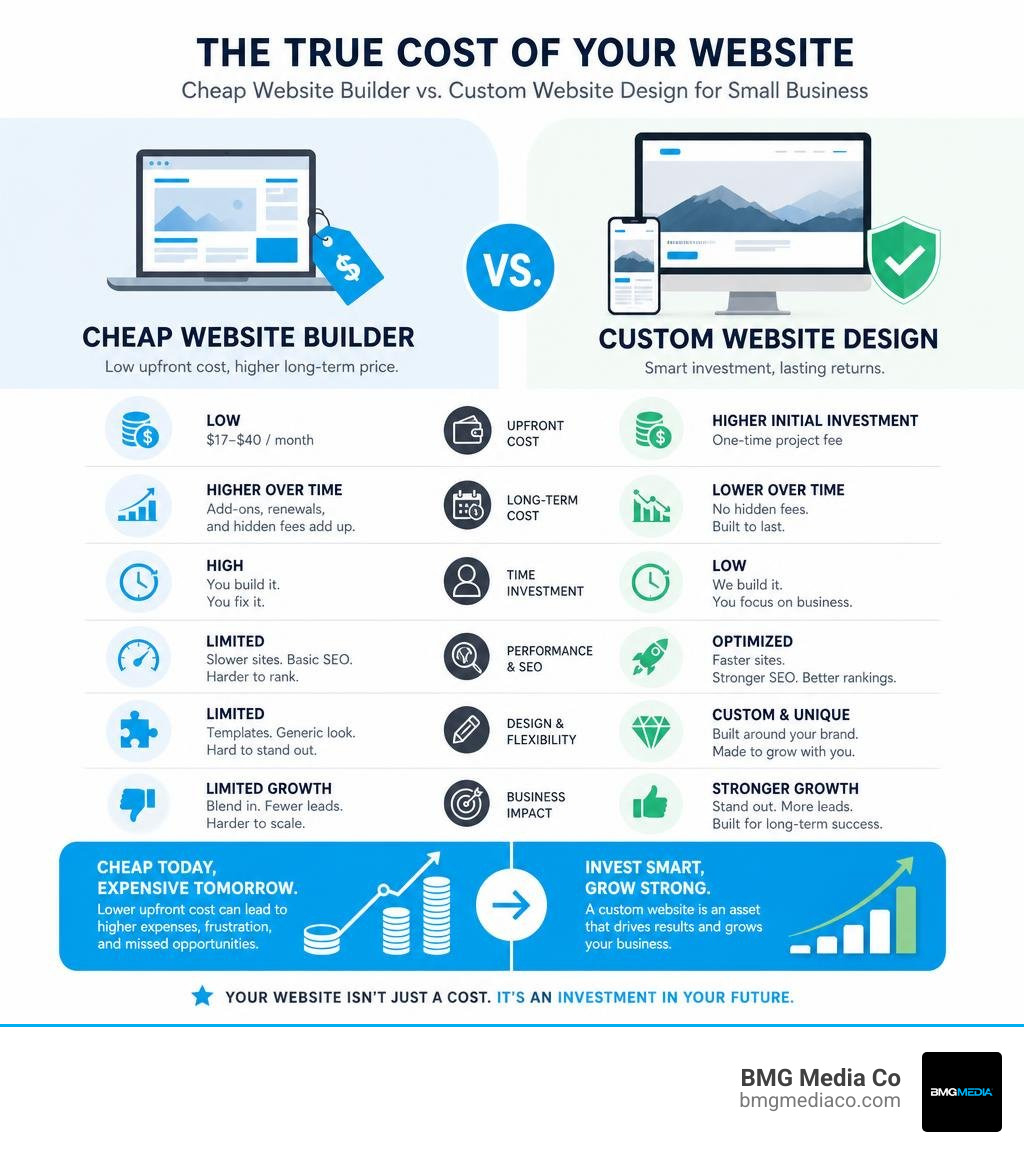
| Criteria | DIY Builders (e.g., Wix, Squarespace) | AI-Powered Builders | Managed Template Packages | Custom Agency Builds |
|---|---|---|---|---|
| Upfront Cost | Very Low ($0 – $50) | Extremely Low ($1 – $20) | Moderate ($99 – $1,500) | Premium ($5,000+) |
| Monthly Fee | $17 – $40/month | $1 – $5/month | $50 – $199/month | Minimal (Hosting only) |
| Time Investment | High (20 – 40 hours) | Extremely Low (< 1 hour) | Low (Review & Approve) | Low (Strategic Oversight) |
| Customization | Moderate (Template-bound) | Low (System-generated) | Moderate (Configured for you) | Unlimited (Built from scratch) |
| SEO & Speed | Standard | Basic | Good | Elite (Fully Optimized) |
If you are evaluating DIY platforms, our breakdown of the Best Website Building Platforms 2024 is an excellent starting point to understand how these tools have evolved.
For businesses looking for professional assistance without agency prices, managed template services provide an exceptional middle ground. These services deliver completed multi-page small business websites for a highly accessible setup fee and a predictable monthly maintenance plan, taking the technical burden off your shoulders.
Artificial intelligence has completely rewritten the playbook for low-cost web design. In 2026, AI tools can generate fully functional, visually coherent landing pages in under five minutes. Platforms powered by AI allow entrepreneurs to build and deploy complete sites starting at just a few dollars per month, replacing hundreds of dollars in separate software subscriptions.
However, while AI is fantastic for speed, it has distinct limitations. AI-generated layouts often rely on repetitive design patterns. They can struggle with complex navigation structures, highly specific local SEO configurations, and unique branding elements. For a simple landing page or a concept validation site, AI is an unbeatable budget tool. For a growing brand that needs to stand out in a crowded local market, rely on AI for your first draft, but expect to transition to human-led design as your business scales.
If you want to bypass the ongoing monthly subscription fees of visual builders, buying hand-coded templates is a highly effective alternative. Many developers offer custom-designed, hand-coded HTML/CSS templates starting at very affordable rates.
The primary advantage here is total file ownership. Unlike subscription-based platforms where your site is locked to their servers, with hand-coded templates, you own every file. You can host your site anywhere, make manual updates, and never worry about a platform raising its monthly fees.
Before you buy a template, make sure you understand the technical trade-off. If you do not know basic HTML or CSS, making updates can feel like learning a foreign language. If you plan to scale your digital footprint, you will eventually need a more robust framework. As we discuss in Why Your Business Needs a Custom Website Design and Development Strategy, a custom architecture is the only way to ensure unlimited scalability. If you are updating an existing site, make sure you read our guide on how to Don’t Just Clone It: A Modern Guide to Web Design and Redesign to avoid losing your search engine rankings.

It is a story we hear all the time in the Detroit metro area, from Novi, MI to Royal Oak, MI: a business owner signs up for a “free” or “$5/month” website builder, only to watch the actual invoice balloon over the course of the year.
Cheap website platforms are built on a “freemium” model. They lure you in with a rock-bottom entry price, then monetize your business through essential add-ons:
info@yourbusiness.com often costs an extra $6 to $10 per user, per month.To protect your business, you must look at the complete picture. We break down these hidden variables in The Secret Sauce of SEO Web Design Packages Revealed so you can spot the warning signs before signing a contract.
A website is not a static billboard; it is a piece of software. It requires continuous maintenance to stay secure and functional. If you use a cheap, self-managed platform, you are solely responsible for:
If you do not have the technical expertise to manage this yourself, look for affordable managed services that bundle security and support into their monthly plans.
Deciding between a DIY builder, a template service, or a professional agency comes down to a simple calculation: Time vs. Money.
If you are a startup with a budget under $1,000, your time is your greatest asset. Spend the 30 to 40 hours required to learn a DIY builder or configure a high-quality template.
If your business is established, generating consistent revenue, and your time is worth $100+/hour, building your own website is actually a highly expensive use of your time. In this scenario, hiring a professional service to handle the build is the smarter financial decision. To see how top-tier providers structure their offerings, explore our analysis of the Top Small Business Web Design Companies.
If you decide to hire a professional, you will find various localized options across Southeast Michigan, from Troy and Rochester to Farmington Hills and Novi. Many regional specialists offer budget-friendly packages tailored to local businesses.
When evaluating these or any other low-cost web design services, use this checklist to spot potential red flags:
For businesses that want a site tailored to their exact brand identity without the cookie-cutter feel, look for services that specialize in Tailor-Made Sites That Fit Your Brand Like a Glove.
Yes, absolutely. Affordable web design can look incredibly polished if it adheres to clean, modern design standards. Professionalism is not about complex animations or custom-coded databases; it is about layout consistency, high-resolution typography, intuitive navigation, and fast load times.
To ensure your budget site builds instant trust with your local audience, we recommend reading our guide on How to Find Your Business Voice Through Custom Design.
A template website uses a pre-built layout where your logo, colors, and text are swapped into existing placeholders. While highly cost-effective and fast to launch, templates limit your ability to create unique user flows or scale complex features.
A custom website is designed from a blank canvas. Every line of code is optimized for your specific conversion goals, search engine performance, and brand identity. For a deep dive into why custom builds consistently outperform templates in competitive markets, check out The Sussex Guide to Bespoke Web Design Without the Cookie Cutter Templates.
A standard DIY or AI-generated website can be launched in a weekend, or even a single afternoon if you have your content ready. Managed template services typically deliver a completed business website within 2 to 4 weeks, depending on how quickly you provide your branding assets, photos, and copy.
Building an affordable website design for small business is entirely about finding the right balance for your current stage of growth. If you are just starting out, leverage AI tools, DIY builders, or affordable template packages to establish your digital footprint quickly and cost-effectively.
However, as your business grows, your digital needs will evolve. When you reach the point where your website needs to be a high-performance sales engine—optimized for search engines, built with clean code, and engineered to maximize conversions—templates and DIY builders will eventually limit your potential.
When you are ready to transition from a starter site to a high-converting digital asset, we are here to help. At BMG Media Co., we specialize in premium, 100% custom web design and development. We don’t use templates, shortcuts, or bloated page builders. Every line of code we write is crafted to fuel your long-term business growth.
Ready to build a website that works as hard as you do? Explore our Custom Web Design and Development Services and let’s build something exceptional together.
