May 2026

The manufacturers website Windows 10 pairing is your most reliable starting point for keeping your PC stable, secure, and running the right drivers. Here’s a quick overview of what it means and why it matters:
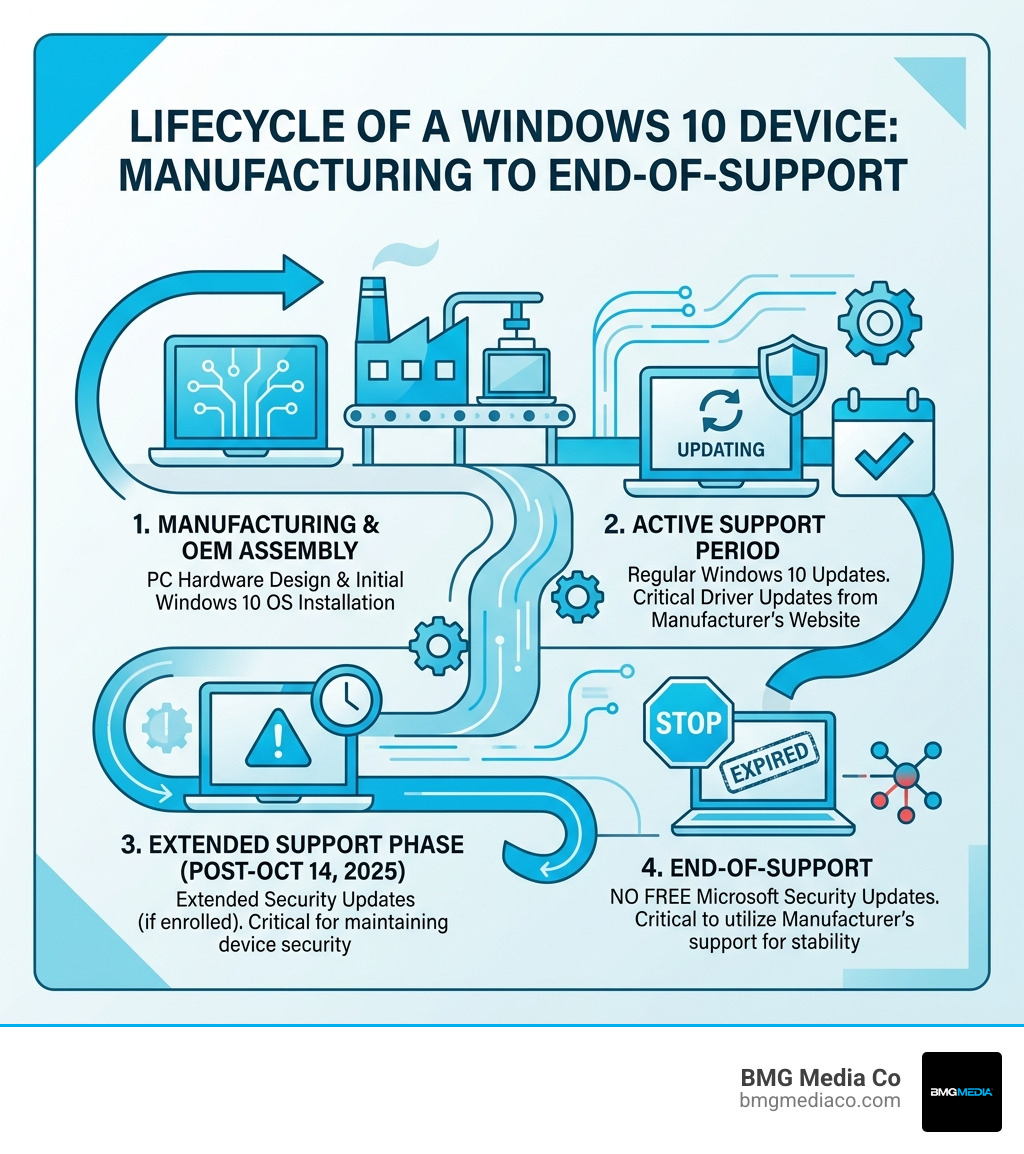
Important: Windows 10 reached end of support on October 14, 2025. Microsoft no longer provides free security updates or technical assistance. Visiting your manufacturer’s website is now more critical than ever to stay protected.
Finding the right drivers and support resources for your specific hardware is not always straightforward — especially as Windows 10 ages. Outdated OEM drivers, confusing support portals, and the risk of downloading from fake sites are real challenges that affect everyday users and business owners alike.
I’m Blake George, founder of BMG MEDIA, a web design and development agency with over a decade of experience building high-performance digital platforms for industries including manufacturing — giving me a front-row seat to how manufacturers website Windows 10 compatibility issues impact real business operations. That experience shapes every practical tip in this guide.
Must-know manufacturers website windows 10 terms:
Before you head to a manufacturers website Windows 10 support page, you need to know exactly who built your machine and what model it is. This might sound simple, but “I have a Dell” isn’t enough when Dell has produced thousands of different configurations over the last decade.
The most accurate way to find your details without crawling under your desk with a flashlight is the System Information utility.
Most laptops have a sticker on the bottom, and desktops often have one on the side or back. These stickers contain the Serial Number or Service Tag. On a manufacturers website Windows 10 portal, entering this specific code is the “gold standard” because it filters the results to show only the parts actually inside your specific chassis.
If your stickers are worn off and you’re feeling a bit techy, you can use the Command Prompt. Type wmic bios get serialnumber to pull your unique ID directly from the motherboard. This ensures that when you look for manufacturing website design resources or drivers, you aren’t guessing.
Be careful not to be misled by the badges on your case. A sticker that says “Intel Core i7” or “NVIDIA GeForce” tells you who made the processor or graphics card, but it doesn’t tell you who built the computer. You want the system manufacturer (the assembler), as they are responsible for the customized drivers that make all those parts work together on Windows 10.
Once you have your model number, the next step is navigating the often-complex support portals. At BMG Media Co, we know that industrial website templates for heavy-duty results are essential for a good user experience, but unfortunately, many older OEM sites can be a bit of a maze.
Look for a menu item labeled Support, Downloads, or Customer Service. Most major brands like Dell, HP, and Lenovo have a dedicated “Drivers & Downloads” search bar right on their homepage.
When you find your model’s page, the site will usually ask for your Operating System. You must choose Windows 10, but you also need to know if you are running the 32-bit or 64-bit version.
If you are starting from scratch and need the OS itself, you should Download Windows 10 directly from Microsoft to ensure you have a genuine copy before layering on the manufacturer’s specific drivers.
For those who aren’t just updating one PC but are instead managing a fleet of devices or building custom systems, Microsoft provides a suite of “manufacturing tools.” These are designed to help OEMs and system builders deploy Windows 10 with specific customizations already baked in.
The Windows Assessment and Deployment Kit (ADK) includes tools like DISM (Deployment Image Servicing and Management). These tools allow you to:
Using these tools ensures that every time a computer is “reset,” it goes back to the state the manufacturer intended, complete with all the necessary drivers. This is a key part of manufacturing website design: from blueprint to launch in the digital sense—creating a stable foundation for the end user.
| Feature | Windows Update | Manufacturer Direct |
|---|---|---|
| Ease of Use | Automatic, no effort | Manual search required |
| Speed of Release | Often delayed by months | Available immediately |
| Customization | Generic drivers | Specifically tuned for your hardware |
| Reliability | Good for basic parts | Essential for specialized hardware (Audio, Trackpads) |
As of October 14, 2025, Windows 10 has officially reached its end of support (EOS). This is a massive milestone that every user needs to take seriously.
When a version of Windows hits EOS, Microsoft stops issuing:
This means your PC becomes a “sitting duck” for new malware and vulnerabilities. While your computer will still turn on and run your apps, the “doorframe” of the OS is essentially rotting away, making even the best antivirus software less effective.
If you absolutely cannot move away from Windows 10 yet—perhaps due to legacy websites for manufacturing companies that require specific browser configurations—Microsoft offers the ESU program. For a fee (typically starting at $30 for the first year), you can continue receiving critical security updates until October 2026.
The best way to stay secure is to Experience the Power of AI with Windows 11. If your hardware is compatible, the upgrade is free. However, many Windows 10 devices do not meet the strict hardware requirements for Windows 11 (like TPM 2.0). If your manufacturers website Windows 10 support page says your model isn’t “Windows 11 Ready,” it might be time to look into new hardware. You can check the End of support for Windows 10 specifications to see exactly where your current machine stands.
It is a common frustration: you go to the manufacturers website Windows 10 page for your laptop, and the latest driver is from 2021, even though the component maker (like Intel) has a version from last week.
You can, but you should be careful. Component manufacturers like Intel, AMD, and NVIDIA provide “generic” drivers. While these often include the latest features for gaming or productivity, they lack the OEM customizations.
To avoid malware and “driver update” scams, always ensure you are on a verified domain. Here are the common starting points:
Navigating a manufacturers website Windows 10 portal is a fundamental skill for any PC owner, especially as we move past the official end-of-support date. Whether you are hunting for a legacy audio driver to fix a “no sound” issue or using professional manufacturing tools to deploy a fleet of secure workstations, the manufacturer’s official site remains your most important resource.
At BMG Media Co, we understand the precision required in the manufacturing world. Just as a machine needs the right parts to function, a business needs a high-performance digital presence to thrive. We specialize in creating fully custom, template-free websites and web apps that drive results for the industrial sector.
If your business is looking to upgrade its digital toolkit, experience the power of high-performance manufacturing web design with us. Based in Birmingham, Michigan, we’ve built over 1,000 custom sites designed to perform as reliably as a well-maintained Windows 10 system. Reach out to BMG Media Co today to see how we can build your blueprint for digital excellence.
