September 2026

Custom UI design services create app interfaces around your users, brand, and real business goals instead of forcing your product into a generic template. The work typically includes user research, wireframes, prototypes, accessible visual design, design tokens, and reusable components that developers can build and maintain.
For modern apps, that matters because most usability problems are structural: crowded screens, unclear choices, and workflows that ask users to do too much. A custom interface can remove that friction, make complex tasks feel simple, and give your product a look competitors cannot copy from the same component library.
Good UI is also a business tool, not decoration. Research commonly cited in the industry associates strong interface design with conversion lifts of up to 200%, while deeper UX improvements can have an even larger effect. The goal is not to make every screen flashy. It is to help the right person take the next step with confidence.
I am Blake George, founder of BMG Media Co. Since 2009, I have helped lead more than 1,000 custom digital projects across industries, with a focus on building fast, scalable experiences that fit each business rather than a template. In this guide, I will explain how custom UI design services support better apps, stronger adoption, and long-term growth.
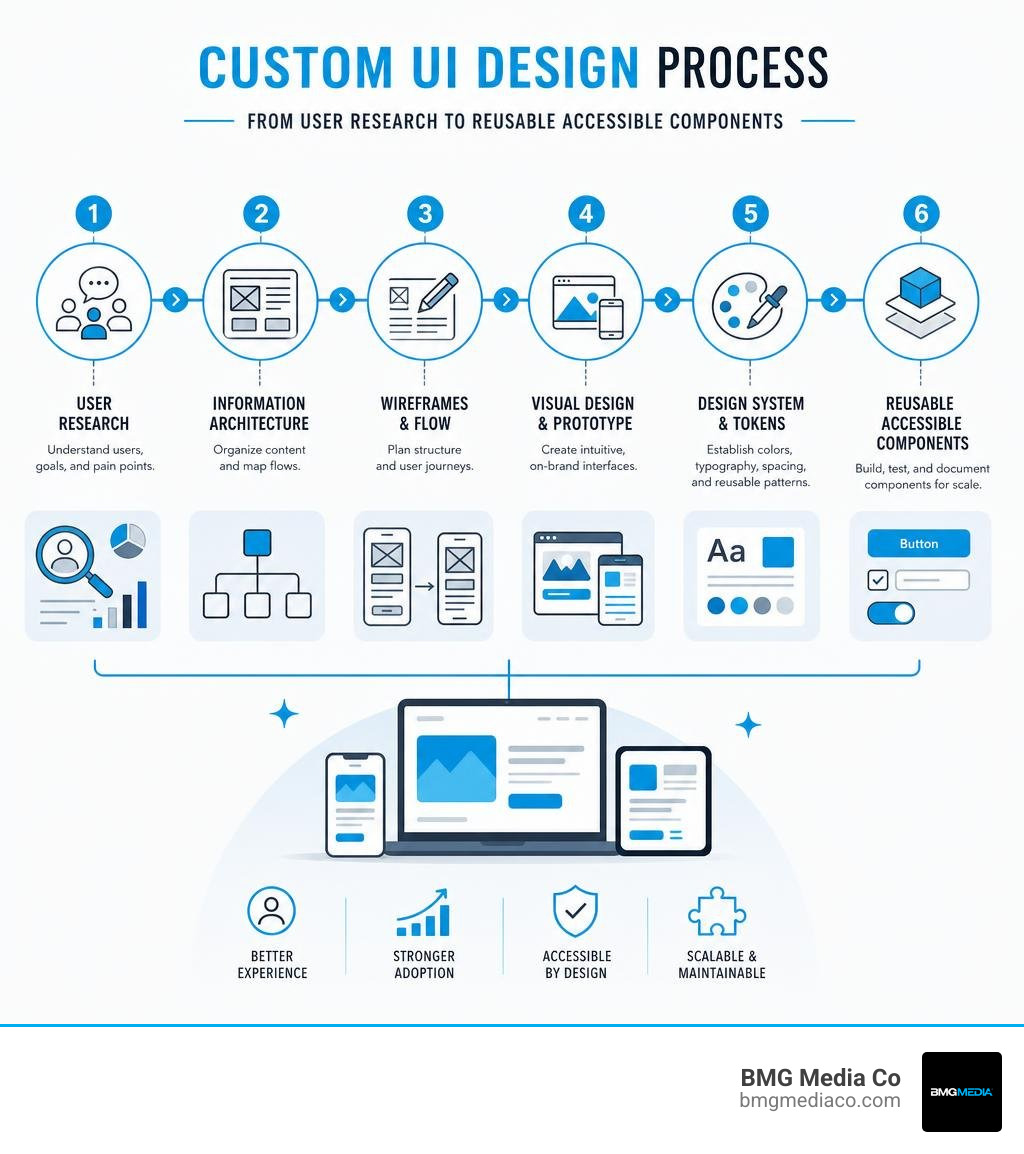
Quick custom ui design services terms:
Every software team encounters a fundamental architectural fork in the road: do you assemble your product using pre-built UI kits like Material UI, Tailwind UI, or Bootstrap, or do you architect a tailored user interface from scratch?
Pre-packaged kits cover 70% to 80% of standard digital patterns reasonably well. They provide instant modals, forms, dropdowns, and buttons. However, off-the-shelf component libraries come with serious hidden costs: heavy runtime bloat, severe visual homogenization, and rigid constraints. When your app attempts to present a unique brand identity or solve an unconventional workflow challenge, template frameworks resist customization at every turn. Overriding their default styles introduces fragile CSS hacks, bloated dependencies, and compounding technical debt.
To better understand how visual styling interacts with underlying user behavior, explore UX vs UI Design: Understanding the Difference and Importance.
| Feature / Dimension | Bespoke Custom UI Components | Generic Component Libraries |
|---|---|---|
| Brand Identity & Differentiation | 100% unique, tailored to your exact brand aesthetics and tone. | Homogenized visual appearance shared with thousands of apps. |
| Frontend Code Bloat | Zero dead code; tree-shaken, ultra-lightweight assets tailored to the app. | Large bundle overhead packed with unused legacy CSS and JS styles. |
| Complex Workflow Support | Specifically architected for proprietary business logic and edge cases. | Forcibly shoehorns unique enterprise processes into generic UI patterns. |
| Accessibility Control | Engineered and tested against strict WCAG standards down to the element. | Basic accessibility that often breaks during deep component overrides. |
| Scalability & Governance | Cleanly modularized using semantic design tokens and custom Storybook components. | Brittle custom stylesheet overrides that break during framework updates. |
Investing in custom interface architecture is not about vanity—it is a strategic decision tied directly to operational scale and product complexity. You should transition from off-the-shelf UI components to a custom architecture when your app meets any of these criteria:
A custom user interface is not an arbitrary assortment of static screens; it is a scalable, living design system. The foundational layer of this system is the design token.
Design tokens are centralized, platform-agnostic variables that store visual design decisions—such as exact hex colors, typography scales, padding units, border radii, shadow depths, and animation timing curves. When an interface relies on design tokens, a design update made to a primary variable automatically cascades through the entire application without needing manual engineering rewrites.
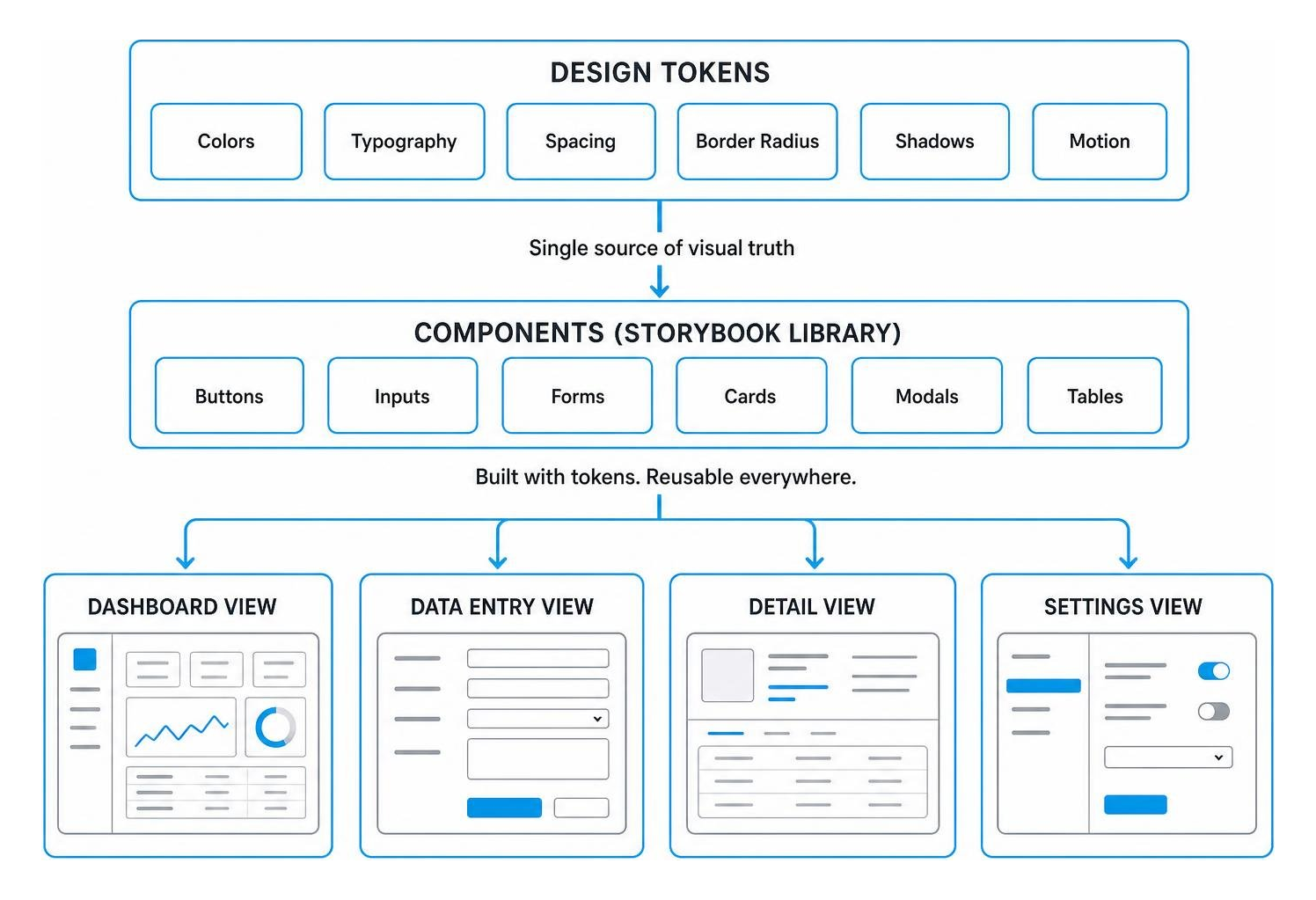
Pairing design tokens with an interactive documentation environment like Storybook enables frontend engineering teams to isolate, build, and test custom UI components in total separation from backend business logic. For businesses pursuing scalable web applications, deploying custom web development solutions ensures that every custom component is fully documented, tested across every interaction state (loading, error, active, disabled), and instantly usable across diverse engineering teams.
When digital products struggle, founders and executives frequently diagnose the issue as a “feature gap.” In reality, product churn and lost revenue are almost always UI-driven friction points. In enterprise software analysis, up to 75% of sales losses stem directly from UI deficiencies and interaction barriers rather than missing functionality.
Most user experience failures are structural. They are caused by confusing visual hierarchies, crowded interfaces, visual clutter, and multi-step flows that place excessive cognitive load on the user. To dive deeper into holistic digital product strategy, review our guide on Mastering User Experience with Professional UX Design Services.
The most visually stunning interface in the world is useless if it does not match the everyday realities of the people using it. Without in-depth discovery, enterprise software projects run the risk of becoming “shelf-ware”—expensive software that users actively avoid.
Effective UI engagements begin with the Jobs-to-be-Done (JTBD) framework and contextual user shadowing. By watching real users navigate their daily tasks, designers identify friction points that simple surveys fail to capture.
Consider these real-world transformations driven by structural interface redesigns:
When you cut visual clutter and eliminate unnecessary steps, software stops fighting the user and starts accelerating productivity.
Accessibility is not a cosmetic marketing checkbox—it is a core engineering requirement. Building an app that fails Web Content Accessibility Guidelines (WCAG) creates legal liability under the Americans with Disabilities Act (ADA) and locks out millions of prospective users.
Our custom interface design embeds accessibility considerations directly into the foundational visual layer:
prefers-reduced-motion settings.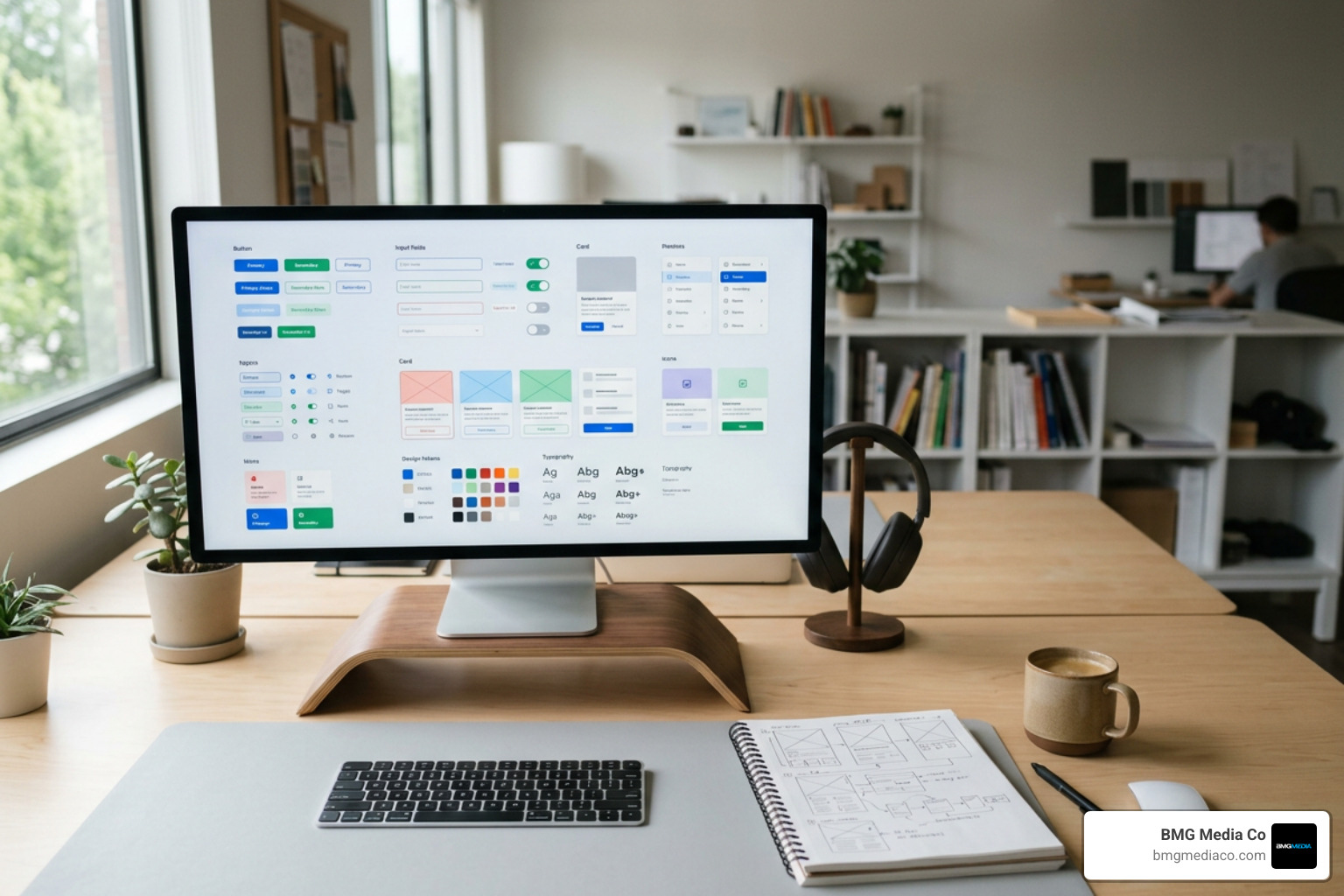
A professional UI design engagement bridges the gap between high-level visual design and high-performance frontend code. It considers both the frontstage UI (the layout, micro-interactions, and visual feedback seen by users) and the backstage processes (API payloads, component rendering logic, state stores, and deployment pipelines).
To ensure that responsive design works seamlessly across desktop, tablet, and mobile environments, review The Easiest Way to Make Your Website Look Good on Every Screen.
A complete custom UI design engagement delivers an organized suite of assets ready for immediate production. Standard deliverables include:
Project durations depend on scope:
The classic point of failure in digital product development occurs during designer-to-developer handoff. When designers work in isolation, they produce static artifacts that are unrealistic to build, violating backend constraints and breaking responsive layouts.
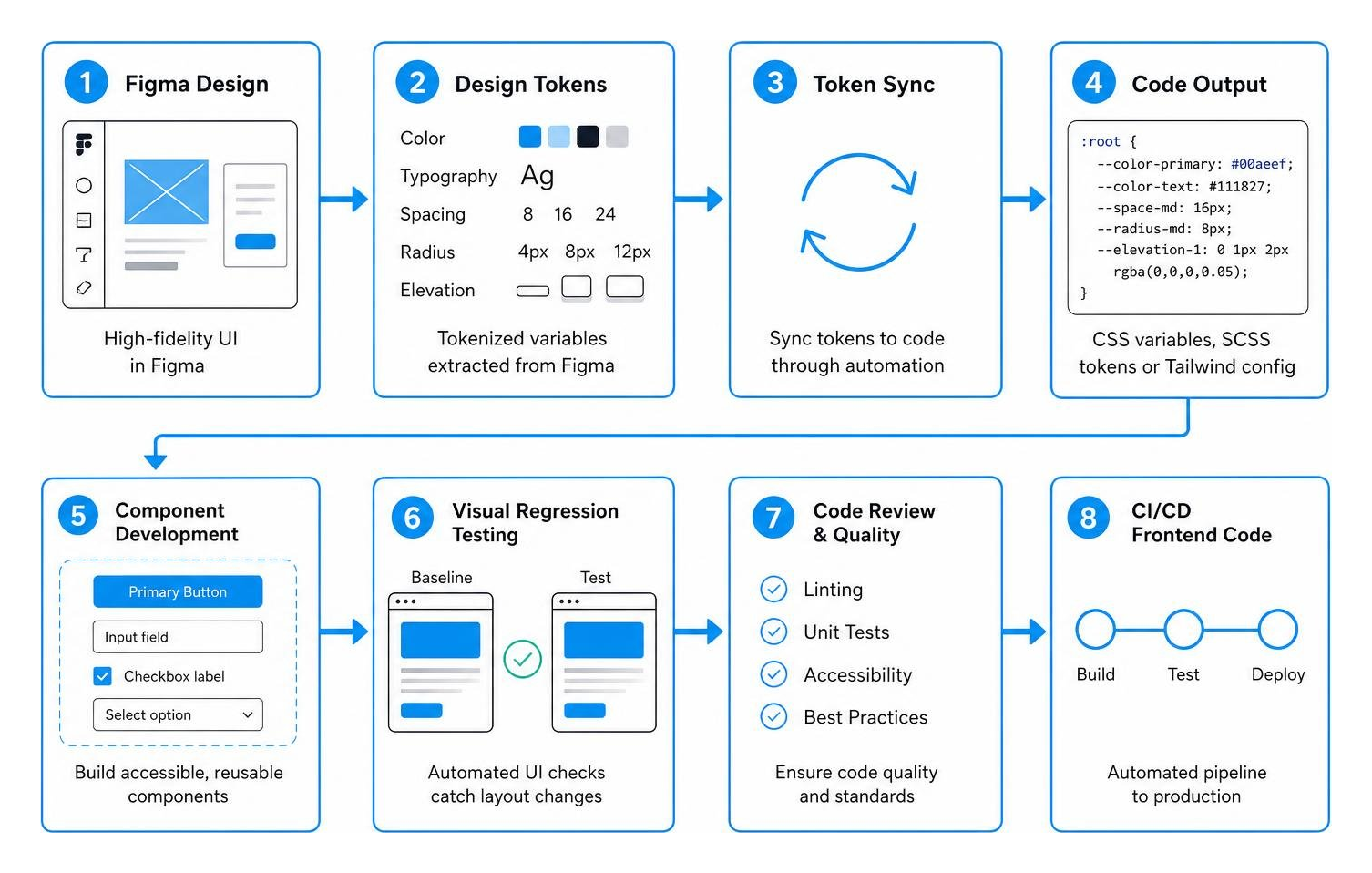
Our custom UI services eliminate handoff friction by embedding closely with engineering pipelines:
Building a custom design system requires ongoing care. Without clear governance, even the best design systems decay into disorganized digital clutter within 12 to 18 months.
Mastering core visual hierarchy and interaction rules is essential to this process; take a moment to explore Web Design Principles You Need to Know.
Design systems rarely fail due to technical limitations; they fail because of human and operational disconnects. The most common pitfalls include:
To prevent these breakdowns, organizations must establish a formal Design System Governance Model. This includes a structured intake process for proposing new component variants, quarterly design audits, and dedicated maintenance retainers that treat your UI design system as a living product.
Artificial intelligence tools have transformed the modern design landscape. AI accelerates initial wireframing, creates contextual placeholder copy, generates boilerplate component styling, and writes baseline unit test suites in seconds.
However, AI cannot replace essential human judgment:
We leverage AI as a force multiplier to eliminate repetitive production tasks, giving our senior team more time to focus on deep user research, interaction polish, and performance optimization.
Pricing for custom UI design services varies based on project scope, user workflow complexity, and the number of distinct platforms involved.
Off-the-shelf UI libraries ship with large stylesheets and JavaScript bundles designed to support thousands of unused features. Bespoke UI components are built lean from the ground up.
By writing clean, semantic HTML, modular CSS, and framework-optimized JavaScript, custom components eliminate dead code. This streamlined codebase reduces Time to First Byte (TTFB), minimizes layout shifts, optimizes Interaction to Next Paint (INP), and helps applications score in the top percentiles of Google Core Web Vitals.
A comprehensive UI redesign for an established application generally takes between 8 and 16 weeks, moving through four key phases:
Your user interface is the digital storefront, control center, and primary touchpoint of your product. Forcing your business into off-the-shelf templates and generic UI libraries saves a few days upfront, but it creates long-term friction, blurs brand differentiation, and limits conversion potential.
Since 2009, BMG Media Co. has engineered over 1,000 high-performance digital platforms from the ground up. Headquartered in Birmingham, Michigan, we deliver founder-led, boutique-level craftsmanship backed by enterprise capabilities. We never use pre-built templates, unoptimized themes, or fragile page builders. Every interface, design token, and line of code is custom-crafted to help your business engage users and scale sustainably.
Ready to transform your application into a fast, intuitive, high-converting digital experience? Partner with our senior team for custom web design and development services that elevate your brand and drive measurable business results.

